Type text, add images, blackout confidential details, add comments, highlights and more.

02. Sign it in a few clicks
Draw your signature, type it, upload its image, or use your mobile device as a signature pad.

03. Share your form with others
Send it via email, link, or fax. You can also download it, export it or print it out.

How to use or fill out annexure d word format with our platform
Ease of Setup
DocHub User Ratings on G2
Ease of Use
DocHub User Ratings on G2
Click ‘Get Form’ to open the annexure d word format in the editor.
Begin by entering your name and address in the designated fields at the top of the form. Ensure that all information is accurate and up-to-date.
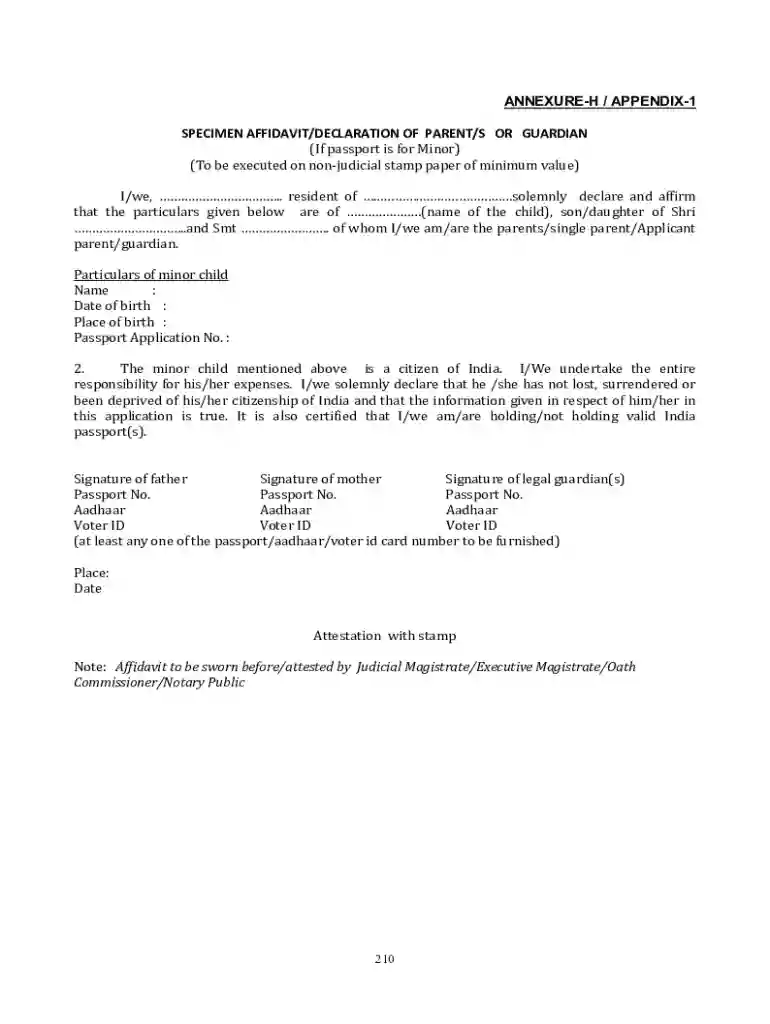
Fill in the particulars of the minor child, including their name, date of birth, place of birth, and passport application number. Double-check for any typos.
Indicate your relationship to the child by selecting from options such as parent, single parent, or guardian.
Complete the declaration section by affirming your responsibility for the child's expenses and confirming their citizenship status.
Sign in the appropriate fields for both parents or guardians. If applicable, include passport numbers and identification details like Aadhaar or Voter ID.
Finally, ensure that you have a space for attestation by a legal authority before submitting your completed form.
Start using our platform today to fill out your annexure d word format easily and for free!
We've got more versions of the annexure d word format form. Select the right annexure d word format version from the list and start editing it straight away!
If both parents are alive and available, each must sign Annexure D. Their full names, citizenship, passport details, Aadhaar number, and contact information must be written clearly. The declaration must be notarised and submitted along with the childs passport file.
How to make an annexure D?
How do you write Annexure D? The details to be filled in Annexure- D include: Minors Name, date of birth and place of birth. Minors parents Names and address. Name of the legal guardian, if any.
How to make an annexure?
1 NEED FOR THE STUDY. Must give a brief idea about why you chose this study (5 10 lines) 2 REVIEW OF LITERATURE. A review of abstracts from journals to define your problem and scope clearly. 3.1 PRIMARY OBJECTIVE. 3.2 SECONDARY OBJECTIVES. 4 METHODOLOGY.
What are the requirements for Annexure D?
Annexure D is required when applying for a passport for a minor. A minor means any applicant below 18 years of age. This form confirms that both parents or the legal guardian agree to the passport application and take full responsibility. If both parents are alive and available, each must sign Annexure D.
What to write in annexure D?
I/We, parent(s)/legal guardian of minor child whose details are mentioned below solemnly declare and affirm as under:- Name. of the minor child:.. Date of Birth: Name of father.
Related Searches
Annexure D for passportAnnexure C for passportAnnexure D for passport how to fillAnnexure D for passport downloadAnnexure D sampleAnnexure D for minor passportAnnexure d for passport fill onlineAnnexure D for passport sample
People also ask
Is Annexure D mandatory for a passport?
If one of the parent is deceased/demised A copy of the death certificate along with the Annexure C, and Annexure D is required. Passport.
What is the difference between annexure C and annexure D?
6. Annexure D must be signed by both parents (DOWNLOAD ). 7. In case one parent has not given consent for issue of passport for the child, Annexure - C must be completed.
When should I submit an annexure D for my passport?
S.No.CaseDocuments to be submitted 1Passport application of a minor with consent of both parentsAnnexure D 3 Minors with single parent (One parent deceased) Annexure D along with Death Certificate of deceased parent 4 Applied by one parent/guardian when consent of one or both parents is not possible Annexure C1 more row
This site uses cookies to enhance site navigation and personalize your experience.
By using this site you agree to our use of cookies as described in our Privacy Notice.
You can modify your selections by visiting our Cookie and Advertising Notice.... Read more...Read less