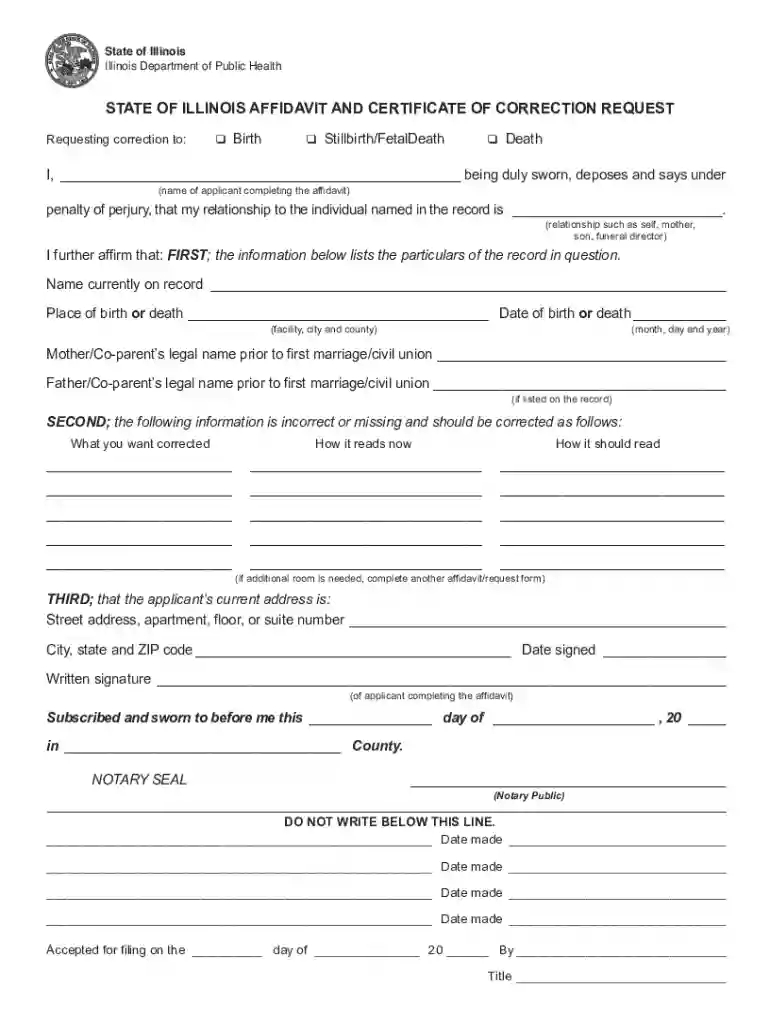
dph illinois gov Preview on Page 1

Affidavit illinois state 2026

Here's how it works

  • 01. Edit your dph illinois gov online

    Type text, add images, blackout confidential details, add comments, highlights and more.

  • 02. Sign it in a few clicks

    Draw your signature, type it, upload its image, or use your mobile device as a signature pad.

  • 03. Share your form with others

    Send affidavit illinois form via email, link, or fax. You can also download it, export it or print it out.

How to use or fill out affidavit illinois state with DocHub

Form edit decoration
9.5
Ease of Setup
DocHub User Ratings on G2
9.0
Ease of Use
DocHub User Ratings on G2
  1. Click ‘Get Form’ to open the affidavit in our editor.
  2. Begin by clearly printing or typing your information in the designated fields. Ensure you use a black pen if filling it out manually.
  3. Select the type of record you are seeking to correct by placing a check mark next to 'Birth', 'Stillbirth/Fetal Death', or 'Death'.
  4. In the section labeled 'Relationship', specify your relationship to the individual named on the record, such as mother, father, or legal representative.
  5. Indicate what needs correction in the 'What you want corrected' section. Clearly state how it currently reads and how it should read.
  6. Provide your current address and ensure all information is accurate before signing. Remember, this form must be signed in front of a notary public.
  7. Gather all required documents including a government-issued photo ID and payment for processing, then submit them as instructed.

Start using our platform today to easily complete your affidavit for free!

See more dph illinois gov versions

We've got more versions of the dph illinois gov form. Select the right dph illinois gov version from the list and start editing it straight away!

VersionsForm popularityFillable & printable
20124.9 Satisfied (44 Votes)

be ready to get more

Complete this form in 5 minutes or less

Got questions?

We have answers to the most popular questions from our customers. If you can't find an answer to your question, please contact us.

Thus, unless otherwise provided for by a specific supreme court rule or statutory authorization, an affidavit must be docHubd to be valid.
An affidavit is a written statement made under oath. This means the person making the statement swears that the contents are true and understands that they may be prosecuted if any part of the statement is false.
What to include in your affidavit. Title. This is either your name (Affidavit of Jane Doe) or the specific case information. Statement of identity. The next paragraph tells the court about yourself. Statement of truth. Statement of facts. Closing statement of truth. Sign and docHub.
A copy of your individual federal income tax return, including W-2s for the most recent tax year, or a statement and/or evidence describing why you were not required to file. Also include a copy of every Form 1099, schedule, and any other evidence of reported income.
Include your full name, address, age, occupation, and other identifying information. Each separate line of the document should provide a separate fact or statement. There are a number of ways to organize an affidavit, and you should choose the manner that works best for your situation.

Security and compliance

At DocHub, your data security is our priority. We follow HIPAA, SOC2, GDPR, and other standards, so you can work on your documents with confidence.

People also ask

Thus, unless otherwise provided for by a specific supreme court rule or statutory authorization, an affidavit must be docHubd to be valid. See Roth, 202 Ill. 2d at 496.
When you need an affidavit you will need to have the document docHubd in order for it to be legally binding. This can be done with a traditional in-person or mobile notary, or an affiant can provide their statement using Remote Online Notarization (RON).
Affidavits can be hand-written or typed, but all information included must be first-person and verifiable mere speculation into the details of a legal circumstance is not valid for an affidavit.

state illinois affidavit form

Approved Statewide Forms Financial Affidavit

The Supreme Court Commission on Access to Justice has approved the following forms. All Illinois Courts must accept these forms.Read more

Learn more
CONSCIENCE AND COMPETING LIBERTY CLAIMS

One author counts ten states that have passed their own version of RFRA: Arizona, Connecticut,. Florida, Idaho, Illinois, New Mexico, Oklahoma, Rhode Island,Read more

Learn more
Affidavit

This original signed affidavit must be returned to Illinois State University Office of Admissions, 201 Hovey Hall, Campus. Box 2200, Normal, IL 61790-2200. IfRead more

Learn more
If you believe that this page should be taken down, please follow our DMCA take down process here