Aaron Notary Appointment Services, Inc P O Box 69-3002-2026

Get Form
Aaron Notary Appointment Services, Inc P O Box 69-3002 Preview on Page 1

Here's how it works

01. Edit your form online
Type text, add images, blackout confidential details, add comments, highlights and more.

02. Sign it in a few clicks
Draw your signature, type it, upload its image, or use your mobile device as a signature pad.

03. Share your form with others
Send it via email, link, or fax. You can also download it, export it or print it out.

How to use or fill out Aaron Notary Appointment Services, Inc P O Box 69-3002

Form edit decoration
9.5
Ease of Setup
DocHub User Ratings on G2
9.0
Ease of Use
DocHub User Ratings on G2
  1. Click ‘Get Form’ to open it in the editor.
  2. Begin by entering your personal information in the designated fields. This includes your full name, home address, and contact details. Ensure all entries are accurate and complete.
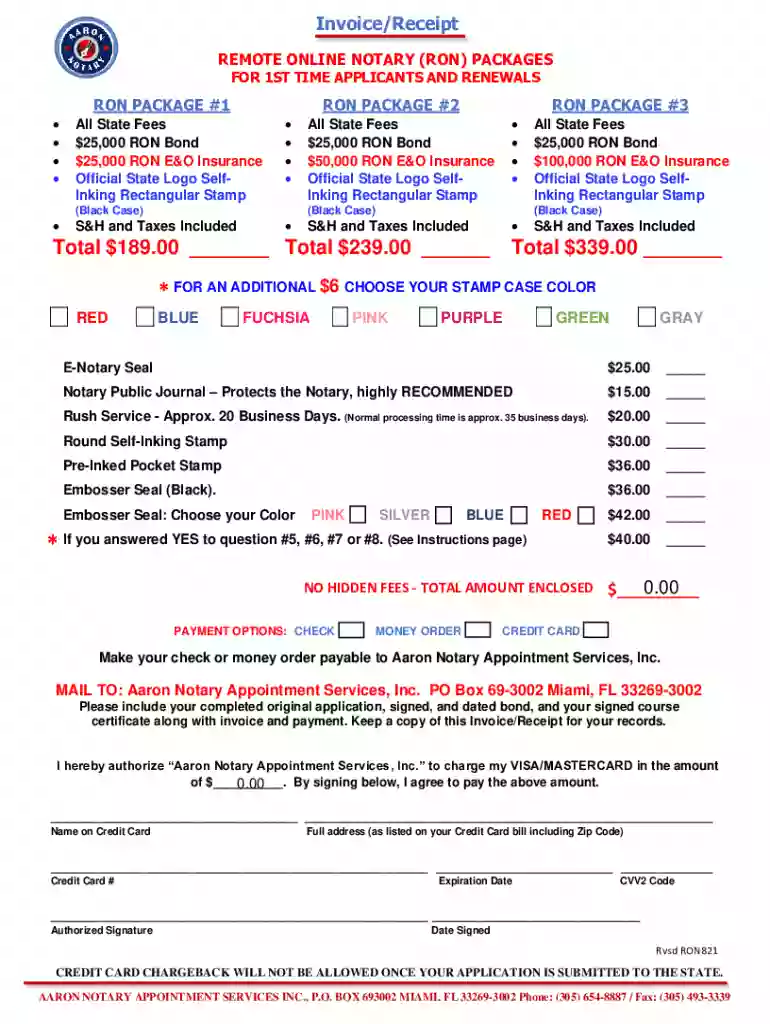
  3. Select your desired RON package from the options provided. Each package includes specific fees and benefits; make sure to review them carefully before making a selection.
  4. If applicable, indicate any additional services you wish to include, such as rush service or specific stamp colors. Fill in the corresponding fields with the appropriate selections.
  5. Complete the payment section by choosing your payment method (check, money order, or credit card). If using a credit card, provide all necessary details including card number and expiration date.
  6. Review all entered information for accuracy. Once confirmed, proceed to sign and date where required. Remember that wet ink signatures are mandatory for certain sections.

Start using our platform today to streamline your document editing and signing process for free!

See more Aaron Notary Appointment Services, Inc P O Box 69-3002 versions

We've got more versions of the Aaron Notary Appointment Services, Inc P O Box 69-3002 form. Select the right Aaron Notary Appointment Services, Inc P O Box 69-3002 version from the list and start editing it straight away!
Versions Form popularity Fillable & printable
2021 4.8 Satisfied (112 Votes)
be ready to get more

Complete this form in 5 minutes or less

Get form

Got questions?

We have answers to the most popular questions from our customers. If you can't find an answer to your question, please contact us.
Contact us

With DocHub, you can rapidly approve your Aaron Notary Appointment Services, Inc P O Box 69-3002 or any other paperwork on iOS, even without installing additional programs. You can access your DocHub account from any internet-connected browser and complete and sign your document in any way you like with just a couple of clicks.

If you are using Chrome, there are two straightforward ways to edit your Aaron Notary Appointment Services, Inc P O Box 69-3002 online. First, go to the DocHub website, add your document, and edit it using our toolbar. You may also install our Chrome extension and edit any document by dragging and dropping it in your web browser window.

Walk-in visits at a UPS where you can get something docHubd will cost you around $15-$30. If you make an appointment ahead of time, it will only cost you a few dollars. UPS can docHub things like trusts, deeds, court documents like affidavits, and more.
The State of Florida allows notaries to charge $10.00 for each signature they docHub. In addition to this, however, there are frequently other charges that cause the fee incur to be higher.
The document signer must be present and competent to execute the document. The signer must be personally known to you or produce appropriate identification. The document must have a jurat, or the document signer must direct you to provide a jurat.

Security and compliance

At DocHub, your data security is our priority. We follow HIPAA, SOC2, GDPR, and other standards, so you can work on your documents with confidence.

Learn more
ccpa2
pci-dss
gdpr-compliance
hipaa
soc-compliance

People also ask

Most notaries charge by either the document or signature, at a rate of anywhere from $1 to $20. Some states cap the maximum amount a notary can charge.
Walk-in visits at a UPS where you can get something docHubd will cost you around $15-$30. If you make an appointment ahead of time, it will only cost you a few dollars. UPS can docHub things like trusts, deeds, court documents like affidavits, and more.
A $7,500, 4-year notary bond in the state of Florida costs $40 through Notary Public Underwriters.
Provisions:TermFour YearsState Filing Fee$39.00 (include with registration package)Bond Required$7,500 (included with registration package)Seal RequiredSelf-inking Stamp (included with registration package)
You can charge up to $10 per signature for general notarial acts like signatures, acknowledgments, verbal oaths, affirmations, and jurats. As a notary public you can also perform wedding ceremonies for Florida residents with marriage licenses which costs $30.

Related links