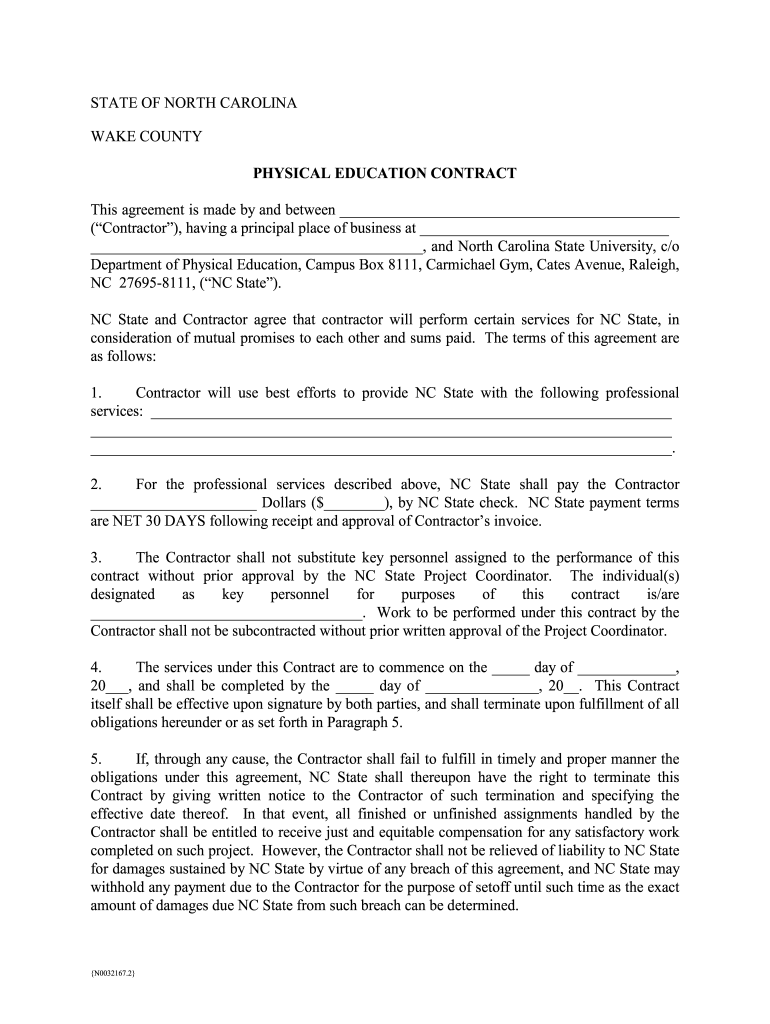
Fabrication Services Agreement (N0014111 DOC;1) 2026

Get Form
Fabrication Services Agreement (N0014111 DOC;1) Preview on Page 1

Here's how it works

01. Edit your form online
Type text, add images, blackout confidential details, add comments, highlights and more.
02. Sign it in a few clicks
Draw your signature, type it, upload its image, or use your mobile device as a signature pad.
03. Share your form with others
Send it via email, link, or fax. You can also download it, export it or print it out.

How to use or fill out Fabrication Services Agreement (N0014111 DOC;1) with our platform

Form edit decoration
9.5
Ease of Setup
DocHub User Ratings on G2
9.0
Ease of Use
DocHub User Ratings on G2
  1. Click ‘Get Form’ to open the Fabrication Services Agreement in the editor.
  2. Begin by filling in the Contractor's name and principal place of business at the top of the document. This identifies who is entering into the agreement.
  3. In Section 1, specify the professional services that will be provided. Be clear and detailed to avoid any misunderstandings.
  4. For Section 2, enter the payment amount that NC State will pay to the Contractor. Ensure this aligns with your agreed terms.
  5. Complete Section 3 by listing key personnel assigned to this contract. Remember, substitutions require prior approval.
  6. Fill in the commencement and completion dates in Section 4, ensuring they reflect your project timeline accurately.
  7. Review Sections 5 through 19 carefully, as they contain important legal obligations and rights for both parties. Make any necessary adjustments based on your specific agreement.
  8. Once all fields are completed, save your changes and proceed to sign electronically using our platform’s signature feature for a seamless process.

Start editing your Fabrication Services Agreement today for free and streamline your workflow!

See more Fabrication Services Agreement (N0014111 DOC;1) versions

We've got more versions of the Fabrication Services Agreement (N0014111 DOC;1) form. Select the right Fabrication Services Agreement (N0014111 DOC;1) version from the list and start editing it straight away!
Versions Form popularity Fillable & printable
2019 4.8 Satisfied (171 Votes)
be ready to get more

Complete this form in 5 minutes or less

Get form

Got questions?

We have answers to the most popular questions from our customers. If you can't find an answer to your question, please contact us.
Contact us

According to eSignature laws, forms approved electronically have the same validity as traditionally approved ones. You can eSign almost any business and private documentation. Four types of documents still require wet signatures only - wills and testamentary trusts, court orders and other court papers, state statutes governing divorce, adoption, or other family law, and notice of cancellation of utility services. If you adhere to the regulations and use a reliable and compliant software solution, like DocHub, you can eSign your Fabrication Services Agreement (N0014111 DOC;1) without printing it.

You need only an internet connection and a web browser to fill out your Fabrication Services Agreement (N0014111 DOC;1) by using an iOS phone. Open the DocHub website and authenticate. Then, add your document or select it from the list in your dashboard. Then use our editing instruments to fill out your form and preserve all your changes. You can also send it to a specified recipient immediately.

Security and compliance

At DocHub, your data security is our priority. We follow HIPAA, SOC2, GDPR, and other standards, so you can work on your documents with confidence.

Learn more
ccpa2
pci-dss
gdpr-compliance
hipaa
soc-compliance
be ready to get more

Complete this form in 5 minutes or less

Get form