Lic 809 2026

Get Form
lic 809 Preview on Page 1

Here's how it works

01. Edit your lic 809 online
Type text, add images, blackout confidential details, add comments, highlights and more.

02. Sign it in a few clicks
Draw your signature, type it, upload its image, or use your mobile device as a signature pad.

03. Share your form with others
Send facility evaluation report via email, link, or fax. You can also download it, export it or print it out.

How to use or fill out lic 809 with our platform

Form edit decoration
9.5
Ease of Setup
DocHub User Ratings on G2
9.0
Ease of Use
DocHub User Ratings on G2
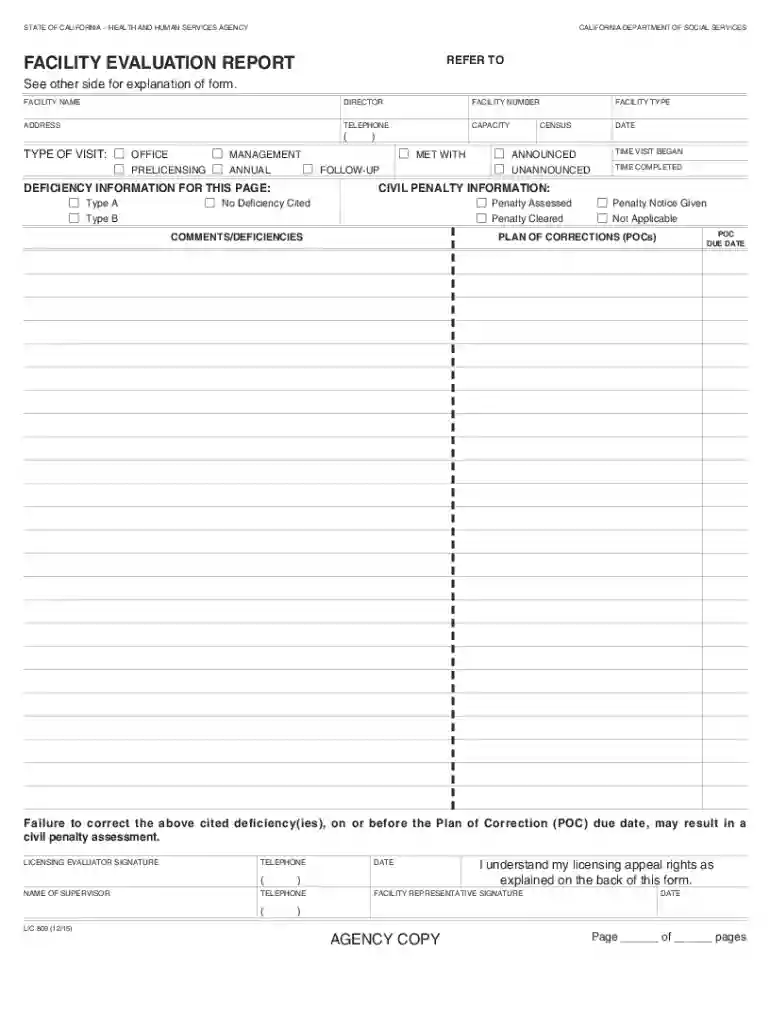
  1. Click ‘Get Form’ to open the lic 809 in the editor.
  2. Begin by entering the facility name, director, and facility number in the designated fields. Ensure accuracy as this information is crucial for identification.
  3. Fill in the address and telephone number of the facility. This helps maintain clear communication with licensing authorities.
  4. Select the type of visit from options such as Office, Prelicensing, Management Annual, or Follow-up. Mark any applicable deficiencies on the left side of the form.
  5. Document any civil penalties if applicable. Indicate whether a penalty was assessed or cleared and provide comments regarding deficiencies.
  6. Complete the Plan of Corrections (POCs) section by detailing specific actions to address cited deficiencies. Be thorough to avoid misunderstandings.
  7. Finally, ensure all signatures are obtained where required, including that of the licensing evaluator and facility representative before saving your document.

Start using our platform today to streamline your lic 809 completion process for free!

See more lic 809 versions

We've got more versions of the lic 809 form. Select the right lic 809 version from the list and start editing it straight away!
Versions Form popularity Fillable & printable
2015 4.8 Satisfied (210 Votes)
2004 4.1 Satisfied (35 Votes)
be ready to get more

Complete this form in 5 minutes or less

Get form

Got questions?

We have answers to the most popular questions from our customers. If you can't find an answer to your question, please contact us.
Contact us
CRIMINAL RECORD STATEMENT OUT-OF-STATE DISCLOSURE. LIC 508 (7/21) Page 1 of 5 State law requires that persons associated with licensed care facilities, Home Care Aide Registry or TrustLine Registry applicants be fingerprinted and disclose any conviction.
Additional child abuse/neglect check for persons who have lived out of state in the last five years. Complete one form for each prospective licensed or certified foster parent and any person over the age of 18 residing in their household. LIC 198B (3/11)
California prohibits CRAs from reporting convictions older than seven years under Cal. Civ. Code 1786.18(a)(7). This law also prohibits CRAs from reporting arrests not leading to convictions even if they occurred within the last seven years, but pending cases can be reported.
CALIFORNIA DEPARTMENT OF SOCIAL SERVICES. PERSONNEL REPORT. INSTRUCTIONS: This form is intended for keeping a current roster of all the facility personnel, other adults and licensees residing in the facility, including backup persons, volunteers and licensee if administrator/director.
The LIC 503 is required by the California Department of Social Services as part of the application process to work in a Community Care facility. It is used during the hiring process to verify the health of the applicant. It requires completion and signature by a physician.

Security and compliance

At DocHub, your data security is our priority. We follow HIPAA, SOC2, GDPR, and other standards, so you can work on your documents with confidence.

Learn more
ccpa2
pci-dss
gdpr-compliance
hipaa
soc-compliance

People also ask

EMERGENCY DISASTER PLAN FOR CHILD CARE CENTERS. Post a copy in a prominent location in facility, near telephone. Licensee is responsible for updating information as required.

california social services facility