2019-20 Dependent Verification Worksheet - Raritan Valley-2026

Get Form
2019-20 Dependent Verification Worksheet - Raritan Valley Preview on Page 1

Here's how it works

01. Edit your form online
Type text, add images, blackout confidential details, add comments, highlights and more.

02. Sign it in a few clicks
Draw your signature, type it, upload its image, or use your mobile device as a signature pad.

03. Share your form with others
Send it via email, link, or fax. You can also download it, export it or print it out.

How to use or fill out 2019-20 Dependent Verification Worksheet - Raritan Valley with DocHub

Form edit decoration
9.5
Ease of Setup
DocHub User Ratings on G2
9.0
Ease of Use
DocHub User Ratings on G2
  1. Click ‘Get Form’ to open the 2019-20 Dependent Verification Worksheet in our platform.
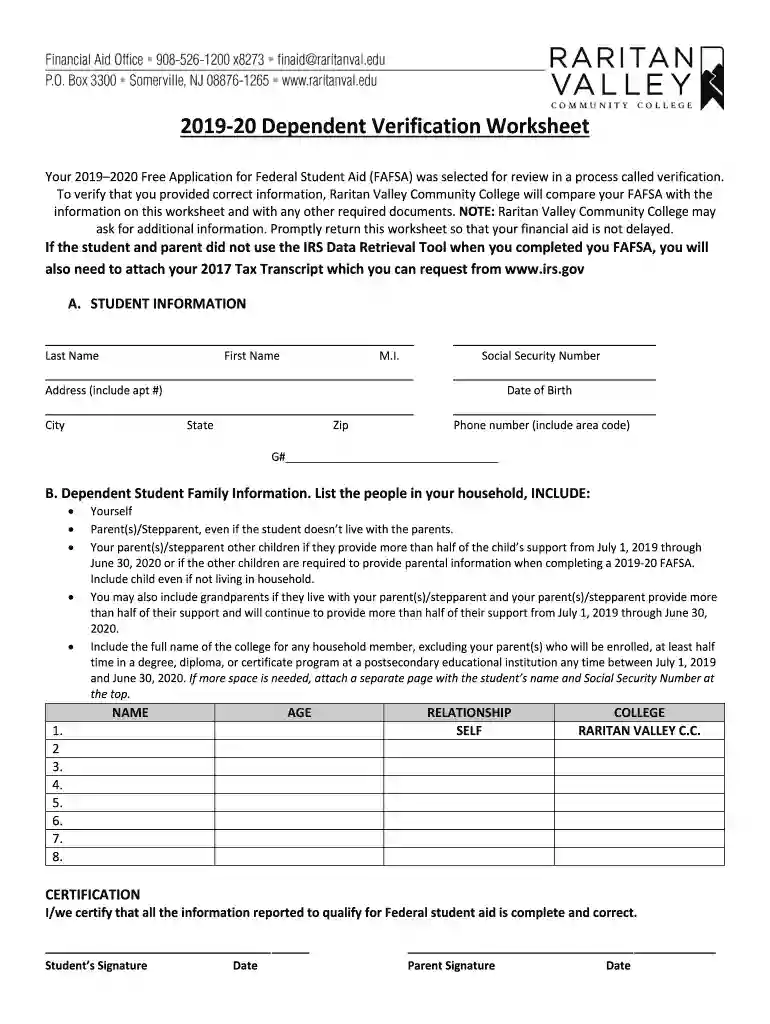
  2. Begin by filling out the 'Student Information' section. Enter your last name, first name, middle initial, Social Security Number, address, date of birth, city, phone number, and G#.
  3. Next, move to the 'Dependent Student Family Information' section. List all individuals in your household as specified. Include yourself, parents/stepparents, siblings who receive support from July 1, 2019 through June 30, 2020, and any other qualifying relatives.
  4. For each person listed, provide their name, age, relationship to you, and the college they will attend if applicable. If more space is needed for additional names or details, attach a separate page with your information at the top.
  5. Finally, complete the certification section by signing and dating where indicated for both you and your parent. Ensure all information is accurate before submitting.

Start using our editor today to fill out your form easily and for free!

See more 2019-20 Dependent Verification Worksheet - Raritan Valley versions

We've got more versions of the 2019-20 Dependent Verification Worksheet - Raritan Valley form. Select the right 2019-20 Dependent Verification Worksheet - Raritan Valley version from the list and start editing it straight away!
Versions Form popularity Fillable & printable
2019 4.8 Satisfied (171 Votes)
2012 3.6 Satisfied (31 Votes)
be ready to get more

Complete this form in 5 minutes or less

Get form

Got questions?

We have answers to the most popular questions from our customers. If you can't find an answer to your question, please contact us.
Contact us

Log in to your DocHub account and import your 2019-20 Dependent Verification Worksheet - Raritan Valley to our editor using one of its upload methods - from your device, cloud storage, secure URL, or your DocHub folders if you have already managed your form before. Open our editor, click the Sign button in the top toolbar, and decide on your signing method. You can upload an image of your handwritten signature, draw it, type in your name, or utilize a QR code as an alternative.

You can easily edit fill out your 2019-20 Dependent Verification Worksheet - Raritan Valley on any iOS device. Open an internet browser of your choice, visit the DocHub site, authorize or create a new account, add your file for editing, and make your required alterations. Our service is mobile-friendly, so using its functions on your phone will be a no-brainer, even on the first try.

The Verification Worksheet - Dependent form is a form that is requested of a dependent student selected for FAFSA Verification. The form requires information from both parents and students to verify some of the information provided on the students Free Application for Federal Student Aid (FAFSA).
The confirmation screen will inform you of your verification status. If your account is verified, you can immediately begin using your account. If your account is created but not verified, youll still immediately be able to access the FAFSA form, but your account will have limited functionality.
You might see a note on your FAFSA Submission Summary saying youve been selected for verification; or your school might contact you to inform you that youve been selected. Verification is the process your school uses to confirm that the data reported on your FAFSA form is accurate.

Security and compliance

At DocHub, your data security is our priority. We follow HIPAA, SOC2, GDPR, and other standards, so you can work on your documents with confidence.

Learn more
ccpa2
pci-dss
gdpr-compliance
hipaa
soc-compliance

People also ask

During verification, the college financial aid administrator will ask the applicant to supply copies of documentation, such as income tax returns, W-2 statements and 1099 forms, to verify the data that was submitted on the Free Application for Federal Student Aid (FAFSA).
Receive FAFSA Confirmation Email You will know it has been processed when you receive an email letting you know your FAFSA Submission Summary is ready for review. You can also track the status by logging into your account and going to the My Activity tab.

Related links