Capped rental 2026

Get Form
medicare routinely form Preview on Page 1

Here's how it works

01. Edit your medicare routinely form online
Type text, add images, blackout confidential details, add comments, highlights and more.

02. Sign it in a few clicks
Draw your signature, type it, upload its image, or use your mobile device as a signature pad.

03. Share your form with others
Send capped rental form via email, link, or fax. You can also download it, export it or print it out.

How to use or fill out capped rental with our platform

Form edit decoration
9.5
Ease of Setup
DocHub User Ratings on G2
9.0
Ease of Use
DocHub User Ratings on G2
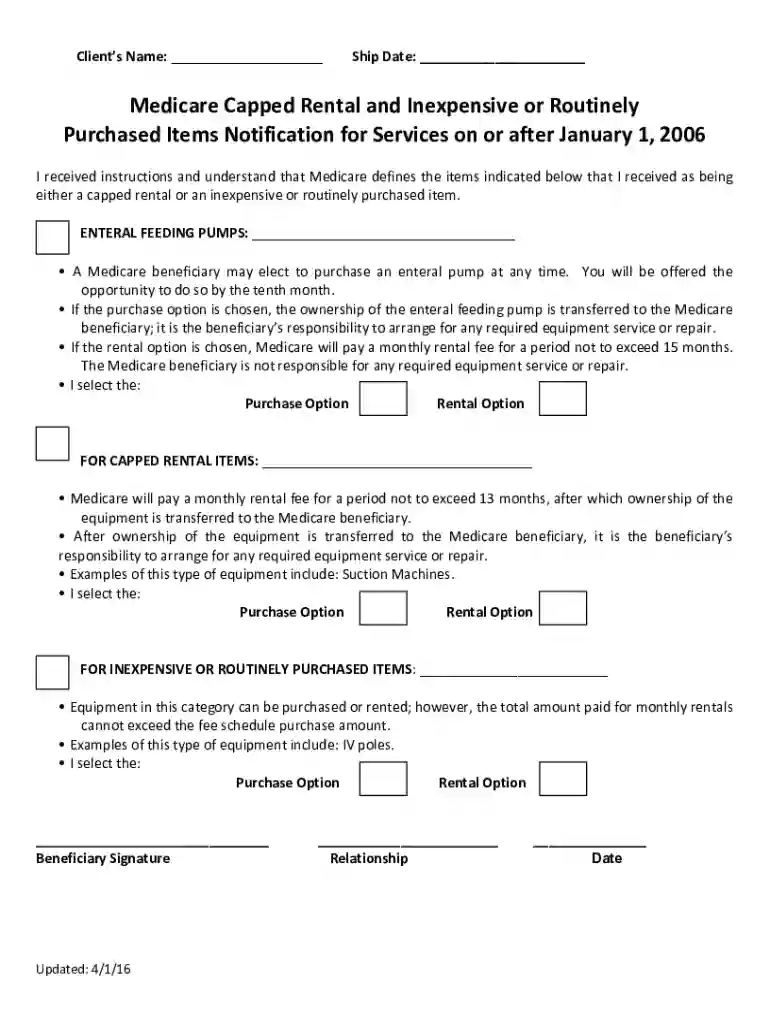
  1. Click ‘Get Form’ to open the capped rental document in the editor.
  2. Begin by entering the Client’s Name in the designated field at the top of the form.
  3. Next, fill in the Ship Date to indicate when the equipment will be delivered.
  4. Review the section on Enteral Feeding Pumps. Choose either 'Purchase Option' or 'Rental Option' by marking your selection clearly.
  5. Proceed to the Capped Rental Items section. Again, select either 'Purchase Option' or 'Rental Option' based on your preference.
  6. In the Inexpensive or Routinely Purchased Items section, make your choice between 'Purchase Option' and 'Rental Option'.
  7. Finally, sign in the Beneficiary Signature field, indicate your relationship, and date your submission.

Start using our platform today for free to complete your capped rental form effortlessly!

See more capped rental versions

We've got more versions of the capped rental form. Select the right capped rental version from the list and start editing it straight away!
Versions Form popularity Fillable & printable
2016 4.8 Satisfied (26 Votes)
be ready to get more

Complete this form in 5 minutes or less

Get form

Got questions?

We have answers to the most popular questions from our customers. If you can't find an answer to your question, please contact us.
Contact us
When billing capped rental equipment codes for Medicare members, you must use modifier KH for the first month of the rental, modifier KI for the second and third months, and modifier KJ for months four through 13. It is not appropriate to report modifier RR throughout the rental period.
Depending on the type of durable medical equipment (DME) you need, Medicare may require that you either rent or buy it. Most equipment is initially rented, including many manual and power wheelchairs. Original Medicare covers 80% of the cost of a monthly rental fee for 13 months. You pay a 20% coinsurance.
The same rules apply to amendments to an HOAs governing documents. That said, there are rental restrictions that California law permits. These include placing a rental cap of 25% or higher and prohibiting short-term rentals for 30 days or less.
After CMS has paid for 13 months of continuous use, the supplier shall transfer the title of the equipment to the beneficiary.
The KX Modifier serves as an indicator of the presence of essential documentation on file to substantiate the medical necessity of the Durable Medical Equipment (DME) item. This modifier applies to a variety of categories, including but not limited to: Hospital beds. Walkers.

Security and compliance

At DocHub, your data security is our priority. We follow HIPAA, SOC2, GDPR, and other standards, so you can work on your documents with confidence.

Learn more
ccpa2
pci-dss
gdpr-compliance
hipaa
soc-compliance

People also ask

Examples of capped rental items include, but are not limited to, the following items: Continuous Positive Airway Pressure (CPAP) devices. External infusion pumps. Hospital beds. Nebulizers. Wheelchairs.
HCPCS Code for Rental (use the rr modifier when dme is to be rented) RR.

capped rental