Type text, add images, blackout confidential details, add comments, highlights and more.
02. Sign it in a few clicks
Draw your signature, type it, upload its image, or use your mobile device as a signature pad.
03. Share your form with others
Send pdi inspection checklist pdf via email, link, or fax. You can also download it, export it or print it out.
How to use or fill out pdi inspection form with our platform
Ease of Setup
DocHub User Ratings on G2
Ease of Use
DocHub User Ratings on G2
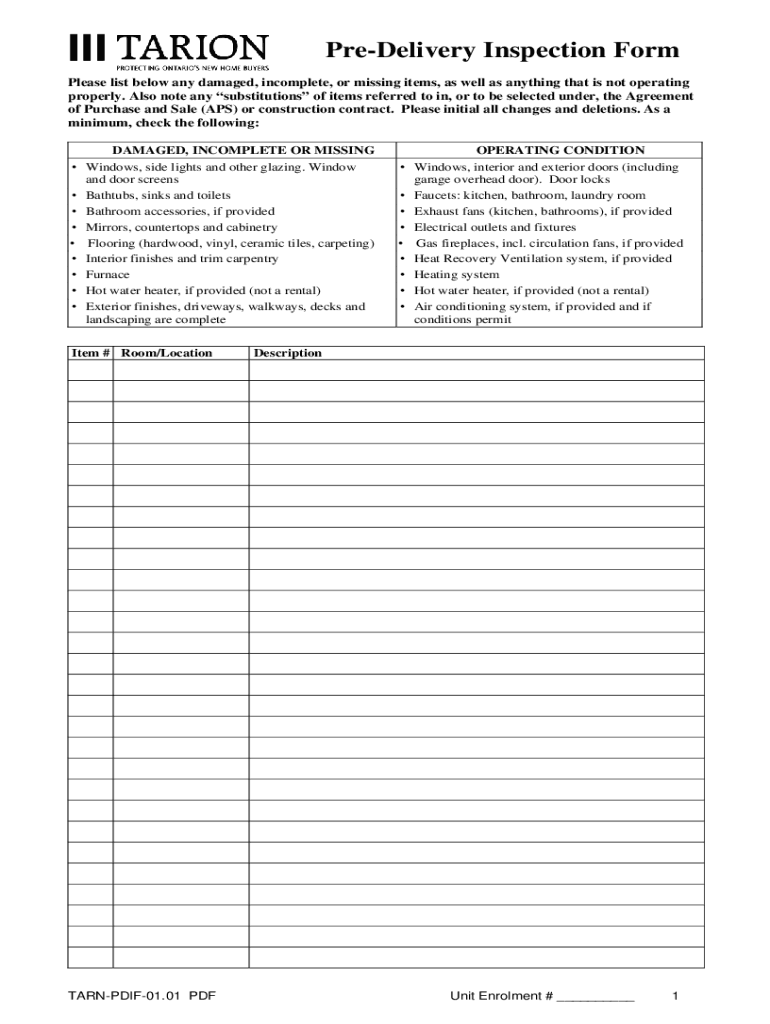
Click ‘Get Form’ to open the PDI inspection form in the editor.
Begin by inspecting the home systematically, starting from either the attic or basement. Document any damaged, incomplete, or missing items directly on the form.
In the designated sections of the form, note any substitutions of items as per the Agreement of Purchase and Sale. Ensure clarity in your descriptions.
Confirm and write down the Date of Possession on the form. This is crucial for record-keeping.
Both you and the purchaser (or their designate) must sign the completed PDI Form to validate it. Make sure all changes are initialed.
Start using our platform today to streamline your PDI inspection process for free!
We've got more versions of the pdi inspection form form. Select the right pdi inspection form version from the list and start editing it straight away!
Feb 26, 2021 The Pre-Delivery Inspection Technician Reference Document is designed to be a resource used in hand with the Pre-Delivery Inspection Checklist (Read more
PERFORMED THE PRE-DELIVERY INSPECTION ON THE VEHICLE IN ACCORDANCE WITH THE. ABOVE RECOMMENDED VEHICLE PRE-ACCEPTANCE CHECKLIST. PRE-DELIVERY INSPECTIONRead more
Feb 3, 2013 Labor estimate for repairs. This can be handwritten but must be completed on the parts repair estimate sheet. Labor estimate for assemblyRead more
Cookie consent notice
This site uses cookies to enhance site navigation and personalize your experience.
By using this site you agree to our use of cookies as described in our Privacy Notice.
You can modify your selections by visiting our Cookie and Advertising Notice.