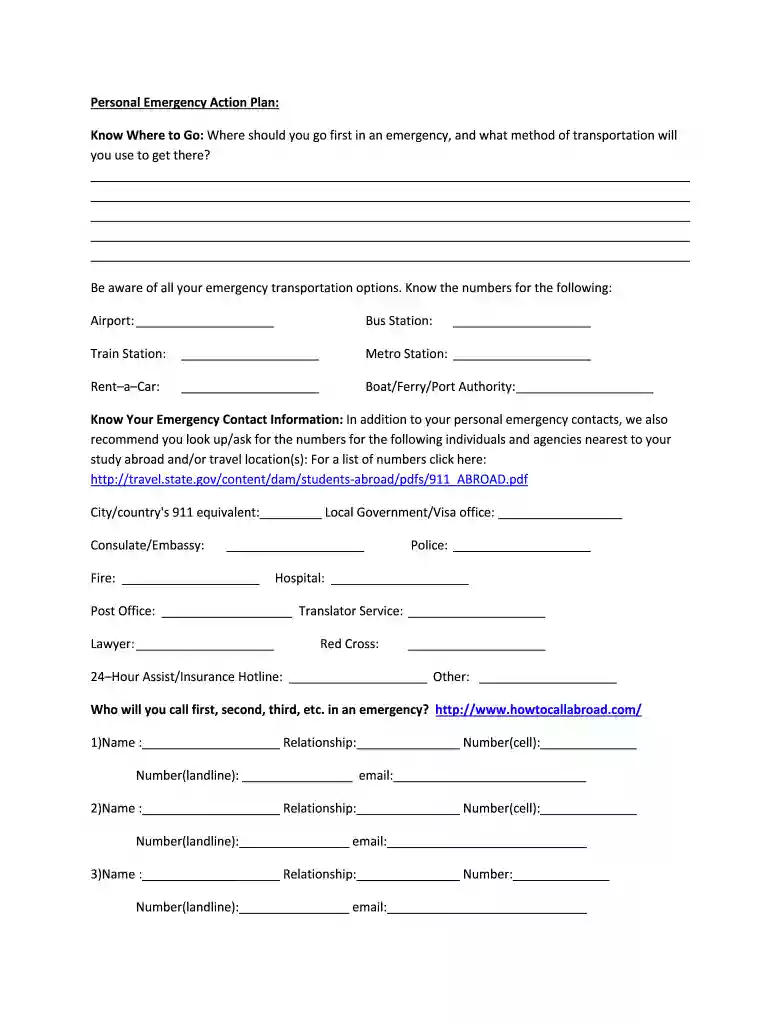
Disaster Preparedness PlanMake a PlanRed Cross Preview on Page 1

Disaster Preparedness PlanMake a PlanRed Cross 2026

Here's how it works

  • 01. Edit your form online

    Type text, add images, blackout confidential details, add comments, highlights and more.

  • 02. Sign it in a few clicks

    Draw your signature, type it, upload its image, or use your mobile device as a signature pad.

  • 03. Share your form with others

    Send it via email, link, or fax. You can also download it, export it or print it out.

How to use or fill out Disaster Preparedness PlanMake a PlanRed Cross with our platform

Form edit decoration
9.5
Ease of Setup
DocHub User Ratings on G2
9.0
Ease of Use
DocHub User Ratings on G2
  1. Click ‘Get Form’ to open it in the editor.
  2. Begin by filling out the 'Know Where to Go' section. Clearly outline your primary destination during an emergency and specify your mode of transportation.
  3. In the 'Emergency Transportation Options' section, list contact numbers for local transport services such as airports, bus stations, and train stations.
  4. Complete the 'Know Your Emergency Contact Information' section. Include personal contacts and essential local agencies like the Red Cross, police, and hospitals.
  5. Utilize the checklist provided to ensure you have notified your emergency contacts and prepared necessary items for your emergency kit.
  6. Follow the 'Emergency Action Plan (EAP) Steps' carefully. Document any additional items or plans that may be relevant to your specific situation.

Start using our platform today to create a comprehensive Disaster Preparedness Plan for free!

See more Disaster Preparedness PlanMake a PlanRed Cross versions

We've got more versions of the Disaster Preparedness PlanMake a PlanRed Cross form. Select the right Disaster Preparedness PlanMake a PlanRed Cross version from the list and start editing it straight away!

VersionsForm popularityFillable & printable
20144.8 Satisfied (174 Votes)

be ready to get more

Complete this form in 5 minutes or less

Security and compliance

At DocHub, your data security is our priority. We follow HIPAA, SOC2, GDPR, and other standards, so you can work on your documents with confidence.

Related links

The Organic Business Guide

by B van Elzakker Cited by 16 It therefore can be a disaster for an organic business if field staff members leave. Managing the database therefore involves checks and cross checks.

Learn more
Disaster Recovery Plan

Establishes the procedures for assessing the impact of the disaster immediately following the event and for damage assessment activities.

Learn more
If you believe that this page should be taken down, please follow our DMCA take down process here