Verification ProcessFinancial Aid and ScholarshipsUC 2026

Get Form
Verification ProcessFinancial Aid and ScholarshipsUC Preview on Page 1

Here's how it works

01. Edit your form online
Type text, add images, blackout confidential details, add comments, highlights and more.

02. Sign it in a few clicks
Draw your signature, type it, upload its image, or use your mobile device as a signature pad.

03. Share your form with others
Send it via email, link, or fax. You can also download it, export it or print it out.

How to use or fill out Verification Process Financial Aid and Scholarships UC with our platform

Form edit decoration
9.5
Ease of Setup
DocHub User Ratings on G2
9.0
Ease of Use
DocHub User Ratings on G2
  1. Click ‘Get Form’ to open it in the editor.
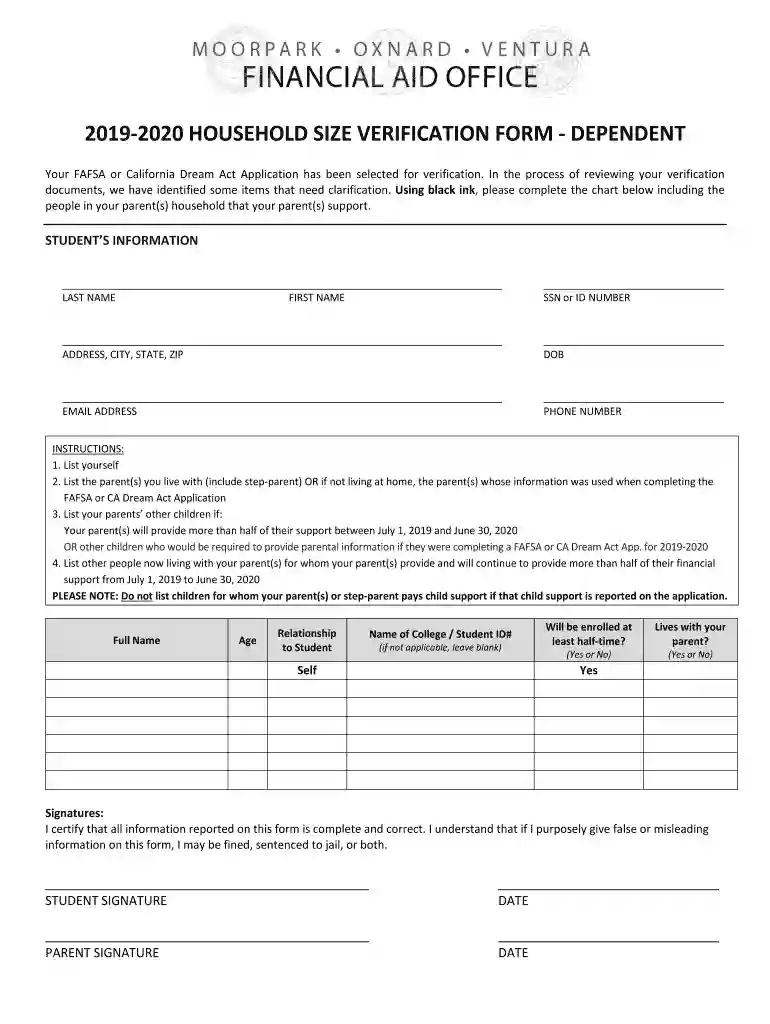
  2. Begin by entering your personal information in the designated fields, including your last name, first name, SSN or ID number, address, date of birth, email address, and phone number.
  3. In the chart provided, list yourself as the first entry. Follow this by including your parent(s) who you live with or the parent(s) whose information was used for your FAFSA or CA Dream Act Application.
  4. Next, include any other children of your parents who will receive more than half of their support from them during the specified period. This includes siblings and other dependents.
  5. Lastly, add any other individuals living with your parents who receive more than half of their financial support from them. Ensure that you do not list children for whom child support is reported on the application.
  6. Once all fields are completed accurately, review the form for correctness before signing. Both you and your parent must provide signatures and dates at the bottom of the form.

Start using our platform today to complete your Verification Process Financial Aid and Scholarships UC form easily and for free!

See more Verification ProcessFinancial Aid and ScholarshipsUC versions

We've got more versions of the Verification ProcessFinancial Aid and ScholarshipsUC form. Select the right Verification ProcessFinancial Aid and ScholarshipsUC version from the list and start editing it straight away!
Versions Form popularity Fillable & printable
2019 4.8 Satisfied (53 Votes)
be ready to get more

Complete this form in 5 minutes or less

Get form

Got questions?

We have answers to the most popular questions from our customers. If you can't find an answer to your question, please contact us.
Contact us
The verification process involves submitting documents such as tax transcripts and W-2 forms so the financial aid office at your college can see that the information on these documents matches your FAFSA application.
How Long Does it Take for my Verification Documents to be Reviewed? There are several factors that impact how quickly your verification documents can be reviewed, including the time of year in which documents are received. During heavy processing periods, it can take 6-8 weeks for your documents to be reviewed.
Berkeley has the largest Regents and Chancellors Scholarship program in the UC system, with a community of more than 600 scholars enrolled. Priority Class Enrollment: Regents and Chancellors Scholars are among a very select group of students who receive priority enrollment for classes.
The Office of Financial Aid will request copies of your (and if a dependent student, your parents) IRS tax return transcript(s) and W-2s, as well as a verification worksheet if you are selected. The information provided by you on the FAFSA is compared to the tax information submitted.

Security and compliance

At DocHub, your data security is our priority. We follow HIPAA, SOC2, GDPR, and other standards, so you can work on your documents with confidence.

Learn more
ccpa2
pci-dss
gdpr-compliance
hipaa
soc-compliance
be ready to get more

Complete this form in 5 minutes or less

Get form