umgc appeal Preview on Page 1

Umgc appeal 2026

Here's how it works

  • 01. Edit your umgc appeal online

    Type text, add images, blackout confidential details, add comments, highlights and more.

  • 02. Sign it in a few clicks

    Draw your signature, type it, upload its image, or use your mobile device as a signature pad.

  • 03. Share your form with others

    Send umgc sap appeal form via email, link, or fax. You can also download it, export it or print it out.

How to use or fill out umgc appeal with our platform

Form edit decoration
9.5
Ease of Setup
DocHub User Ratings on G2
9.0
Ease of Use
DocHub User Ratings on G2
  1. Click ‘Get Form’ to open the umgc appeal in the editor.
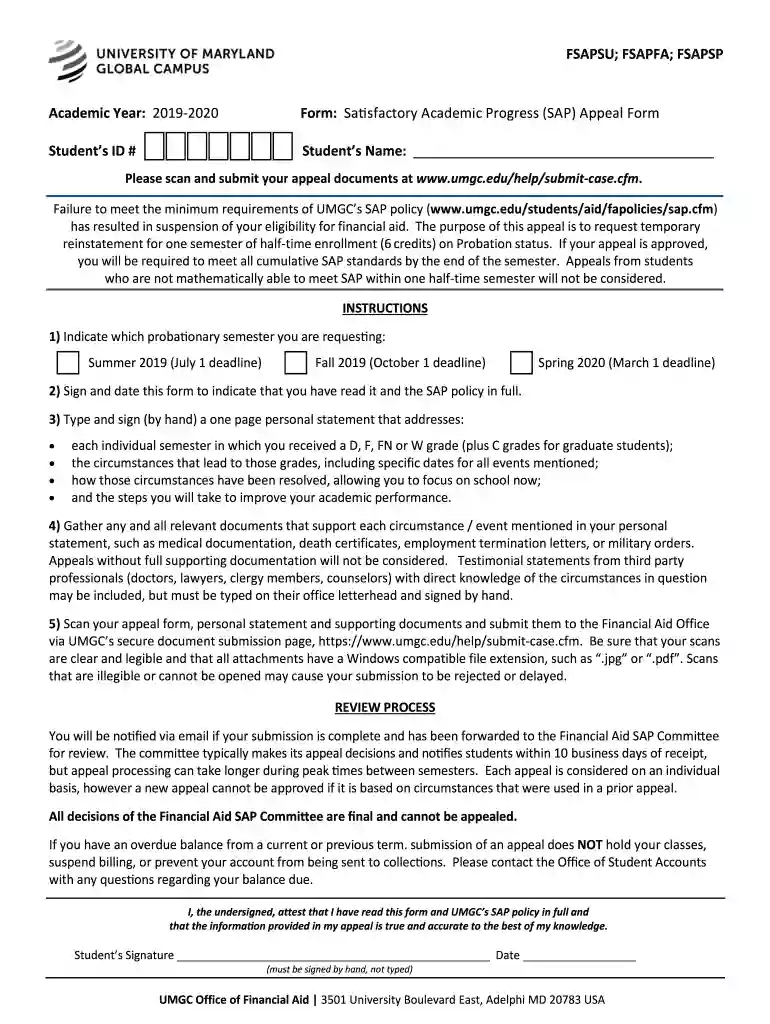
  2. Begin by entering your Student ID # and full name in the designated fields. This information is crucial for identifying your appeal.
  3. Indicate which probationary semester you are requesting by checking the appropriate box for Summer, Fall, or Spring along with their respective deadlines.
  4. Sign and date the form to confirm that you have read and understood UMGC’s SAP policy.
  5. Prepare a one-page personal statement addressing each semester where you received a D, F, FN, or W grade. Include specific circumstances and how they have been resolved.
  6. Gather all relevant supporting documents that validate your circumstances. Ensure these documents are clear and legible before scanning.
  7. Once completed, scan your appeal form, personal statement, and supporting documents. Submit them via UMGC’s secure document submission page.

Start using our platform today to streamline your umgc appeal process for free!

See more umgc appeal versions

We've got more versions of the umgc appeal form. Select the right umgc appeal version from the list and start editing it straight away!

VersionsForm popularityFillable & printable
20194.8 Satisfied (97 Votes)

be ready to get more

Complete this form in 5 minutes or less

Got questions?

We have answers to the most popular questions from our customers. If you can't find an answer to your question, please contact us.

Qualitative standard: Cumulative GPA - Undergraduate students must maintain a minimum cumulative GPA of 2.0.
Valid reasons for an appeal include: medical emergencies. severe health issues. severe personal or family problems. financial or personal catastrophe. return for a second degree or certificate.
Academic Probation is applied at the point when the term or cumulative GPA drops below 3.0. Students on Academic Probation must repeat and may enroll only in the course(s) that caused the term or cumulative GPA to drop below 3.0 after the Academic Probation status is applied.
If you are placed on academic probation, you have two terms of enrollment in which to restore your GPA to 3.0. During that time, you must repeat the course(s) that caused your cumulative GPA to drop below 3.0; you may not attempt any other coursework until you have earned a grade of B or better in the repeated course.
Academic probation has a larger impact than a warning, and is given only when there are additional signs of academic difficulty. While you are on probation, you can take at most 4.5 CUs per semester; the idea is to give you some time to improve your performance.

Security and compliance

At DocHub, your data security is our priority. We follow HIPAA, SOC2, GDPR, and other standards, so you can work on your documents with confidence.

People also ask

Schools may require students on probation to meet GPA benchmarks, attend advising sessions, or complete support courses within a set timeframe. Regaining good standing typically involves raising the term or cumulative GPA. Some institutions allow multiple terms to show progress before suspension.
Academic Probation Policy Students, who fail to meet the 2.0 cumulative grade point average requirement, are placed on academic probation for one semester. Students on academic probation will be restricted to a credit load of 12-13* hours and will be required to follow an Academic Success Plan.

Related links

University of Maryland Global Campus

Appeal DecisionsToggle submenu. General Schedule Federal Wage System Website: umgc.edu/fedgov. Admissions Contact: E-mail: fedprogram@umgc.edu.

Learn more
Professional Judgment

Appeal forms received after the deadline for a given semester will be reviewed for the following semester. A decision will typically be rendered in 10 business

Learn more
If you believe that this page should be taken down, please follow our DMCA take down process here