State v1 printable 2026

Get Form
palm beach state dependent Preview on Page 1

Here's how it works

01. Edit your palm beach state dependent online
Type text, add images, blackout confidential details, add comments, highlights and more.

02. Sign it in a few clicks
Draw your signature, type it, upload its image, or use your mobile device as a signature pad.

03. Share your form with others
Send palm beach state college verification via email, link, or fax. You can also download it, export it or print it out.

How to use or fill out state v1 printable with our platform

Form edit decoration
9.5
Ease of Setup
DocHub User Ratings on G2
9.0
Ease of Use
DocHub User Ratings on G2
  1. Click ‘Get Form’ to open the state v1 printable in the editor.
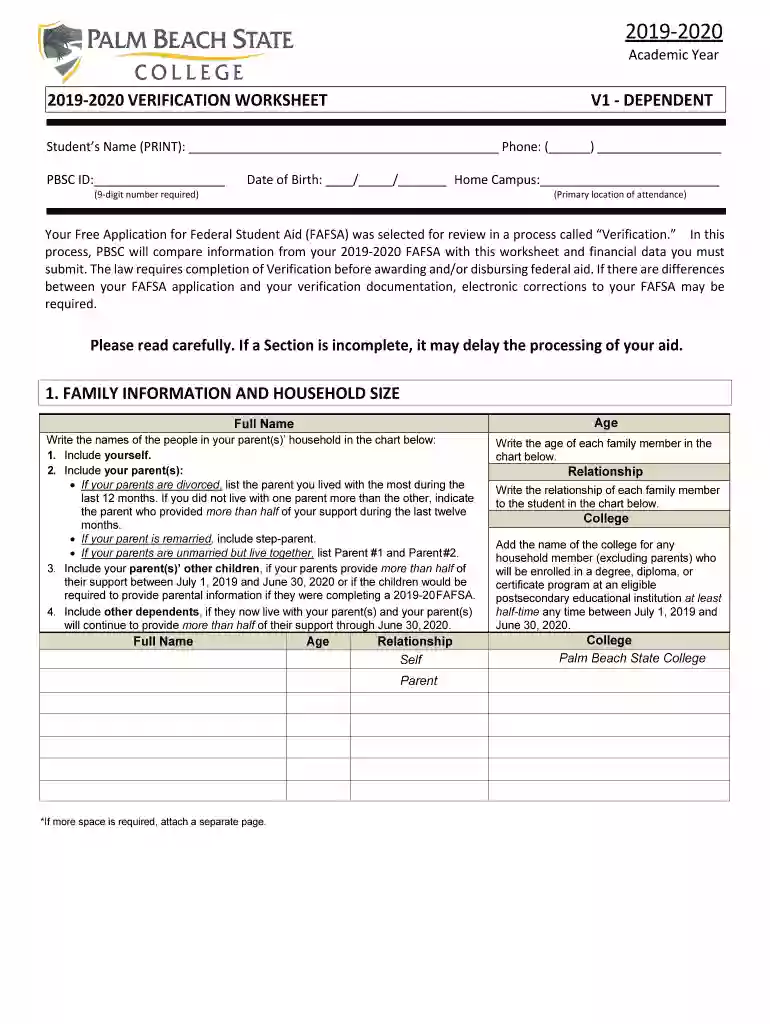
  2. Begin by entering your personal information at the top of the form, including your name, phone number, PBSC ID, and date of birth. Ensure all details are accurate to avoid processing delays.
  3. In the 'Family Information and Household Size' section, list all members of your household as instructed. Include yourself, parents, siblings, and any other dependents. Use additional pages if necessary.
  4. For the 'Dependent Student’s Income and Tax Information', check the appropriate box that applies to your tax filing status. If you were employed but not required to file a tax return, complete the income chart provided.
  5. Repeat step 4 for your parent's income information. Make sure to attach any required documents such as W-2 forms or Verification of Non-Filing Letters.
  6. Finally, both you and a parent must sign and date the form in the designated area to certify that all information is correct.

Start filling out your state v1 printable today for free using our platform!

See more state v1 printable versions

We've got more versions of the state v1 printable form. Select the right state v1 printable version from the list and start editing it straight away!
Versions Form popularity Fillable & printable
2019 4.8 Satisfied (107 Votes)
be ready to get more

Complete this form in 5 minutes or less

Get form

Got questions?

We have answers to the most popular questions from our customers. If you can't find an answer to your question, please contact us.
Contact us

You need to use only trustworthy software solutions with strong data protection compliance to approve your documents electronically. DocHub is just the type of editor you need! It stores data on Amazon Web Servers and complies with all essential security criteria and eSignature laws, so it’s a trusted way to eSign your palm beach state college verification or other documents using this tool.

If you use Chrome, there are two simple ways to edit your state v1 form online. First, go to the DocHub website, add your file, and edit it utilizing our toolbar. You can also set up our Chrome extension and edit any document by dragging and dropping it in your browser window.

Many states provide car owners with a convenient way to register their vehicles through their website. Some online services will allow you to complete the entire registration process online, while others will allow you to fill out your paperwork and print it to reduce the processing time at the DMV.
The Alaska Division of Motor Vehicles (DMV) requires specific paperwork to process your vehicle registration successfully, and being prepared will help ensure a smooth transaction. Drivers license or state-issued identification card. Proof of ownership (original title or manufacturers certificate of origin)
To register a vehicle in Alaska for the first time, you must submit the following: Current out-of-state registration. Title (if there is no lienholder) Application for Title Registration (Form V1) and submit here. Filling out a V1 application instructional video. Fees.

Security and compliance

At DocHub, your data security is our priority. We follow HIPAA, SOC2, GDPR, and other standards, so you can work on your documents with confidence.

Learn more
ccpa2
pci-dss
gdpr-compliance
hipaa
soc-compliance

People also ask

3:18 6:46 Tab. Then scroll down to vehicle or boat sale. From here enter all the information on the slip suchMoreTab. Then scroll down to vehicle or boat sale. From here enter all the information on the slip such as the buyers. Name address and date of sale.
If you are working in Alaska or establishing residency, you must apply for registration within 10 days of entering the state or taking a job within the state. A non-resident may operate a vehicle with a current registration from another state for 60 days.

state form v1