




Here's how it works

01. Edit your umaine meal plan online
Type text, add images, blackout confidential details, add comments, highlights and more.

02. Sign it in a few clicks
Draw your signature, type it, upload its image, or use your mobile device as a signature pad.

03. Share your form with others
Send umaine meal plan via email, link, or fax. You can also download it, export it or print it out.
How to use or fill out umaine meal plan with our platform

- Click ‘Get Form’ to open the umaine meal plan in the editor.
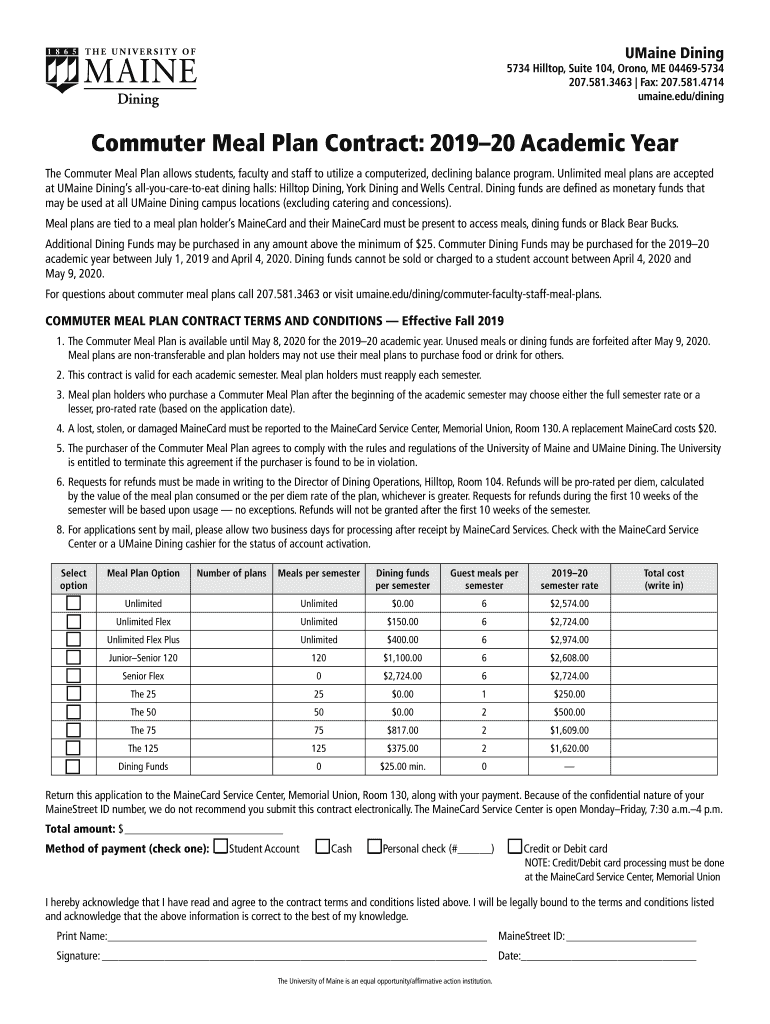
- Begin by selecting your preferred Meal Plan Option from the dropdown menu. Options include Unlimited, Junior–Senior 120, and various Flex plans.
- Indicate the Number of plans you wish to purchase. Ensure this aligns with your dining needs for the semester.
- Fill in the Meals per semester and Dining funds per semester fields based on your selected meal plan. Review the associated costs displayed next to each option.
- Complete the Guest meals per semester section if applicable, noting how many guest meals you would like included.
- In the Total cost field, write in the total amount based on your selections. Choose a method of payment and provide any necessary details.
- Finally, print your name, MaineStreet ID, sign, and date the form to confirm your agreement with the contract terms and conditions.
Start filling out your umaine meal plan today for free using our platform!
Fill out umaine meal plan online
It's free
It's free
See more umaine meal plan versions
We've got more versions of the umaine meal plan form. Select the right umaine meal plan version from the list and start editing it straight away!
| Versions | Form popularity | Fillable & printable |
|---|---|---|
| 2019 | 4.8 Satisfied (197 Votes) |
Security and compliance
At DocHub, your data security is our priority. We follow HIPAA, SOC2, GDPR, and other standards, so you can work on your documents with confidence.
Learn more




