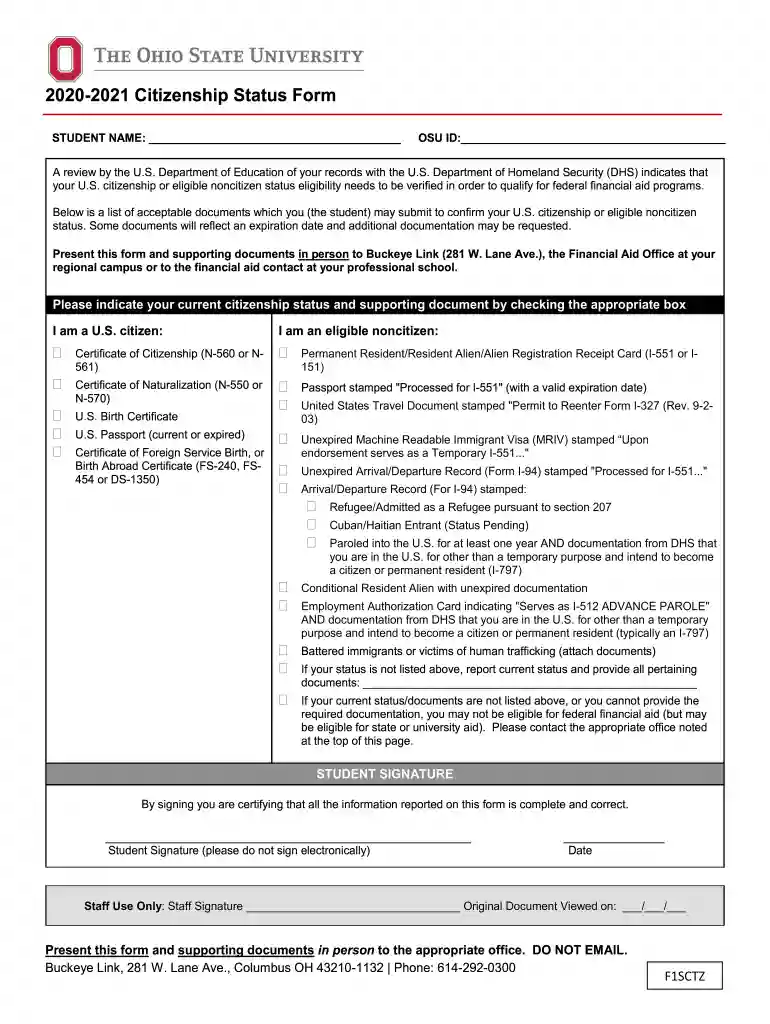
Citizenship status form 2026

Get Form
citizenship status form Preview on Page 1

Here's how it works

01. Edit your citizenship status form online
Type text, add images, blackout confidential details, add comments, highlights and more.

02. Sign it in a few clicks
Draw your signature, type it, upload its image, or use your mobile device as a signature pad.

03. Share your form with others
Send it via email, link, or fax. You can also download it, export it or print it out.

How to use or fill out citizenship status form with our platform

Form edit decoration
9.5
Ease of Setup
DocHub User Ratings on G2
9.0
Ease of Use
DocHub User Ratings on G2
  1. Click ‘Get Form’ to open the citizenship status form in the editor.
  2. Begin by entering your full name in the 'STUDENT NAME' field and your OSU ID in the corresponding section.
  3. Review the list of acceptable documents carefully. Check the box that corresponds to your current citizenship status: either 'I am a U.S. citizen' or 'I am an eligible noncitizen'.
  4. If applicable, indicate which supporting document you will provide by checking the appropriate box next to it. Ensure you have these documents ready for submission.
  5. In case your status is not listed, report your current status and provide all relevant documentation in the designated area.
  6. Finally, sign and date the form in the 'STUDENT SIGNATURE' section. Remember, do not sign electronically.

Start filling out your citizenship status form today for free using our platform!

See more citizenship status form versions

We've got more versions of the citizenship status form form. Select the right citizenship status form version from the list and start editing it straight away!
Versions Form popularity Fillable & printable
2020 4.8 Satisfied (46 Votes)
2019 4 Satisfied (41 Votes)
be ready to get more

Complete this form in 5 minutes or less

Get form

Got questions?

We have answers to the most popular questions from our customers. If you can't find an answer to your question, please contact us.
Contact us
What Is the Purpose of Form I-485? Form I-485, Application to Register Permanent Residence or Adjust Status, is for a person in the United States to apply for lawful permanent resident status (often referred to as a Green Card).
The only acceptable evidence includes one of the following: Copy of U.S. passport (current or expired) Copy of U.S. civil issued birth certificate. Copy of alien registration card. Copy of naturalization/citizenship certificate.
Document TypeWho Needs to Submit It? Proof of green card holder (permanent resident) status All applicants State-issued identification All applicants Travel records All applicants Proof of current marital status and termination of your prior marriages, if any All currently or previously married applicants12 more rows
The best way is to see a US Passport. A certified birth certificate showing birth in the US is also considered proof of US citizenship. People who were born abroad to US- citizen parents may have a ``CRBA document: Consular Report of Birth Abroad of a US Citizen.
A birth certificate is a basic document given by the authorities once a child is born. Thus, it lists down the place of birth. For someone who receives this document within Indian boundaries, issued under the Registration of Births and Deaths Act, 1969, it stands as a valid and primary proof of citizenship.

Security and compliance

At DocHub, your data security is our priority. We follow HIPAA, SOC2, GDPR, and other standards, so you can work on your documents with confidence.

Learn more
ccpa2
pci-dss
gdpr-compliance
hipaa
soc-compliance
be ready to get more

Complete this form in 5 minutes or less

Get form

People also ask

Primary (Stand-Alone) Evidence of Citizenship U.S. Passport or U.S. Passport Card, current or expired (issued without limitation). Certificate of U.S. Citizenship. Form N-560. Form N-561.

Related links