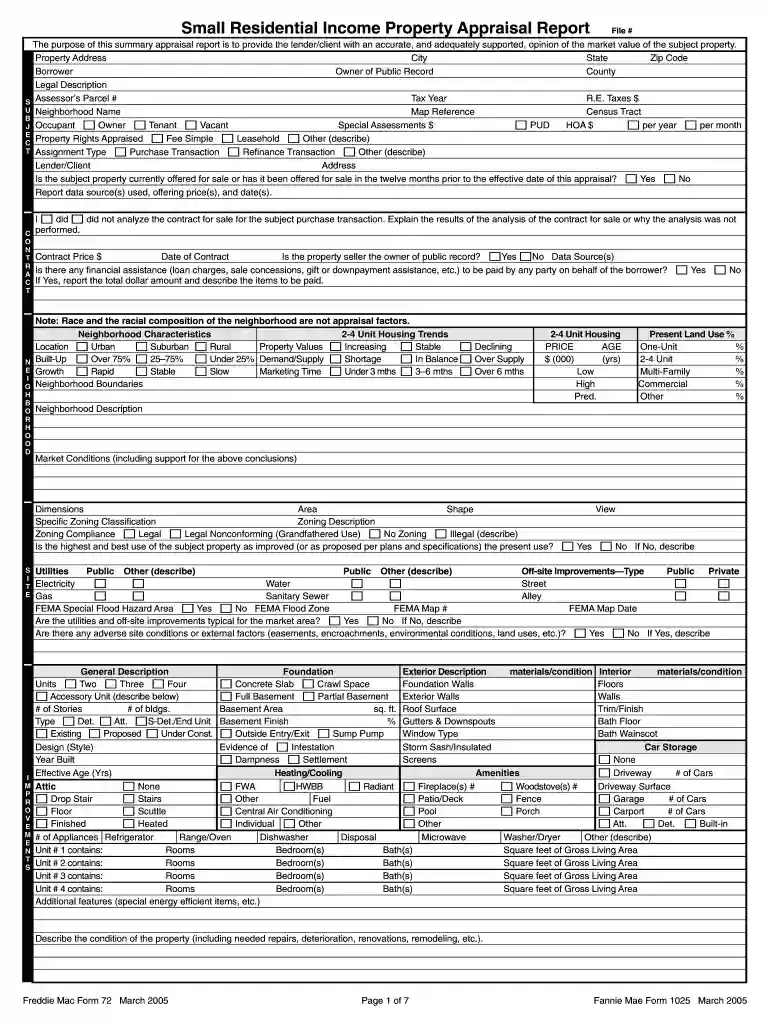
residential property appraisal Preview on Page 1

Form 1025-2026

Here's how it works

  • 01. Edit your residential property appraisal online

    Type text, add images, blackout confidential details, add comments, highlights and more.

  • 02. Sign it in a few clicks

    Draw your signature, type it, upload its image, or use your mobile device as a signature pad.

  • 03. Share your form with others

    Send 1025 via email, link, or fax. You can also download it, export it or print it out.

How to use or fill out form 1025 with our platform

Form edit decoration
9.5
Ease of Setup
DocHub User Ratings on G2
9.0
Ease of Use
DocHub User Ratings on G2
  1. Click ‘Get Form’ to open the Small Residential Income Property Appraisal Report in the editor.
  2. Begin by entering the property address, including city, state, and zip code. This information is crucial for identifying the subject property.
  3. Fill in details about the borrower and owner of public record. Ensure accuracy as this data supports the appraisal process.
  4. Complete sections regarding property rights appraised, such as Fee Simple or Leasehold. Select the appropriate option based on your assessment.
  5. Provide information on neighborhood characteristics and market conditions. This includes trends in property values and demand/supply metrics.
  6. Document any physical deficiencies or adverse conditions affecting livability. This section is vital for a comprehensive appraisal report.
  7. Finally, review all entries for accuracy before saving or exporting your completed form. Utilize our platform’s features to ensure a smooth submission process.

Start filling out form 1025 today for free using our platform!

See more residential property appraisal versions

We've got more versions of the residential property appraisal form. Select the right residential property appraisal version from the list and start editing it straight away!

VersionsForm popularityFillable & printable
20054.8 Satisfied (243 Votes)

be ready to get more

Complete this form in 5 minutes or less

Security and compliance

At DocHub, your data security is our priority. We follow HIPAA, SOC2, GDPR, and other standards, so you can work on your documents with confidence.

form 1025 or 1007

Bulldog Card Refund | Bowie State

To remove any Bulldog Bucks off of the Bulldog Card you must complete a refund form. This form can be found on the official Bowie State website or withinRead more

Learn more
FS Form 1025

Use this form to apply for relief on account of loss, theft, or destruction of United States registered securities and registered securities for which theRead more

Learn more
2005 Publication 972

To figure the amount of earned income you enter on line 4a of Form 8812, Additional Child Tax Credit. This publication is intended primarily for individualsRead more

Learn more
If you believe that this page should be taken down, please follow our DMCA take down process here