NYCEIP AT Medical Necessity Justification bFormb with bb - NYCgov 2026

Get Form
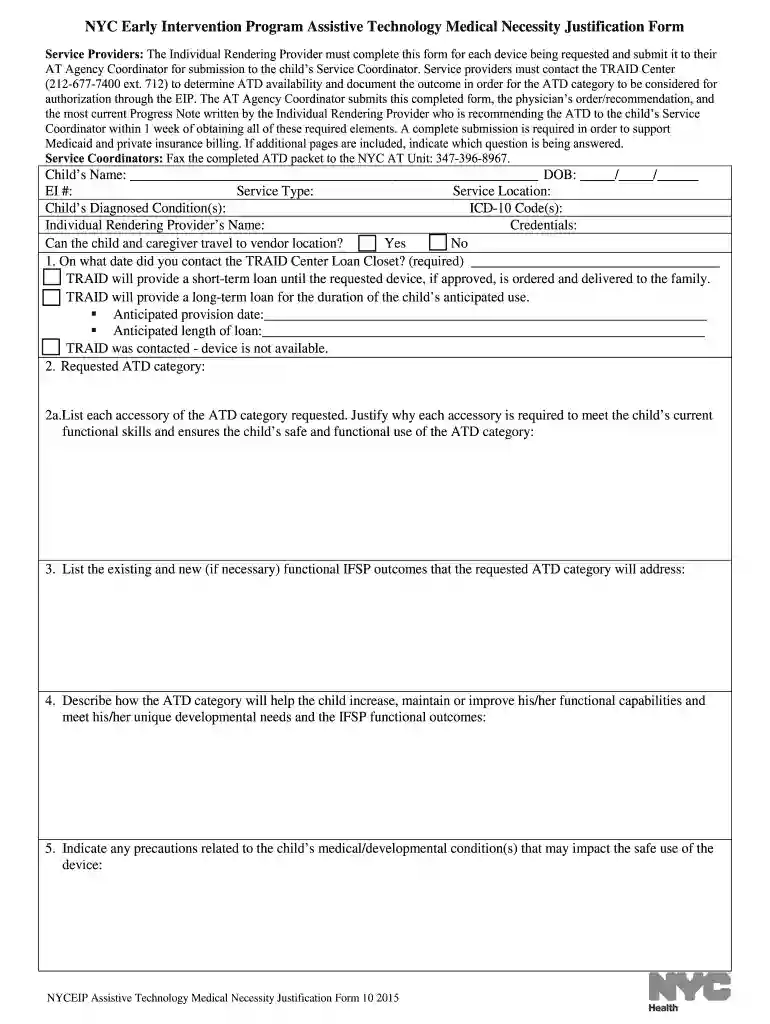
NYCEIP AT Medical Necessity Justification bFormb with bb - NYCgov Preview on Page 1

Here's how it works

01. Edit your form online
Type text, add images, blackout confidential details, add comments, highlights and more.

02. Sign it in a few clicks
Draw your signature, type it, upload its image, or use your mobile device as a signature pad.

03. Share your form with others
Send it via email, link, or fax. You can also download it, export it or print it out.

How to use or fill out NYCEIP AT Medical Necessity Justification Form with NYCgov using our platform

Form edit decoration
9.5
Ease of Setup
DocHub User Ratings on G2
9.0
Ease of Use
DocHub User Ratings on G2
  1. Click ‘Get Form’ to open it in the editor.
  2. Begin by entering the child's name, date of birth, and EI number at the top of the form. Ensure all information matches what is recorded in NYEIS.
  3. Fill in the service type and location, along with the child's diagnosed conditions and corresponding ICD-10 codes.
  4. Document your contact with the TRAID Center by noting the date and outcome of your inquiry regarding device availability.
  5. In section two, specify the requested ATD category and list any necessary accessories, providing justifications for each based on how they support the child’s functional skills.
  6. Complete sections detailing how the ATD will improve functional capabilities, address safety precautions, and integrate into daily routines.
  7. Finally, ensure both parent/caregiver and provider signatures are included before submitting to the appropriate coordinator.

Start filling out your form today for free using our platform to streamline your document editing process!

See more NYCEIP AT Medical Necessity Justification bFormb with bb - NYCgov versions

We've got more versions of the NYCEIP AT Medical Necessity Justification bFormb with bb - NYCgov form. Select the right NYCEIP AT Medical Necessity Justification bFormb with bb - NYCgov version from the list and start editing it straight away!
Versions Form popularity Fillable & printable
2017 4.6 Satisfied (28 Votes)
2015 4.8 Satisfied (160 Votes)
2014 4.6 Satisfied (38 Votes)
be ready to get more

Complete this form in 5 minutes or less

Get form

Got questions?

We have answers to the most popular questions from our customers. If you can't find an answer to your question, please contact us.
Contact us

As outlined by eSignature regulations, forms approved digitally have the same validity as those approved with pen and paper. You can eSign almost any business and private paperwork. Four types of documents still require handwritten signatures only - wills and testamentary trusts, court orders and other court papers, state statutes regulating divorce, adoption, or other family law, and notice of cancellation of utility services. If you adhere to the regulations and use a safe and compliant software solution, like DocHub, you can eSign your NYCEIP AT Medical Necessity Justification bFormb with bb - NYCgov without printing it.

When you choose analog methods of completing your NYCEIP AT Medical Necessity Justification bFormb with bb - NYCgov, you can easily download your file for printing. Search DocHub’s Forms & Templates catalog to locate the exact file template you need and open it for editing or download it on your device in the format of your choice. It is easy to complete your form electronically and place your handwritten signature on it after printing or eSign your file with DocHub.

For children from birth to 3 years old - contact your states early intervention service for information on how to receive services. For children 3 years or older - contact your local elementary school or school district to request an evaluation. Your child can be evaluated even if they do not attend public school.
Applicants must have documentation of a minimum of 1,000 clock hours prior to the date of application to the Department for approval, delivering such service to children under 5 years of age in an early intervention, clinical pediatric, early childhood education program, which may include relevant experience obtained
A letter of medical necessity, whether being submitted to the Department of Human Services, a private insurance company or other funding source, should contain the information needed to convince the reader that the requested assistive technology is necessary to meet the medical needs of the person for whom the

Security and compliance

At DocHub, your data security is our priority. We follow HIPAA, SOC2, GDPR, and other standards, so you can work on your documents with confidence.

Learn more
ccpa2
pci-dss
gdpr-compliance
hipaa
soc-compliance
be ready to get more

Complete this form in 5 minutes or less

Get form

People also ask

Early Intervention services are confidential, voluntary and free for families,* regardless of income, immigration or insurance status. *If you have health insurance, including Medicaid, it will be used to pay for Early Intervention services at no direct cost to you.
Families, doctors, and community members can make a referral by: Calling 311 and asking for Early Intervention. Completing the Early Intervention Program Referral Form (Fillable PDF) and faxing it to the Citywide Early Intervention Referral Unit.
If you think your child has a developmental delay and needs help, you can make a referral to EI by calling 311 and asking for Early Intervention, or completing the New York City Intervention Referral form and faxing it to (347) 396-8801.
To be eligible for services, children must be under 3 years of age and have a confirmed disability or established developmental delay, as defined by the State, in one or more of the following areas of development: physical, cognitive, communication, social-emotional, and/or adaptive.