Hmsa credentialing 2026

Get Form
hmsa credentialing Preview on Page 1

Here's how it works

01. Edit your hmsa credentialing online
Type text, add images, blackout confidential details, add comments, highlights and more.

02. Sign it in a few clicks
Draw your signature, type it, upload its image, or use your mobile device as a signature pad.

03. Share your form with others
Send hmsa credentialing application via email, link, or fax. You can also download it, export it or print it out.

How to use or fill out hmsa credentialing with our platform

Form edit decoration
9.5
Ease of Setup
DocHub User Ratings on G2
9.0
Ease of Use
DocHub User Ratings on G2
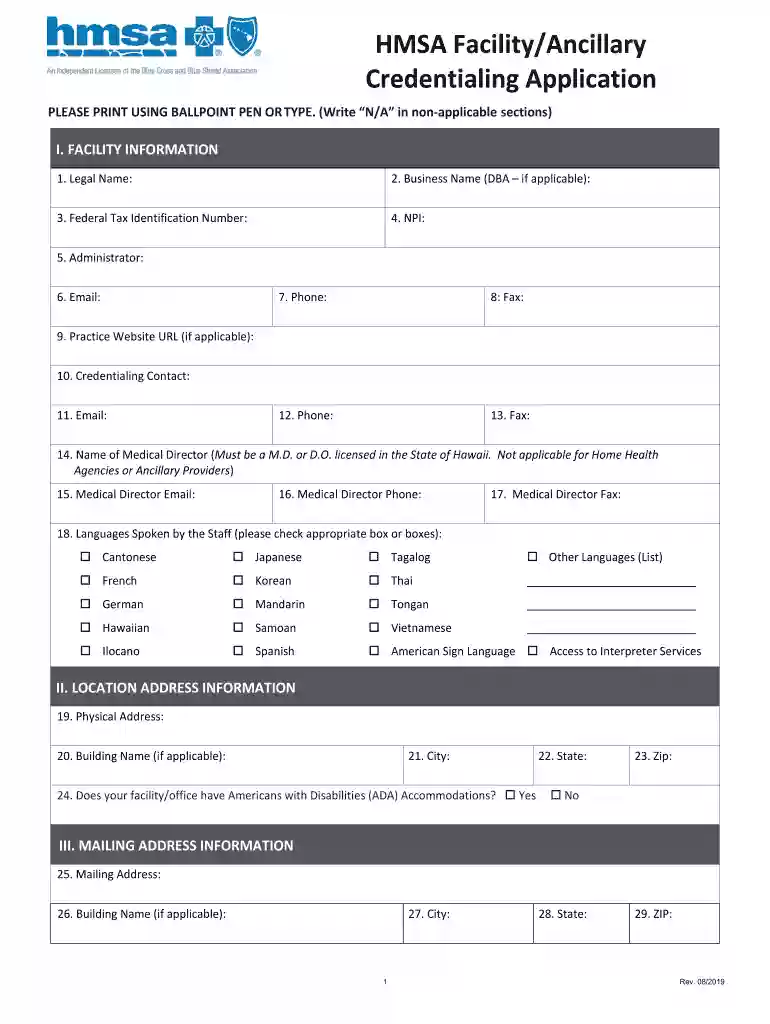
  1. Click ‘Get Form’ to open the HMSA Credentialing Application in the editor.
  2. Begin with Section I: Facility Information. Fill in the Legal Name, Business Name (if applicable), Federal Tax Identification Number, and NPI. Ensure all fields are completed accurately.
  3. Continue to provide contact details for the Administrator, including their email and phone number. Don’t forget to include the Medical Director's information if applicable.
  4. In Section II, enter the Physical Address of your facility. Confirm if ADA accommodations are available by checking 'Yes' or 'No'.
  5. Proceed to Section III for Mailing Address Information. This may differ from your physical address; ensure accuracy.
  6. Complete Sections IV through XI as required, ensuring you attach any necessary documentation such as insurance certificates or accreditation letters.
  7. Finally, review all entries for completeness and accuracy before electronically signing the form at the end.

Start using our platform today to streamline your HMSA credentialing process effortlessly!

See more hmsa credentialing versions

We've got more versions of the hmsa credentialing form. Select the right hmsa credentialing version from the list and start editing it straight away!
Versions Form popularity Fillable & printable
2019 4.8 Satisfied (133 Votes)
2018 3.8 Satisfied (45 Votes)
be ready to get more

Complete this form in 5 minutes or less

Get form

Got questions?

We have answers to the most popular questions from our customers. If you can't find an answer to your question, please contact us.
Contact us
Credentialing is closely tied with privileging and is frequently a first step for physicians seeking hospital privileges.
Licenses and certifications are the two primary types of credentials. Credentials can also be earned via apprenticeships. Some state licensures may be earned by passing national exams.
What are the Main Types of Medical Credentials? Academic Degrees. Academic degrees represent the foundational education that healthcare professionals receive. Licensure. Board Certification. Professional Designations and Certifications. International Medical Credentials.
The credentialing process is a vital yet challenging aspect of healthcare that, if not managed effectively, can lead to docHub delays, frustration, and even financial losses.
Typical Credentialing Timelines On average, credentialing can take anywhere from 60 to 180 days, depending on factors like the complexity of the providers qualifications, the organization type, and specific payer requirements.

Security and compliance

At DocHub, your data security is our priority. We follow HIPAA, SOC2, GDPR, and other standards, so you can work on your documents with confidence.

Learn more
ccpa2
pci-dss
gdpr-compliance
hipaa
soc-compliance

People also ask

Individual physician credentialing costs between $100-$200 per physician. Most insurances and facilities require recredentialing every two years, which may vary. The CAQH Proview database is an option for online provider data collection.
Gathering provider information Credentialing begins with the collection of essential documents and data, including educational certificates, licenses, residency completion records, and work history.

hawaii credentialing application