




Here's how it works



How to use or fill out Revenue from Gift Cards Redeemable for Both Goods and

- Click ‘Get Form’ to open it in the editor.
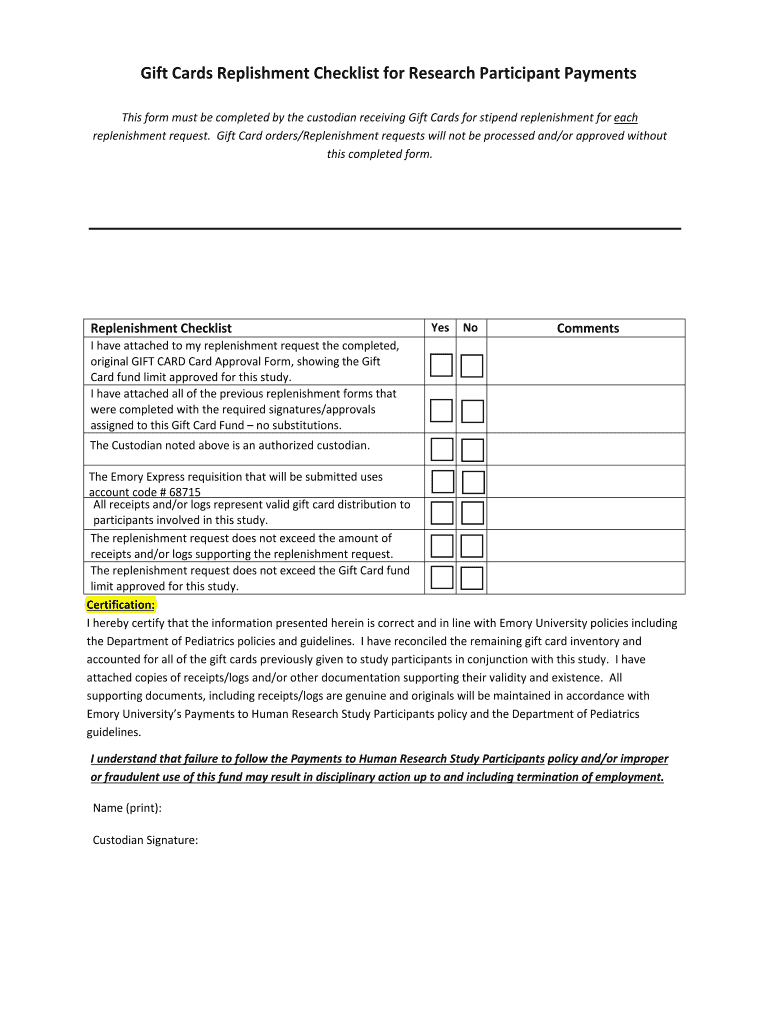
- Begin by filling in the Award ID, Project ID, and Date fields. Ensure that these details are accurate as they are crucial for tracking your replenishment request.
- Next, enter the Smartkey and Study IRB Number. These identifiers help maintain compliance with research protocols.
- In the Gift Card Custodian section, provide your name and title. This identifies you as the authorized custodian responsible for managing gift card distributions.
- Review the Replenishment Checklist carefully. For each item, mark 'Yes' or 'No' based on your compliance with the requirements. Add comments if necessary to clarify any points.
- Finally, complete the Certification section by printing your name, title, and signing. This certifies that all information is correct and adheres to institutional policies.
Start using our platform today to streamline your document editing and form completion process for free!
It's free
See more Revenue from Gift Cards Redeemable for Both Goods and versions
| Versions | Form popularity | Fillable & printable |
|---|---|---|
| 2016 | 4.8 Satisfied (37 Votes) |
Got questions?
What is the best way to send my Revenue from Gift Cards Redeemable for Both Goods and for eSignature?
Upload your Revenue from Gift Cards Redeemable for Both Goods and to DocHub (once you’ve created an account for this). If you need to complete fields in it, use appropriate tools from the upper pane. For instance, drop Signature Fields, assign each to specific person, and click on Sign → Request signatures from others. Personalize your message for your recipients and click Send Request. You can also send your form by fax or as a Signing link instead of using email (you’ll locate these options by navigating to the Menu → Send)
How do you edit Revenue from Gift Cards Redeemable for Both Goods and on iOS?
You can easily edit and complete your Revenue from Gift Cards Redeemable for Both Goods and on any iOS gadget. Open an internet browser of your choice, go to the DocHub site, authorize or create a new account, add your file for editing, and make your desired alterations. Our service is mobile-friendly, so utilizing its functions on your smartphone will be a no-brainer, even on the first try.
Security and compliance
At DocHub, your data security is our priority. We follow HIPAA, SOC2, GDPR, and other standards, so you can work on your documents with confidence.
Learn more




