




Here's how it works



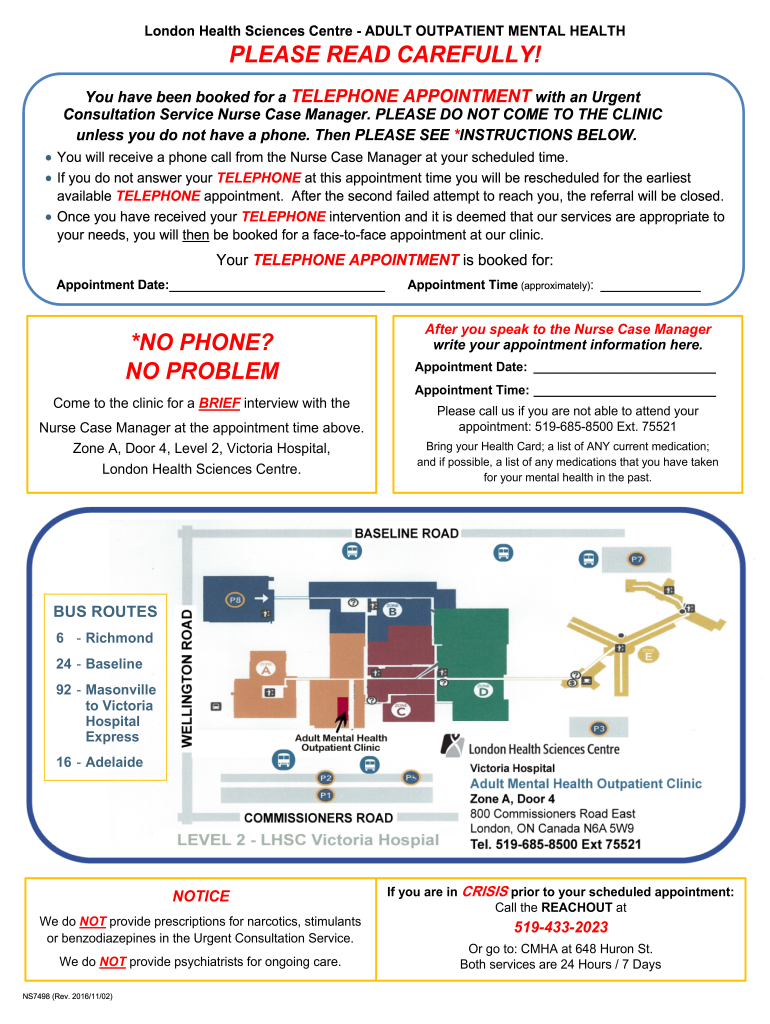
How to use or fill out the TELEPHONE APPOINTMENT NOTICE with our platform

- Begin by accessing the document through our editor. Click ‘Get Form’ to open it.
- Locate the section labeled 'Appointment Date' and enter your scheduled appointment date.
- Next, find the 'Appointment Time' field and input the approximate time of your telephone appointment.
- If you do not have a phone, refer to the instructions under 'NO PHONE? NO PROBLEM' and note down your visit details for the clinic.
- After your conversation with the Nurse Case Manager, record any new appointment information in the designated fields provided.
- Lastly, ensure you have noted down any necessary items to bring, such as your Health Card and medication lists.
Start using our platform today for free to streamline your appointment management!
It's free
See more AGREEMENT BETWEEN THE ALANKIT HEALTHCARE LIMITED INCORPORATED versions
| Versions | Form popularity | Fillable & printable |
|---|---|---|
| 2016 | 4.8 Satisfied (152 Votes) |
Got questions?
How can I send my AGREEMENT BETWEEN THE ALANKIT HEALTHCARE LIMITED INCORPORATED from Google Drive for approval?
If you frequently deal with documents kept in your Google Drive, DocHub is an excellent option for you to easily and quickly complete, modify, and approve them. This editor integrates properly with Google apps, so you can export your AGREEMENT BETWEEN THE ALANKIT HEALTHCARE LIMITED INCORPORATED from your Google Drive to the editor without downloading and re-uploading it. Right-click on your document, choose Open With → DocHub PDF Sign and Edit. In our editor, add and assign Signature Fields for all parties involved, then click on the Menu option above → Send → select how you want to share your form.
How do you fill out AGREEMENT BETWEEN THE ALANKIT HEALTHCARE LIMITED INCORPORATED online?
You may find and edit your AGREEMENT BETWEEN THE ALANKIT HEALTHCARE LIMITED INCORPORATED online by using DocHub. Its straightforward yet feature-rich design allows you to start effective work right after you register your account. Create your profile and add your document, then our user interface will guide you through our stress-free form completion experience.
Security and compliance
At DocHub, your data security is our priority. We follow HIPAA, SOC2, GDPR, and other standards, so you can work on your documents with confidence.
Learn more




