Ccc10 2026

Get Form
commodity credit Preview on Page 1

Here's how it works

01. Edit your commodity credit online
Type text, add images, blackout confidential details, add comments, highlights and more.
02. Sign it in a few clicks
Draw your signature, type it, upload its image, or use your mobile device as a signature pad.
03. Share your form with others
Send ccc10 via email, link, or fax. You can also download it, export it or print it out.

How to use or fill out ccc10 with our platform

Form edit decoration
9.5
Ease of Setup
DocHub User Ratings on G2
9.0
Ease of Use
DocHub User Ratings on G2
  1. Click ‘Get Form’ to open the ccc10 in the editor.
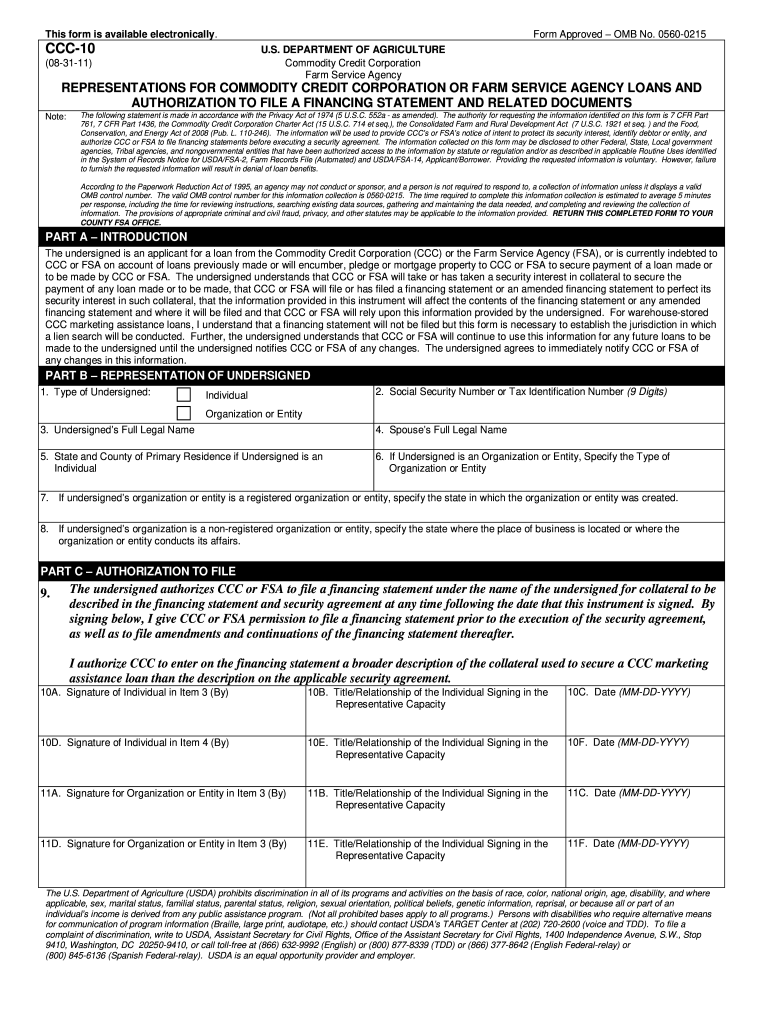
  2. Begin with Part A – Introduction. Read the statement carefully and ensure you understand your obligations regarding the loan.
  3. Move to Part B – Representation of Undersigned. Fill in your type (Individual or Organization), Social Security Number or Tax Identification Number, and full legal names as required.
  4. Complete the address fields for your primary residence or business location, depending on whether you are an individual or an organization.
  5. In Part C – Authorization to File, authorize CCC or FSA by signing where indicated. Ensure all signatures are dated correctly.

Start filling out your ccc10 form online for free today!

be ready to get more

Complete this form in 5 minutes or less

Get form

Got questions?

We have answers to the most popular questions from our customers. If you can't find an answer to your question, please contact us.
Contact us

A lot of software applications are available out there for document editing and signing. DocHub is one of the most in-demand online solutions that comply with all data protection and compliance standards and ensures your eSigned documentation is legally enforceable. All you need to give it a try is to register an account, add your ccc10, fill out the requested details, and click Sign. Generate your eSignature by typing, drawing it, uploading its image to your form, or scanning a unique QR code.

If you are searching for a state-specific ccc10 sample, you will find it in our DocHub Forms & Templates catalog. Use the search field, key in your form’s name, and search through the results for your state. You can also filter out irrelevant results while browsing our catalog by categories.

Again, the easiest way to find a court date is to go to the Dallas County Background Search page (http://www.dallascounty.org/criminalBackgroundSearch/). Enter the defendant's first and last name, and date of birth (DOB).
In the case of a court with one judge, the records custodian is the judge of the court. Judicial records are open to the public unless exempt from disclosure, and where a respondent does not raise exemptions and the special committee cannot conclude any apply the records must be released.
Court dockets and some case files are available on the Internet through the Public Access to Court Electronic Records system (PACER), at www.pacer.gov. In addition, nearly every federal court maintains a website with information about court rules and procedures.

Security and compliance

At DocHub, your data security is our priority. We follow HIPAA, SOC2, GDPR, and other standards, so you can work on your documents with confidence.

Learn more
ccpa2
pci-dss
gdpr-compliance
hipaa
soc-compliance
be ready to get more

Complete this form in 5 minutes or less

Get form

People also ask

DFW area overview The Dallas-Fort Worth-Arlington Metropolitan Area (aka DFW metroplex, Dallas metroplex, DFW area, north Texas) encompasses thirteen north Texas counties, Collin, Dallas, Denton, Ellis, Hood, Hunt, Johnson, Kaufman, Parker, Rockwall, Somervell, Tarrant and Wise.
Dallas County is a county located in the U.S. state of Texas. As of the 2010 census, the population was 2,368,139. It is the second-most populous county in Texas and the ninth-most populous in the United States.
Locate a federal court case by using the Public Access to Court Electronic Records (PACER) or by visiting the Clerk's Office of the courthouse where the case was filed.
In the case of a court with one judge, the records custodian is the judge of the court. Judicial records are open to the public unless exempt from disclosure, and where a respondent does not raise exemptions and the special committee cannot conclude any apply the records must be released.
You will need to select the court location, and then click on either Criminal Case Records or Case Records Search. You may search for your case using the court's full case number (JP05-17-SC0000xxxx) or the party name.

Related links