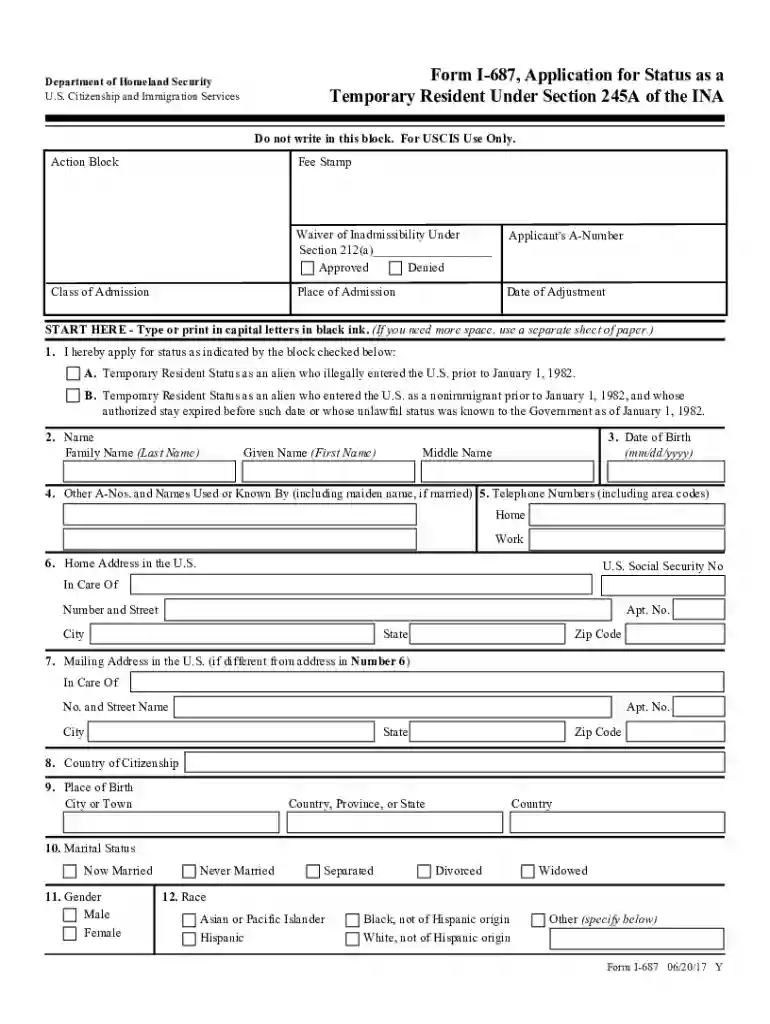
homeland security uscis status Preview on Page 1

Dhs uscis application status 2026

Here's how it works

  • 01. Edit your homeland security uscis status online

    Type text, add images, blackout confidential details, add comments, highlights and more.

  • 02. Sign it in a few clicks

    Draw your signature, type it, upload its image, or use your mobile device as a signature pad.

  • 03. Share your form with others

    Send case checks via email, link, or fax. You can also download it, export it or print it out.

How to use or fill out DHS USCIS Application Status with DocHub

Form edit decoration
9.5
Ease of Setup
DocHub User Ratings on G2
9.0
Ease of Use
DocHub User Ratings on G2
  1. Click ‘Get Form’ to open the DHS USCIS Application Status form in our platform.
  2. Begin by filling out your personal information in Section 1. Indicate your application type by checking the appropriate box for Temporary Resident Status.
  3. In Section 2, enter your full name, including family name and given names. Ensure accuracy as this will be critical for processing.
  4. Proceed to Section 3 and input your date of birth in the specified format (mm/dd/yyyy).
  5. Complete Sections 4 through 10 with details about other names used, contact information, citizenship, and place of birth.
  6. Continue filling out Sections 11 to 20 regarding marital status, race, previous applications, and family details.
  7. For Sections 21 to 33, provide information on your immigration history, residences, affiliations, absences from the U.S., and employment history.
  8. Finally, review all sections for completeness and accuracy before signing in Section 47. Use our editor's features to ensure everything is clear and legible.

Start using our platform today for free to streamline your DHS USCIS Application process!

See more homeland security uscis status versions

We've got more versions of the homeland security uscis status form. Select the right homeland security uscis status version from the list and start editing it straight away!

VersionsForm popularityFillable & printable
20244.1 Satisfied (25 Votes)
20174.8 Satisfied (92 Votes)

be ready to get more

Complete this form in 5 minutes or less

Got questions?

We have answers to the most popular questions from our customers. If you can't find an answer to your question, please contact us.

U.S. Department of Homeland Security (DHS) The Department of Homeland Security (DHS) works to improve the security of the United States. The Departments work includes customs, border, and immigration enforcement, emergency response to natural and manmade disasters, antiterrorism work, and cybersecurity.
Online: Use the case status online tool to check for updates about your immigration case. You will need your 13-character receipt number from your application or petition. By phone: If you are calling from the U.S., contact the USCIS Contact Center at 1-800-375-5283 or TTY 1-800-767-1833.

Security and compliance

At DocHub, your data security is our priority. We follow HIPAA, SOC2, GDPR, and other standards, so you can work on your documents with confidence.

homeland security application status

Check Immigration Case Status

Jun 28, 2022 The US Department of Homeland Security allows those who have applied or petitioned for an immigration benefit to check the status of their case online.Read more

Learn more
Form G-1145, e-Notification of Application/Petition

We will send the e-Notification within 24 hours after we accept your application. tell you how to get updated case status information. receive within 10 days

Learn more
If you believe that this page should be taken down, please follow our DMCA take down process here