01. Edit your assignment of insurance claim online
Type text, add images, blackout confidential details, add comments, highlights and more.

02. Sign it in a few clicks
Draw your signature, type it, upload its image, or use your mobile device as a signature pad.

03. Share your form with others
Send it via email, link, or fax. You can also download it, export it or print it out.

How to use or fill out assignment of insurance claim with our platform
Ease of Setup
DocHub User Ratings on G2
Ease of Use
DocHub User Ratings on G2
Click ‘Get Form’ to open the assignment of insurance claim in the editor.
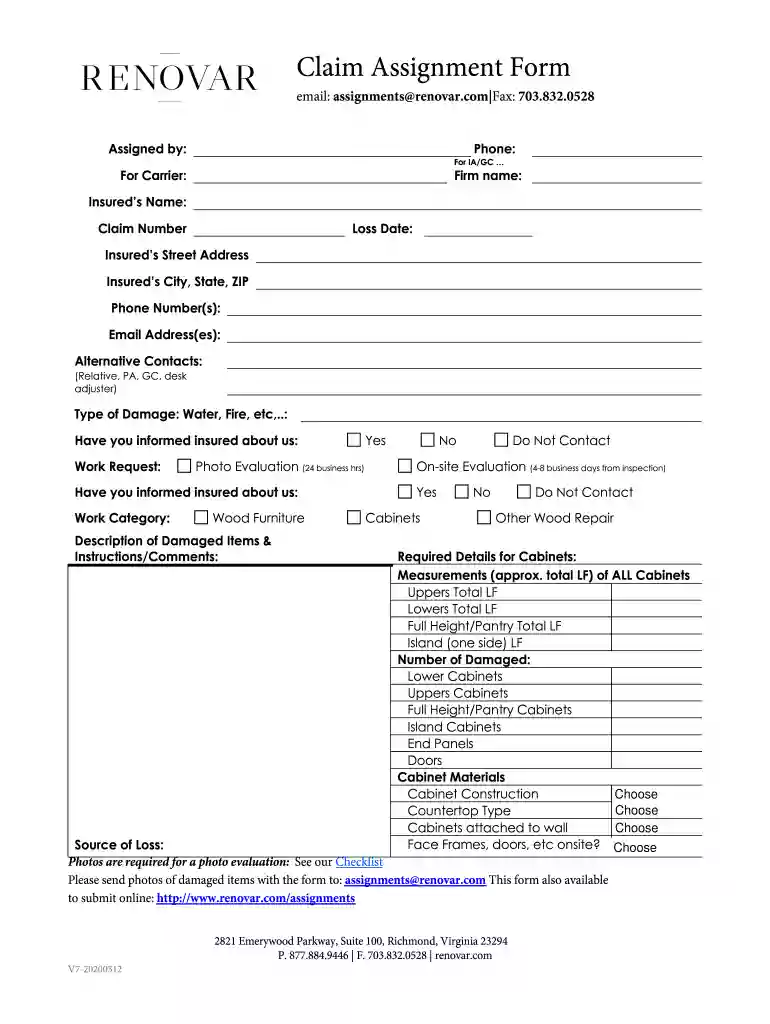
Begin by filling in your contact information, including your email and phone number. This ensures that all parties can communicate effectively regarding the claim.
Next, provide details about the insured party. Fill in their name, claim number, loss date, and address. Accurate information here is crucial for processing the claim smoothly.
Indicate the type of damage (e.g., water, fire) and whether you have informed the insured about your involvement. This helps clarify communication lines.
In the 'Description of Damaged Items' section, detail what has been damaged and any specific instructions or comments that may assist in evaluating the claim.
If applicable, provide measurements for cabinets and specify materials. This detailed information aids in accurate assessments and repairs.
Finally, attach any required photos of damaged items as per the checklist provided. Ensure these are sent along with your form submission.
Start using our platform today to streamline your assignment of insurance claims for free!
Fill out assignment of insurance claim online It's free
We've got more versions of the assignment of insurance claim form. Select the right assignment of insurance claim version from the list and start editing it straight away!
In California, for instance, the enforceability of the clause depends on both the timing of the assignment and whether the claim is a first party loss where the insured is seeking benefits for, say, a sunk ship or a burned building or a third party claim, which protects insured in certain instances when the insured
What does it mean if insurance has been assigned?
Be cautious about signing an Assignment of Benefits. An AOB can be a useful tool for getting repairs done, as it allows the repair company to deal directly with your insurance company when negotiating repairs and issuing payment directly to the repair company.
What is the meaning of assignment of insurance?
An Assignment of Benefits, or an AOB, is an agreement signed by a policyholder that allows a third partysuch as a water extraction company, a roofer or a plumberto act on behalf of the insured and seek direct payment from the insurance company.
What is an example of assignment insurance?
Assignment of Benefits (AOB) is an agreement that transfers the insurance claims rights or benefits of the policy to a third party. An AOB gives the third party authority to file a claim, make repair decisions, and collect insurance payments without the involvement of the homeowner.
What is the meaning of assignment in insurance?
For example, Assignment Insurance may be used when an individual or business takes on the financial risk associated with a particular asset or activity, such as the purchase of a home or a business venture.
Related Searches
Assignment of insurance claim sampleWhat is assignment of benefits in medical billingAssignment of insurance policy PDFAssignment of benefits homeowners insuranceAssignment of benefits exampleAssignment of benefits insuranceAssignment of benefits formAssignment of insurance claim california
Security and compliance
At DocHub, your data security is our priority. We follow HIPAA, SOC2, GDPR, and other standards, so you can work on your documents with confidence.
What is a Post-Loss Assignment? When is a Post-Loss
A post-loss assignment of a claim is a contract signed by a homeowner, after a covered loss, granting a contractor all rights and duties of the claim under the
Cookie consent notice
This site uses cookies to enhance site navigation and personalize your experience.
By using this site you agree to our use of cookies as described in our Privacy Notice.
You can modify your selections by visiting our Cookie and Advertising Notice.