Agreement service contract 2026

Get Form
store maintenance Preview on Page 1

Here's how it works

01. Edit your store maintenance online
Type text, add images, blackout confidential details, add comments, highlights and more.

02. Sign it in a few clicks
Draw your signature, type it, upload its image, or use your mobile device as a signature pad.

03. Share your form with others
Send agreement service maintenance via email, link, or fax. You can also download it, export it or print it out.

How to use or fill out agreement service contract with our platform

Form edit decoration
9.5
Ease of Setup
DocHub User Ratings on G2
9.0
Ease of Use
DocHub User Ratings on G2
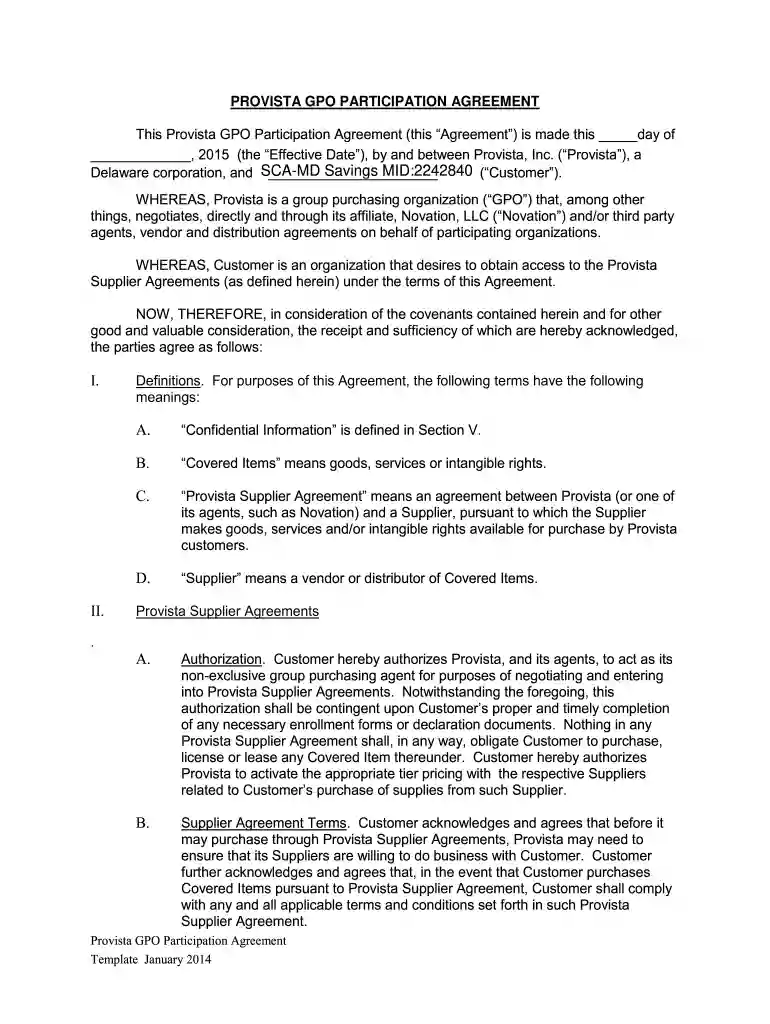
  1. Click ‘Get Form’ to open the agreement service contract in the editor.
  2. Begin by entering the Effective Date at the top of the form. This is crucial as it marks the start of your agreement.
  3. Fill in the Customer's name and details in the designated fields. Ensure accuracy to avoid any future discrepancies.
  4. Review Section I for definitions. Familiarize yourself with terms like 'Confidential Information' and 'Covered Items' as they are essential for understanding your obligations.
  5. In Section II, provide authorization details. Confirm that you authorize Provista to act on your behalf regarding supplier agreements.
  6. Complete Section III regarding your organization's use of goods purchased through Provista Supplier Agreements, ensuring compliance with legal requirements.
  7. Finally, review all sections for completeness and accuracy before signing at the bottom of the document. Use our platform’s signature feature to sign electronically.

Start filling out your agreement service contract today for free using our platform!

See more agreement service contract versions

We've got more versions of the agreement service contract form. Select the right agreement service contract version from the list and start editing it straight away!
Versions Form popularity Fillable & printable
2014 4.9 Satisfied (44 Votes)
be ready to get more

Complete this form in 5 minutes or less

Get form

Got questions?

We have answers to the most popular questions from our customers. If you can't find an answer to your question, please contact us.
Contact us

A lot of software solutions are available on the market for document modifying and signing. DocHub is one of the most in-demand online solutions that comply with all data protection and compliance standards and ensures your eSigned paperwork is legally enforceable. All you need to give it a try is to create an account, add your retail agreement service, provide the requested information, and click Sign. Create your electronic signature by typing, drawing it, uploading its picture to your document, or scanning a unique QR code.

You can find and modify your retail store contract online by using DocHub. Its straightforward but feature-rich design allows you to begin effective work right after you register your account. Create your account and add your document, and then our interface will guide you through our stress-free form completion experience.

4 Common Types of Contracts Non-Disclosure Agreement. Companies often request or provide a Non-Disclosure Agreement (NDA) when they have sensitive or confidential information to disclose. Master Services Agreement. Order Form. Buy-Side Contracts.
How to write a Service Agreement Information about the service. First, specify how long services are needed (e.g., for a single job, a fixed term, or indefinitely) and where the work will be done (as this affects the laws that apply to your contract). Party details. Payment. Terms and conditions. Final details. Service Agreement (Australia) Form - LawDepot lawdepot.com business service-contract lawdepot.com business service-contract
Service Level Agreements are not automatically legally binding, but they can be. Contracts can be legally binding, and SLAs are often meant to act as contract extensions. If an organization felt that a vendor violated an SLA and failed to honor penalties, they could take that business to court over it.

Security and compliance

At DocHub, your data security is our priority. We follow HIPAA, SOC2, GDPR, and other standards, so you can work on your documents with confidence.

Learn more
ccpa2
pci-dss
gdpr-compliance
hipaa
soc-compliance

People also ask

While an SLA is a type of contract, there are important differences. A standard contract sets out the overall terms of the relationship, such as payment, duration, and general obligations of each party. In contrast, a service level agreement narrows the focus to service performance and accountability.
In a contract of service, employers are responsible for compliance with employment laws, tax deductions, and employee benefits. In a service contract, the contractors are responsible for paying their taxes and they have no right to labor laws and employment benefits.
SLAs are generally formed between a vendor and an external customer, but companies also use SLAs internally to formalize agreements between departments or teams. SLAs are an important part of outsourcing and information technology (IT) vendor contracts, providing an end-to-end view of the working relationship.

Related links