Dd form 2962-2026

Get Form
da form 2962 Preview on Page 1

Here's how it works

01. Edit your da form 2962 online
Type text, add images, blackout confidential details, add comments, highlights and more.
02. Sign it in a few clicks
Draw your signature, type it, upload its image, or use your mobile device as a signature pad.
03. Share your form with others
Send it via email, link, or fax. You can also download it, export it or print it out.

How to use or fill out dd form 2962 with our platform

Form edit decoration
9.5
Ease of Setup
DocHub User Ratings on G2
9.0
Ease of Use
DocHub User Ratings on G2
  1. Click ‘Get Form’ to open the dd form 2962 in the editor.
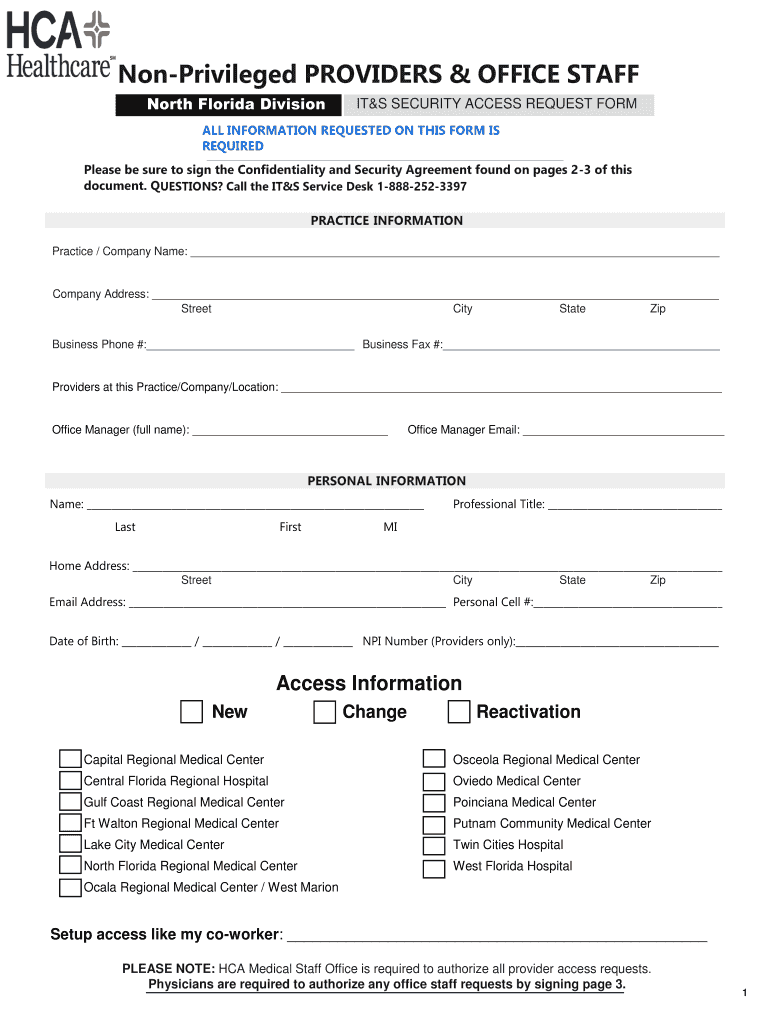
  2. Begin by filling out the 'Office Staff Requesting Access' section. Ensure all required fields are completed accurately, typing your information directly into each field.
  3. Proceed to the 'Practice Information' section. Enter your practice or company name, address, and contact details as requested.
  4. In the 'Personal Information' section, provide your full name, professional title, home address, email address, and date of birth. Make sure to double-check for accuracy.
  5. Select the type of access you are requesting (New, Change, Reactivation) and specify which medical center you need access to from the provided list.
  6. Review the Confidentiality and Security Agreement carefully. After understanding its terms, print the form and sign where indicated.
  7. Finally, submit your completed form via fax or email to the corresponding hospital using the contact information provided at the end of the document.

Start using our platform today for free to streamline your document editing and submission process!

See more dd form 2962 versions

We've got more versions of the dd form 2962 form. Select the right dd form 2962 version from the list and start editing it straight away!
Versions Form popularity Fillable & printable
2019 4.8 Satisfied (49 Votes)
2018 4.8 Satisfied (60 Votes)
be ready to get more

Complete this form in 5 minutes or less

Get form

Got questions?

We have answers to the most popular questions from our customers. If you can't find an answer to your question, please contact us.
Contact us
Each DISS user will be required to have a DoD approved Public Key Infrastructure (PKI) certificate smartcard/token in the form of a Common Access Card (CAC), Personal Identity Verification (PIV) card, or authorized External Certificate Authority (ECA) certificate.
TO OBTAIN A COPY OF THIS FORM, PLEASE CONTACT THE UNDER SECRETARY OF DEFENSE FOR INTELLIGENCE AND SECURITY (IS).
Personnel Security System Access Request Form The PSSAR form, also known as DD Form 2962, is used by the Defense Counterintelligence and Security Agency (DCSA) to collect information required to grant access to personnel security systems, specifically the National Background Investigation Services (NBIS) system.