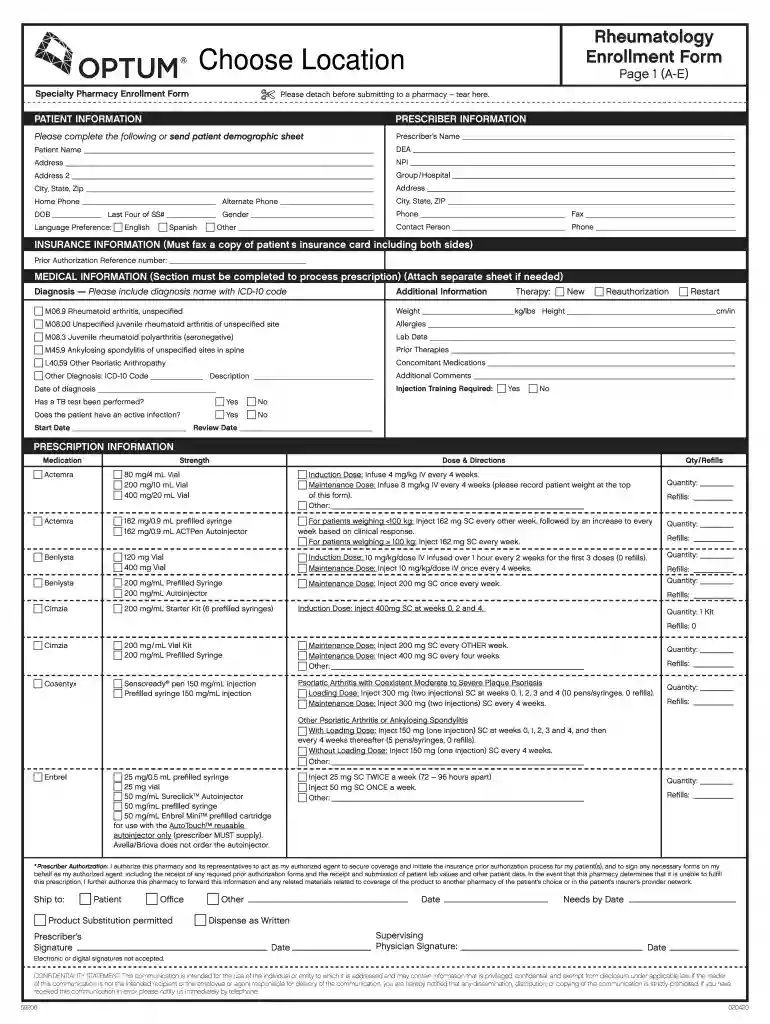
Rheumatology enrollment form 2026

Get Form
rinvoq complete enrollment form Preview on Page 1

Here's how it works

01. Edit your rinvoq complete enrollment form online
Type text, add images, blackout confidential details, add comments, highlights and more.

02. Sign it in a few clicks
Draw your signature, type it, upload its image, or use your mobile device as a signature pad.

03. Share your form with others
Send rheumatology enrollment form via email, link, or fax. You can also download it, export it or print it out.

How to use or fill out rheumatology enrollment form with our platform

Form edit decoration
9.5
Ease of Setup
DocHub User Ratings on G2
9.0
Ease of Use
DocHub User Ratings on G2
  1. Click ‘Get Form’ to open the rheumatology enrollment form in the editor.
  2. Begin by filling out the 'Patient Information' section. Enter the patient's name, date of birth, and contact details. Ensure accuracy as this information is crucial for processing.
  3. Next, complete the 'Prescriber Information' section. Input the prescriber's name, DEA number, and NPI. This helps in verifying the prescribing authority.
  4. In the 'Insurance Information' section, provide a copy of the patient’s insurance card. Include both sides to ensure all necessary details are captured.
  5. Fill out the 'Medical Information' section thoroughly. Include diagnosis names along with their ICD-10 codes and any relevant medical history that may affect treatment.
  6. Proceed to the 'Prescription Information' section where you will specify medication details including dosage and quantity required for each prescribed drug.
  7. Finally, review all entered information for accuracy before submitting. Use our platform's features to save your progress or share it directly with relevant parties.

Start using our platform today to streamline your document editing and form completion process for free!

See more rheumatology enrollment form versions

We've got more versions of the rheumatology enrollment form form. Select the right rheumatology enrollment form version from the list and start editing it straight away!
Versions Form popularity Fillable & printable
2020 4.8 Satisfied (47 Votes)
be ready to get more

Complete this form in 5 minutes or less

Get form

Got questions?

We have answers to the most popular questions from our customers. If you can't find an answer to your question, please contact us.
Contact us
To enroll in the Taltz Together program, simply fax your completed enrollment form to 1-844-344-8108.
Requirements You must have completed Basic Specialist Training in the relevant specialty (or an equivalent programme) by the start date for HST. You must have achieved a relevant postgraduate qualification such as MRCPI in General Medicine, General Paediatrics or Obstetrics and Gynaecology.
To submit to Lilly Support Services, please fax the completed enrollment form to 1-844-344-8108 or upload online at patientsupportnow.org with code 8443448108.
FAX COMPLETED FORM TO: 1-877-329-8484. QUESTIONS? CALL 1-800-VIVITROL (1-800-848-4876), 9AM8PM (EST).
The number for your doctor to fax a prescription to Accredo is 888-302-1028.

Security and compliance

At DocHub, your data security is our priority. We follow HIPAA, SOC2, GDPR, and other standards, so you can work on your documents with confidence.

Learn more
ccpa2
pci-dss
gdpr-compliance
hipaa
soc-compliance
be ready to get more

Complete this form in 5 minutes or less

Get form

People also ask

To cancel your participation in the program, please contact us at 1-844-TALTZ-NOW (1-844-825-8966). Before Taltz Together can start helping you, Lilly may ask for some information about you and your health from your Health Care Entities (as defned below). This is known as your Protected Health Information, or PHI.

Related links