State of alaska bidders registration 2012 form-2026

Get Form
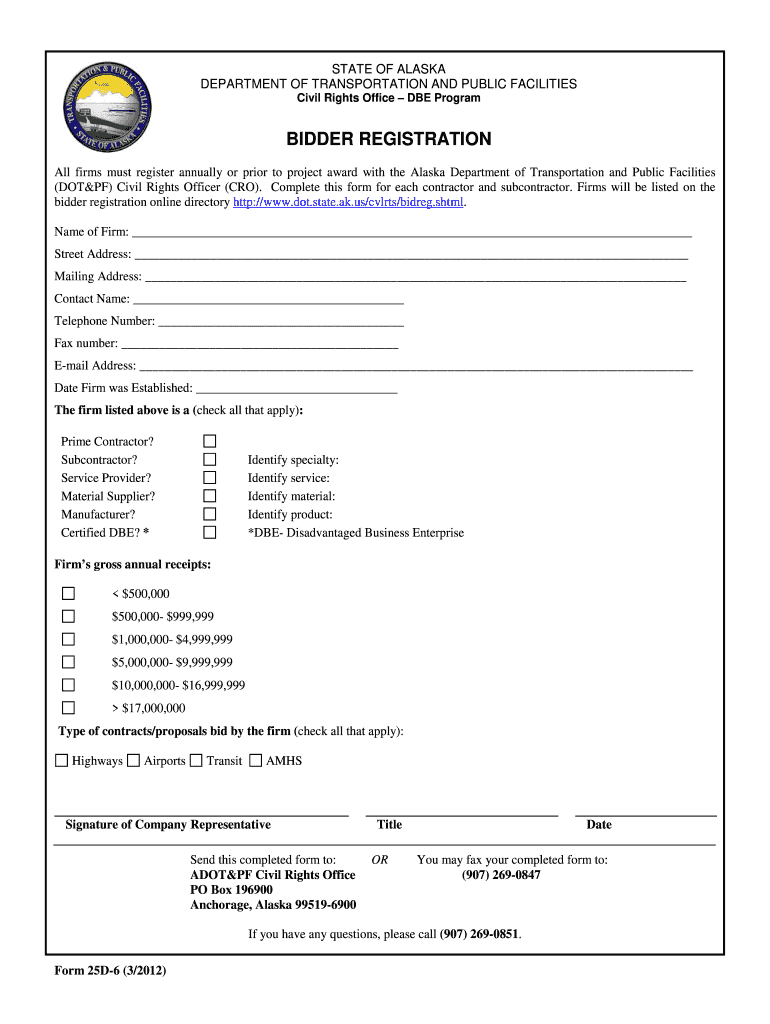
state of alaska bidders registration 2012 form Preview on Page 1

Here's how it works

01. Edit your form online
Type text, add images, blackout confidential details, add comments, highlights and more.
02. Sign it in a few clicks
Draw your signature, type it, upload its image, or use your mobile device as a signature pad.
03. Share your form with others
Send it via email, link, or fax. You can also download it, export it or print it out.

How to use or fill out the State of Alaska Bidders Registration 2012 Form

Form edit decoration
9.5
Ease of Setup
DocHub User Ratings on G2
9.0
Ease of Use
DocHub User Ratings on G2
  1. Click ‘Get Form’ to open it in the editor.
  2. Begin by entering the 'Name of Firm' in the designated field. Ensure accuracy as this will be used for official records.
  3. Fill in both the 'Street Address' and 'Mailing Address'. This information is crucial for correspondence.
  4. Provide a 'Contact Name', along with their 'Telephone Number', 'Fax Number', and 'E-mail Address' for communication purposes.
  5. Indicate the 'Date Firm was Established' to provide context about your business's experience.
  6. Check all applicable boxes under the firm type: Prime Contractor, Subcontractor, Service Provider, Material Supplier, Manufacturer, and Certified DBE.
  7. Identify your specialty, service, material, and product in the respective fields to clarify your business offerings.
  8. Select your firm's gross annual receipts from the provided options to categorize your business size.
  9. Check all types of contracts or proposals that your firm bids on: Highways, Airports, Transit, AMHS.
  10. Finally, ensure a representative signs and dates the form before submission. Send it to ADOT&PF Civil Rights Office via mail or fax as indicated.

Start filling out your State of Alaska Bidders Registration form today using our platform for free!

See more state of alaska bidders registration 2012 form versions

We've got more versions of the state of alaska bidders registration 2012 form form. Select the right state of alaska bidders registration 2012 form version from the list and start editing it straight away!
Versions Form popularity Fillable & printable
2016 4.8 Satisfied (48 Votes)
2014 4.4 Satisfied (220 Votes)
2012 4.4 Satisfied (269 Votes)
be ready to get more

Complete this form in 5 minutes or less

Get form

Got questions?

We have answers to the most popular questions from our customers. If you can't find an answer to your question, please contact us.
Contact us

You need to use only trustworthy software solutions with strong data protection compliance to approve your documents electronically. DocHub is just the type of service you need! It stores data on Amazon Web Servers and complies with all essential security criteria and eSignature regulations, so it’s a trusted way to eSign your state of alaska bidders registration 2012 form or other forms with this tool.

You can find the latest and most relevant version of the state of alaska bidders registration 2012 form in our DocHub forms collection. Search it by categories or use the search field to locate the exact template that fits your situation. You may open this form for editing after you find it.

The Alaska Bidder, Veteran, and Offeror preferences are the three most common preferences involved in the State of Alaska procurement process. ALASKA BIDDER PREFERENCE (AS 36.30.321 (a)) A contract award is made to the lowest responsive and responsible bidder after applying the 5% bidder preference.
Bid Preference means a percentage by which a Projects Bid will be reduced solely for Bid evaluation purposes. For example, using a 10% Bid preference, a Bid for 5 cents/kWh would be evaluated as if it were 4.5 cents/kWh (5 cents x 90%).
Permits authorizing the use of the Made in Alaska logo serve both producers and consumers by docHubing product authenticity. To be eligible for a Made in Alaska permit, products must meet program criteria, including being at least 51 percent produced in the state.

Security and compliance

At DocHub, your data security is our priority. We follow HIPAA, SOC2, GDPR, and other standards, so you can work on your documents with confidence.

Learn more
ccpa2
pci-dss
gdpr-compliance
hipaa
soc-compliance

People also ask

An in-state (local) preference is an advantage given to bidders/proposers in response to a solicitation for products or services, granted based on pre-established criteria.

Related links