




Here's how it works



How to use or fill out application form pulilan with our platform

- Click ‘Get Form’ to open the application form pulilan in the editor.
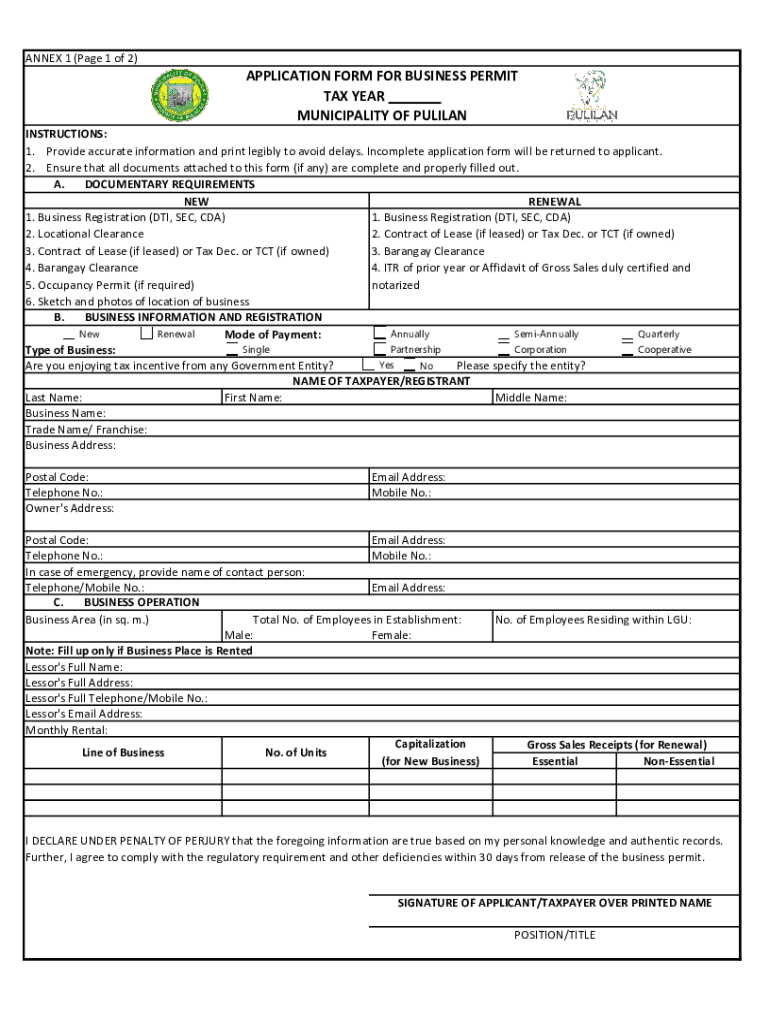
- Begin by filling out the 'Business Information and Registration' section. Enter your name, business name, address, and contact details accurately to avoid delays.
- In the 'Documentary Requirements' section, ensure you check off all necessary documents for new or renewal applications. Attach copies of your business registration, locational clearance, and other required documents.
- Complete the 'Business Operation' section by providing details such as business area, number of employees, and lessor information if applicable. This helps in assessing your application correctly.
- Finally, review all entered information for accuracy. Sign the declaration at the end of the form to confirm that all details are true and complete before submitting.
Start using our platform today to fill out your application form pulilan easily and for free!
It's free
See more application form pulilan versions
Got questions?
What is the best way to electronically sign my business permit pulilan?
A lot of software solutions are available on the market for document editing and signing. DocHub is one of the most in-demand online solutions that comply with all security and compliance standards and ensures your eSigned documentation is legally enforceable. All you need to try it out is to register an account, upload your business permit pulilan, fill out the required information, and click Sign. Create your electronic signature by typing, drawing it, uploading its picture to your document, or scanning a unique QR code.
How do you create an e-signature for the permit pulilan on iOS?
Apart from a comprehensive toolset for editing PDFs on mobile phones, DocHub allows you to sign your permit pulilan along the way. Open our editor in your browser, make modifications using DocHub’s toolset, and complete your editing by eSigning the completed form.
What is the old name of Pulilan Bulacan?
What is the crime rate in Pulilan Bulacan?
In what region is Bulacan belong?
Security and compliance
At DocHub, your data security is our priority. We follow HIPAA, SOC2, GDPR, and other standards, so you can work on your documents with confidence.
Learn more




