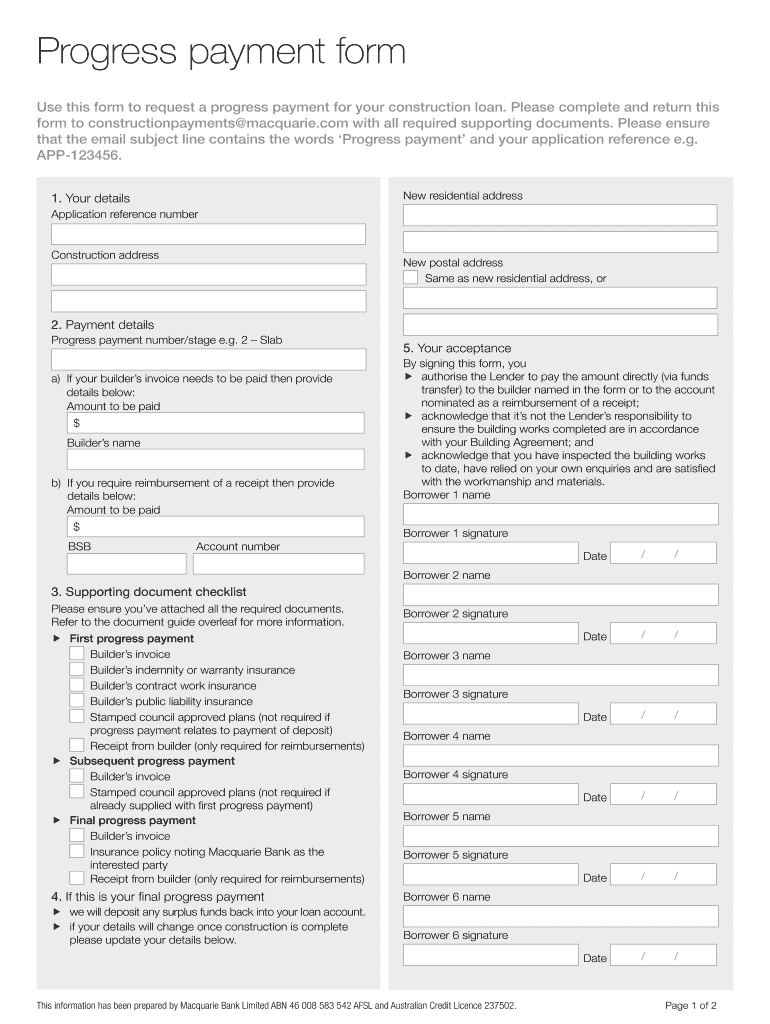
57574 MAC PROGRESS PAYMENT FORM 57574 MAC PROGRESS PAYMENT FORM 2026

Get Form
57574 MAC PROGRESS PAYMENT FORM 57574 MAC PROGRESS PAYMENT FORM Preview on Page 1

Here's how it works

01. Edit your form online
Type text, add images, blackout confidential details, add comments, highlights and more.
02. Sign it in a few clicks
Draw your signature, type it, upload its image, or use your mobile device as a signature pad.
03. Share your form with others
Send it via email, link, or fax. You can also download it, export it or print it out.

How to use or fill out 57574 MAC PROGRESS PAYMENT FORM 57574 MAC PROGRESS PAYMENT FORM

Form edit decoration
9.5
Ease of Setup
DocHub User Ratings on G2
9.0
Ease of Use
DocHub User Ratings on G2
  1. Click ‘Get Form’ to open it in the editor.
  2. Begin by entering your details in the 'Your details' section. Fill in your application reference number, construction address, and new postal address if different from your residential address.
  3. In the 'Payment details' section, specify the progress payment number/stage. If you have a builder’s invoice, provide the amount to be paid and the builder’s name. For reimbursements, include the amount and BSB.
  4. Sign and date the form in the 'Your acceptance' section. Ensure that all borrowers sign where indicated.
  5. Review the 'Supporting document checklist' to ensure all required documents are attached before submission.

Start using our platform today to complete your 57574 MAC PROGRESS PAYMENT FORM for free!

See more 57574 MAC PROGRESS PAYMENT FORM 57574 MAC PROGRESS PAYMENT FORM versions

We've got more versions of the 57574 MAC PROGRESS PAYMENT FORM 57574 MAC PROGRESS PAYMENT FORM form. Select the right 57574 MAC PROGRESS PAYMENT FORM 57574 MAC PROGRESS PAYMENT FORM version from the list and start editing it straight away!
Versions Form popularity Fillable & printable
2019 4.8 Satisfied (47 Votes)
be ready to get more

Complete this form in 5 minutes or less

Get form

Got questions?

We have answers to the most popular questions from our customers. If you can't find an answer to your question, please contact us.
Contact us

Sure, you’ll find many different applications for this on the web. Nonetheless, if you need to eSign your 57574 MAC PROGRESS PAYMENT FORM 57574 MAC PROGRESS PAYMENT FORM without installing extra software, DocHub is the optimum choice you can make. This powerful editor works on mobile devices just as on desktops. Open our editor in any internet browser, register or log in to your account, and start managing your paperwork.

You can complete and eSign your 57574 MAC PROGRESS PAYMENT FORM 57574 MAC PROGRESS PAYMENT FORM online, even on a tight deadline. All you need to access high quality editing tools on any device is a DocHub account, which you can register in a few moments. After you sign up, upload your file or find what you are looking for in our catalog, complete it using the editing tools you want, and place your electronic signature on it at the end.

Contractors or subcontractors can request a progress payment using a payment application, which should be defined in the contract requirements. A payment application is a type of construction document that prime contractors and first-tier subcontractors use to request payment from the hiring party.
20% of contract value progress payment. The standard progress payment set out in the Domestic Building Contracts Act is 15%, the builder has added and additional 5% which for an average home could be $15k-$30 more at the early stages of construction.
Progress Payment is a payment method commonly used in the construction industry, where the contractor is paid at intervals as work progresses rather than receiving a single lump-sum payment upon completion.

Security and compliance

At DocHub, your data security is our priority. We follow HIPAA, SOC2, GDPR, and other standards, so you can work on your documents with confidence.

Learn more
ccpa2
pci-dss
gdpr-compliance
hipaa
soc-compliance