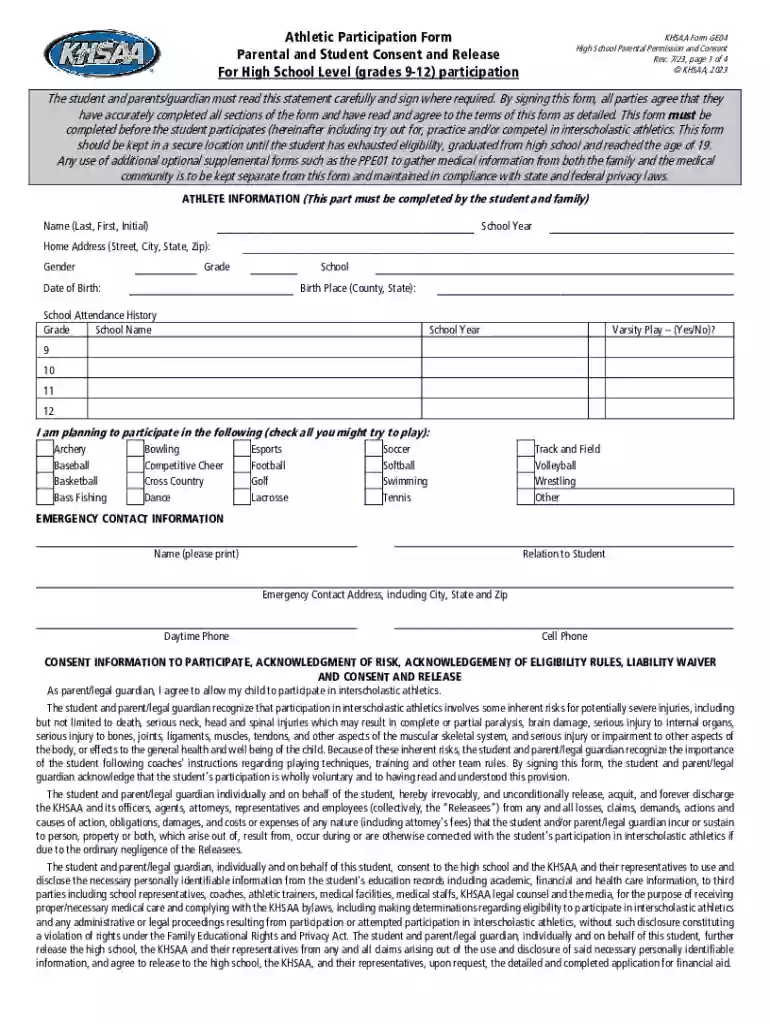
KHSAA Form GE04 High School Parental Permission and 2026

Get Form
KHSAA Form GE04 High School Parental Permission and Preview on Page 1

Here's how it works

01. Edit your form online
Type text, add images, blackout confidential details, add comments, highlights and more.

02. Sign it in a few clicks
Draw your signature, type it, upload its image, or use your mobile device as a signature pad.

03. Share your form with others
Send it via email, link, or fax. You can also download it, export it or print it out.

How to use or fill out KHSAA Form GE04 High School Parental Permission and with our platform

Form edit decoration
9.5
Ease of Setup
DocHub User Ratings on G2
9.0
Ease of Use
DocHub User Ratings on G2
  1. Click ‘Get Form’ to open it in the editor.
  2. Begin by filling out the 'Athlete Information' section. Enter the student's name, school year, home address, gender, grade, school, date of birth, and place of birth.
  3. Complete the 'School Attendance History' by listing previous schools attended during grades 9-12 and indicate if the student participated in varsity play.
  4. In the 'Emergency Contact Information' section, provide details for a contact person including their relationship to the student and phone numbers.
  5. Review and sign the 'Consent Information' section. Ensure both parent/legal guardian and student understand the risks involved in athletics before signing.
  6. Fill out the 'Required Insurance Information' with details about your insurance carrier and policy number.
  7. Finally, ensure all signatures are obtained from both student and parent/guardian before submitting the form.

Start using our platform today to easily complete your KHSAA Form GE04 for free!

See more KHSAA Form GE04 High School Parental Permission and versions

We've got more versions of the KHSAA Form GE04 High School Parental Permission and form. Select the right KHSAA Form GE04 High School Parental Permission and version from the list and start editing it straight away!
Versions Form popularity Fillable & printable
2023 4.6 Satisfied (49 Votes)
2013 4 Satisfied (40 Votes)
2012 4.8 Satisfied (80 Votes)
be ready to get more

Complete this form in 5 minutes or less

Get form

Got questions?

We have answers to the most popular questions from our customers. If you can't find an answer to your question, please contact us.
Contact us

Most eSignature services require users to have a paid subscription. With DocHub, there are two ways for you to create an electronic signature to your KHSAA Form GE04 High School Parental Permission and without being charged:

  • You can do it during a 7-day trial period;
  • You can subscribe to a free plan.

The second option, though, has restrictions on the number of signatures, sign requests, emails, and documents for adjusting available per month. You can check for full information here.

It is a no-brainer on a computer or via a mobile phone to fill out a KHSAA Form GE04 High School Parental Permission and with DocHub. All you need to do is open any installed web browser on your smartphone and go to the DocHub site. Once authenticated, add your document and open it in editing mode. Use our toolbar to make your edits and save changes. Optionally, keep your file in your files or send it to a recipient immediately.

Security and compliance

At DocHub, your data security is our priority. We follow HIPAA, SOC2, GDPR, and other standards, so you can work on your documents with confidence.

Learn more
ccpa2
pci-dss
gdpr-compliance
hipaa
soc-compliance
be ready to get more

Complete this form in 5 minutes or less

Get form