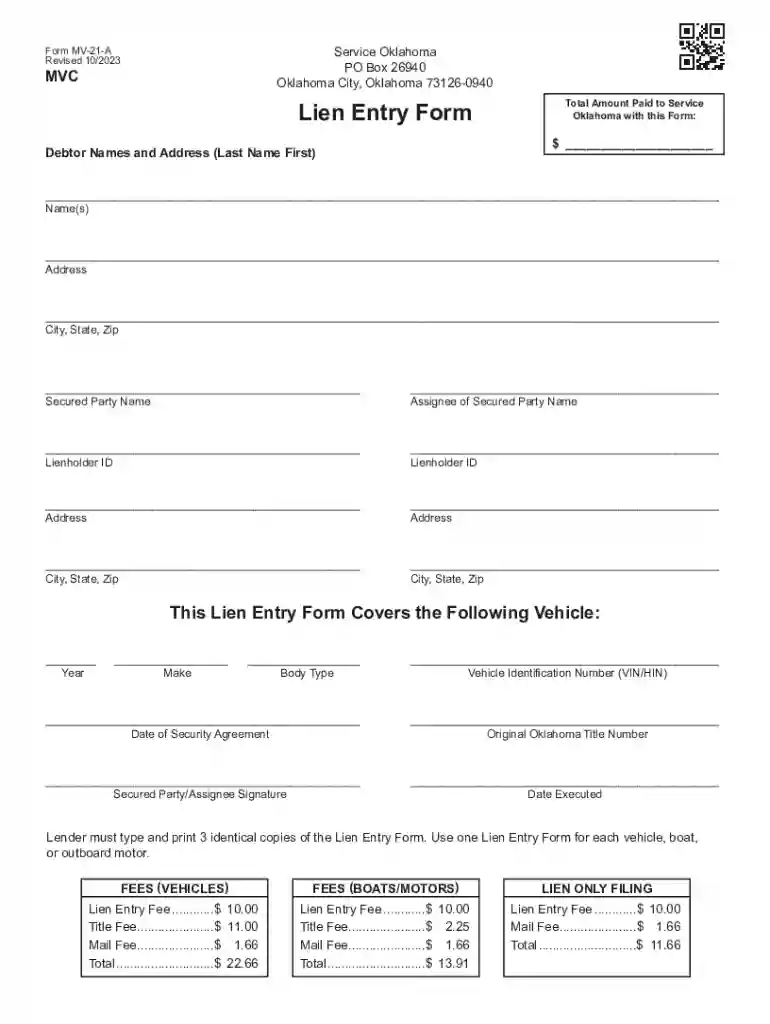
Form MV-21-A Lien Entry Form 2026

Get Form
vehicle pdf Preview on Page 1

Here's how it works

01. Edit your vehicle pdf online
Type text, add images, blackout confidential details, add comments, highlights and more.

02. Sign it in a few clicks
Draw your signature, type it, upload its image, or use your mobile device as a signature pad.

03. Share your form with others
Send oklahoma form mv 21 a via email, link, or fax. You can also download it, export it or print it out.

How to use or fill out Form MV-21-A Lien Entry Form with DocHub

Form edit decoration
9.5
Ease of Setup
DocHub User Ratings on G2
9.0
Ease of Use
DocHub User Ratings on G2
  1. Click ‘Get Form’ to open the MV-21-A Lien Entry Form in our platform.
  2. Begin by entering the total amount paid to Service Oklahoma at the top of the form. This ensures accurate processing of your lien entry.
  3. In the 'Debtor Names and Address' section, fill in the last name first, followed by the first name, address, city, state, and zip code. Ensure all information is correct for proper identification.
  4. Next, provide details for the secured party and assignee. Fill in their names and addresses accurately to avoid any issues with lien enforcement.
  5. Complete the vehicle information section by entering the year, make, body type, VIN/HIN, date of security agreement, and original Oklahoma title number.
  6. Finally, ensure that both the secured party/assignee signature and date executed are filled out before submitting your form. Remember to print three identical copies as required.

Start using our editor today for free to streamline your document completion process!

See more Form MV-21-A Lien Entry Form versions

We've got more versions of the Form MV-21-A Lien Entry Form form. Select the right Form MV-21-A Lien Entry Form version from the list and start editing it straight away!
Versions Form popularity Fillable & printable
2023 4.5 Satisfied (22 Votes)
2022 4.8 Satisfied (25 Votes)
2019 4.8 Satisfied (87 Votes)
2016 4.4 Satisfied (270 Votes)
2014 4.4 Satisfied (429 Votes)
2011 4 Satisfied (54 Votes)
2007 4.9 Satisfied (32 Votes)
2004 4.3 Satisfied (52 Votes)
be ready to get more

Complete this form in 5 minutes or less

Get form

Got questions?

We have answers to the most popular questions from our customers. If you can't find an answer to your question, please contact us.
Contact us
Once youve paid off your car loan in full, the lender also called the lienholder should contact your local Department of Motor Vehicles (DMV) to release the lien. Once the lien is released, they relinquish their right to repossess your car. Your obligation to them is over and the car is officially lien free.
A lien release removes the lien claim once the loan is paid off in full. When you pay off your loan and fulfill all other aspects of your agreement, your lender will release the lien and sign over the title to you.
Verify release: Once the lienholder has been paid off, they should contact the DMV to let them know the vehicles title needs to be updated. The title is then transferred to you or your buyer, depending on the specifics of your sale.
If a lien is still active, no action is required. The lienholder will continue to hold the paper or electronic title until the lien is satisfied. If a lien has been paid off but a paper title has not been issued, the vehicle owner may request an electronic title release through Service Oklahoma.
Attaching a judgment lien to Oklahoma real estate is simple. File a Statement of Judgment (AOC Form 27a) with the county clerk and pay a nominal filing fee. Your signature must be docHubd, so be sure to sign it in front of a notary.

Security and compliance

At DocHub, your data security is our priority. We follow HIPAA, SOC2, GDPR, and other standards, so you can work on your documents with confidence.

Learn more
ccpa2
pci-dss
gdpr-compliance
hipaa
soc-compliance
be ready to get more

Complete this form in 5 minutes or less

Get form