English-Spanish GlossarySSA - Social Security Administration Preview on Page 1

English-Spanish GlossarySSA - Social Security Administration 2026

Here's how it works

  • 01. Edit your form online

    Type text, add images, blackout confidential details, add comments, highlights and more.

  • 02. Sign it in a few clicks

    Draw your signature, type it, upload its image, or use your mobile device as a signature pad.

  • 03. Share your form with others

    Send it via email, link, or fax. You can also download it, export it or print it out.

How to use or fill out English-Spanish GlossarySSA - Social Security Administration with our platform

Form edit decoration
9.5
Ease of Setup
DocHub User Ratings on G2
9.0
Ease of Use
DocHub User Ratings on G2
  1. Click 'Get Form' to open the English-Spanish GlossarySSA in the editor.
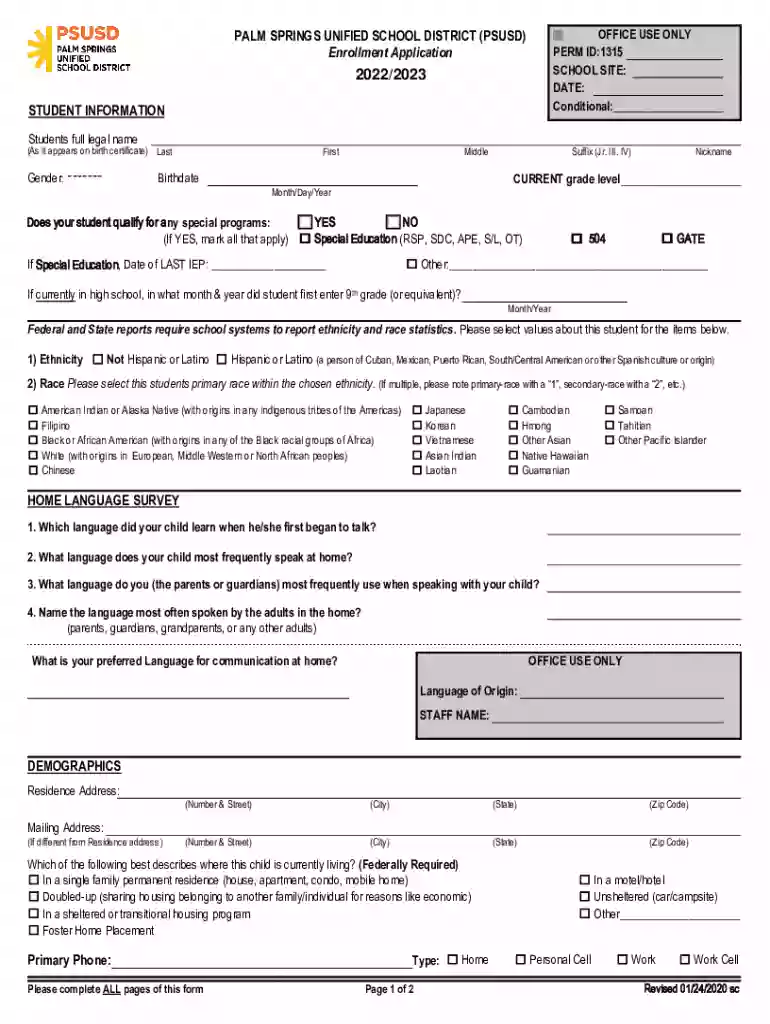
  2. Begin by filling out the 'Student Information' section. Enter the student's full legal name as it appears on their birth certificate, including last name, first name, middle name, and any suffixes.
  3. Indicate the current grade level and gender of the student. Provide the birthdate in the specified format (Month/Day/Year).
  4. Inquire about special programs eligibility by checking 'Yes' or 'No'. If applicable, mark all relevant special education programs.
  5. Complete the 'Demographics' section with residence and mailing addresses. Ensure all information is accurate for effective communication.
  6. Fill out parent/guardian information, including names, relationships, contact numbers, and preferred languages for communication.
  7. Review all sections for completeness before submitting. Use our platform's features to save your progress or print a copy if needed.

Start using our platform today to easily fill out your English-Spanish GlossarySSA form for free!

See more English-Spanish GlossarySSA - Social Security Administration versions

We've got more versions of the English-Spanish GlossarySSA - Social Security Administration form. Select the right English-Spanish GlossarySSA - Social Security Administration version from the list and start editing it straight away!

VersionsForm popularityFillable & printable
20204.8 Satisfied (56 Votes)
20174 Satisfied (28 Votes)

be ready to get more

Complete this form in 5 minutes or less

Got questions?

We have answers to the most popular questions from our customers. If you can't find an answer to your question, please contact us.

Sure, and it’s really easy! DocHub is an online PDF editor with advanced document processing capabilities that allow you quickly edit your documents, complete empty fields and add new ones for other people to fill out, and create eSignatures in several ways. Upload your English-Spanish GlossarySSA - Social Security Administration, provide information as requested, and select how you want to eSign your document - by typing your name, drawing your signature, uploading its picture, or using a QR code.

You can easily fill out, modify, and even eSign your English-Spanish GlossarySSA - Social Security Administration using DocHub. Create a new profile and start your free trial. After that, you can upload the file with the form and simply make all the necessary edits. No need to print on paper or use a third-party application to sign it, as you can put your electronic signature on your document quicker through DocHub.

Social Security provides financial protection for our nations people, supporting Americans throughout all of lifes journeys. We administer retirement, disability, survivor, and family benefits, and enroll individuals in Medicare.
Call our toll-free number, 1-800-772-1213. If you need service in Spanish, press 7 and wait for a Spanish-speaking representative to help you. For all other languages, stay on the line and remain silent during our English voice automation prompts until a representative answers.
Interpreters mediate languages orally while translators work with written material. When it comes to language skills, translators need to have solid reading comprehension, transfer, and target language production skills.

Security and compliance

At DocHub, your data security is our priority. We follow HIPAA, SOC2, GDPR, and other standards, so you can work on your documents with confidence.

People also ask

Note: If you receive your Statement in English and would like to receive it in Spanish, or vice versa, call Social Security at 1-800-772-1213 (TTY 1-800-325-0778).
No waiting period is required if you were previously entitled to disability benefits or to a period of disability under 404.320 any time within 5 years of the month you again became disabled.
Medicare does not reimburse providers for language access services. On the other hand, State Medicaid Programs and Childrens Health Insurance Programs can, as an optional benefit, access Federal matching funds to reimburse for language access services.
We provide free interpreter services to help you conduct your Social Security business. These interpreter services are available whether you talk to us by phone or in the Social Security office. Call our toll-free number, 1-800-772-1213.
It also produces the Primary Insurance Amount (PIA), Maximum Family Benefit (MFB), the actuarial reduction or increment factor (for early or delayed retirement), and the Monthly Benefit Amount (MBA). The Calculator can produce a benefit for any historical case from the first Social Security benefit paid (1940).

Related links

2023 Chime va deposit schedule 2023 show - teloparkis.wiki

15 hours ago English and Spanish. Call +1 800-772-1213 As you probably know, we typically receive direct deposits from the Social Security Administration

Learn more
English-Spanish glossary of Social Security Administration

English-Spanish glossary of Social Security Administration terminology [electronic resource]. ssa.gov/espanol/glossintro.html; current access via PURL. View

Learn more
English-Spanish Glossary

This English-Spanish Wordbank of Social Security Terminology contains everyday words and expressions as well as technical Social Security terminology.

Learn more
If you believe that this page should be taken down, please follow our DMCA take down process here