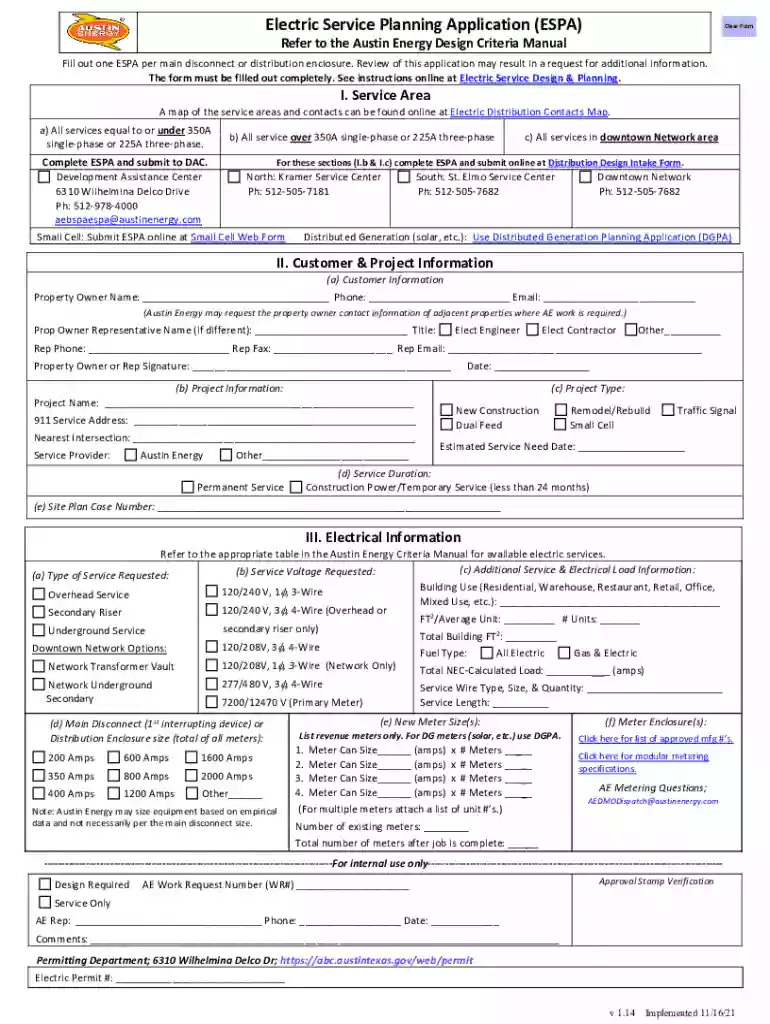
Electric Service Planning Application (ESPA)Electric Service Planning Application (ESPA)Austin Energ 2026

Get Form
espa electrical Preview on Page 1

Here's how it works

01. Edit your espa electrical online
Type text, add images, blackout confidential details, add comments, highlights and more.

02. Sign it in a few clicks
Draw your signature, type it, upload its image, or use your mobile device as a signature pad.

03. Share your form with others
Send espa application via email, link, or fax. You can also download it, export it or print it out.

How to use or fill out Electric Service Planning Application (ESPA) Austin Energy with our platform

Form edit decoration
9.5
Ease of Setup
DocHub User Ratings on G2
9.0
Ease of Use
DocHub User Ratings on G2
  1. Click ‘Get Form’ to open the Electric Service Planning Application (ESPA) in the editor.
  2. Begin with Section I: Service Area. Select the appropriate service area based on your project’s specifications, ensuring you understand the requirements for services over 350A or within downtown areas.
  3. Proceed to Section II: Customer & Project Information. Fill in all required fields, including property owner details and project specifics. Ensure accuracy as this information is crucial for processing.
  4. In Section III: Electrical Information, provide detailed electrical load information and service voltage requested. Refer to the Austin Energy Criteria Manual for guidance on available services.
  5. Review all sections for completeness before submitting your application online through the designated forms provided in the ESPA.

Start using our platform today to streamline your Electric Service Planning Application process for free!

See more Electric Service Planning Application (ESPA)Electric Service Planning Application (ESPA)Austin Energ versions

We've got more versions of the Electric Service Planning Application (ESPA)Electric Service Planning Application (ESPA)Austin Energ form. Select the right Electric Service Planning Application (ESPA)Electric Service Planning Application (ESPA)Austin Energ version from the list and start editing it straight away!
Versions Form popularity Fillable & printable
2021 4.8 Satisfied (170 Votes)
2018 4.4 Satisfied (37 Votes)
be ready to get more

Complete this form in 5 minutes or less

Get form

Got questions?

We have answers to the most popular questions from our customers. If you can't find an answer to your question, please contact us.
Contact us
Customer applies for service, and sets up billing information, by calling 512-494-9400. Austin Energy energizes the location.
Multiple City Utility Services All in One Bill It can include charges for drainage, electricity, solid waste, street service, wastewater, and water.
Austin Energy App. for Monitoring Electric Usage at your Home or Business.
(888) 340-6465 Austin Energy / Customer service
Start, Stop, or Transfer Service You can start, stop, or transfer utility service with the City of Austin on the phone, online, or in person: Call Customer Care at 512-494-9400 to speak with a representative. Register with Online Customer Care to request new service or changes to your existing service.

Security and compliance

At DocHub, your data security is our priority. We follow HIPAA, SOC2, GDPR, and other standards, so you can work on your documents with confidence.

Learn more
ccpa2
pci-dss
gdpr-compliance
hipaa
soc-compliance
be ready to get more

Complete this form in 5 minutes or less

Get form

People also ask

Electric Service Planning Application (ESPA) The Electrical Service Planning Application (ESPA) is needed to obtain your permit and is also used by the design team to determine your power requirements.

Related links