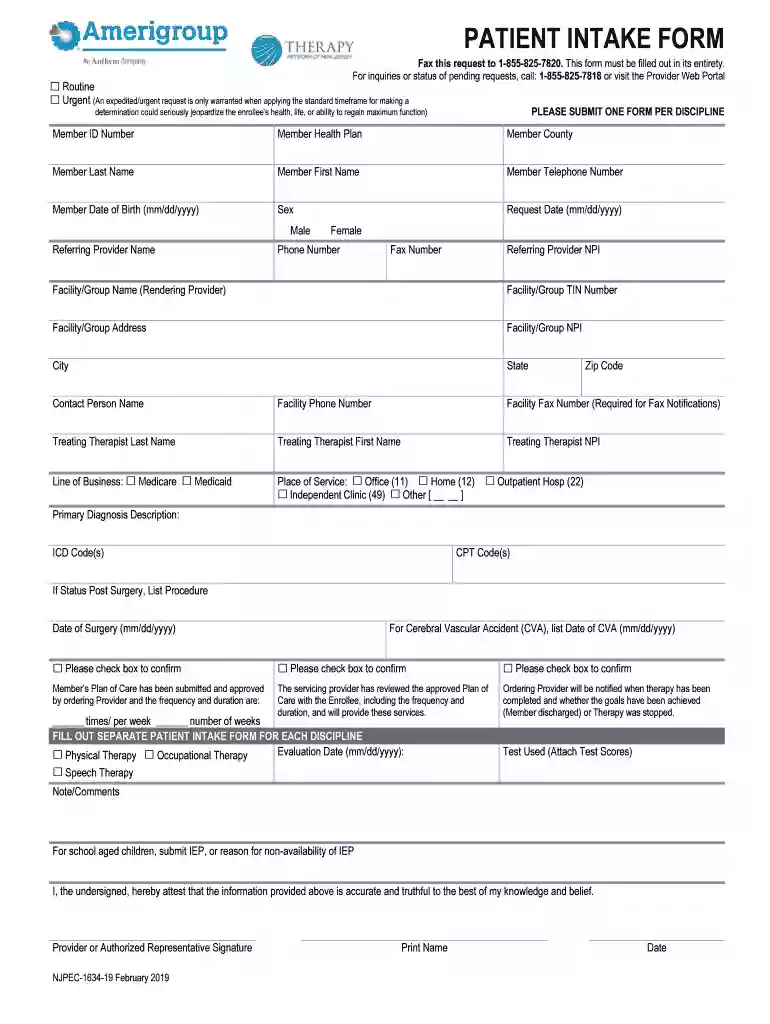
amerigroup patient form Preview on Page 1

Amerigroup patient form 2026

Here's how it works

  • 01. Edit your amerigroup patient form online

    Type text, add images, blackout confidential details, add comments, highlights and more.

  • 02. Sign it in a few clicks

    Draw your signature, type it, upload its image, or use your mobile device as a signature pad.

  • 03. Share your form with others

    Send amerigroup patient form via email, link, or fax. You can also download it, export it or print it out.

How to use or fill out amerigroup patient form with our platform

Form edit decoration
9.5
Ease of Setup
DocHub User Ratings on G2
9.0
Ease of Use
DocHub User Ratings on G2
  1. Click ‘Get Form’ to open the amerigroup patient form in the editor.
  2. Begin by selecting whether your request is Routine or Urgent. This is crucial for processing your request appropriately.
  3. Fill in the Member ID Number, Health Plan, County, Last Name, First Name, Telephone Number, Date of Birth, and Sex. Ensure all personal information is accurate.
  4. Enter the Request Date and details about the Referring Provider including their Name, Phone Number, Fax Number, and NPI.
  5. Provide information about the Facility/Group including Name, TIN Number, Address, NPI, City, State, Zip Code, and Contact Person's Name.
  6. Indicate the Line of Business (Medicare or Medicaid) and Place of Service (e.g., Office or Home).
  7. Complete the Primary Diagnosis Description along with ICD and CPT Codes. If applicable, include surgery details.
  8. Confirm that you have reviewed the Plan of Care by checking the appropriate boxes and filling in frequency and duration.
  9. Finally, sign as Provider or Authorized Representative at the bottom of the form to attest to its accuracy.

Start filling out your amerigroup patient form online for free today!

See more amerigroup patient form versions

We've got more versions of the amerigroup patient form form. Select the right amerigroup patient form version from the list and start editing it straight away!

VersionsForm popularityFillable & printable
20194.9 Satisfied (51 Votes)

be ready to get more

Complete this form in 5 minutes or less

Got questions?

We have answers to the most popular questions from our customers. If you can't find an answer to your question, please contact us.

Medicaid members may call 877-423-4746 or go online at .gateway.ga.gov to report changes. If I have a question about my Medicaid application who should I contact?
Manually send a patient form Open the patient profile. Under the Contact Details section, check first that the patient has a valid email address. Click the. In the Send Patient Form pop-up, click the Email or SMS tab for how you want to send the form. Configure the rest of the form as follows: Click Send.
877-396-0409 (TTY: 711) Now is a good time to receive the extra benefits you need by switching to an Amerigroup Medicare Advantage plan. Call 877-396-0409 (TTY: 711).
Currently, Amerigroup offers health care services through three government programs that target different segments of the countrys low-income population: Medicaid, the Childrens Health Insurance Program (CHIP) and Medicare.
Call Member Services at 1-800-600-4441 (TTY 711). *If you need telephonic oral translation services for a doctor visit, please call Member Services at least 24 hours before your visit.

Security and compliance

At DocHub, your data security is our priority. We follow HIPAA, SOC2, GDPR, and other standards, so you can work on your documents with confidence.

Related links

Amerigroup Georgia Funds $90000 in Grant Sponsorships

These kits contain the essentials needed to remotely assess and diagnose a patient if they cannot visit a clinician for in-person care.

Learn more
If you believe that this page should be taken down, please follow our DMCA take down process here