Type text, add images, blackout confidential details, add comments, highlights and more.
02. Sign it in a few clicks
Draw your signature, type it, upload its image, or use your mobile device as a signature pad.
03. Share your form with others
Send it via email, link, or fax. You can also download it, export it or print it out.
How to use or fill out Dstv Registration Form - Fill Out and Sign Printable PDF with DocHub
Ease of Setup
DocHub User Ratings on G2
Ease of Use
DocHub User Ratings on G2
Click ‘Get Form’ to open it in the editor.
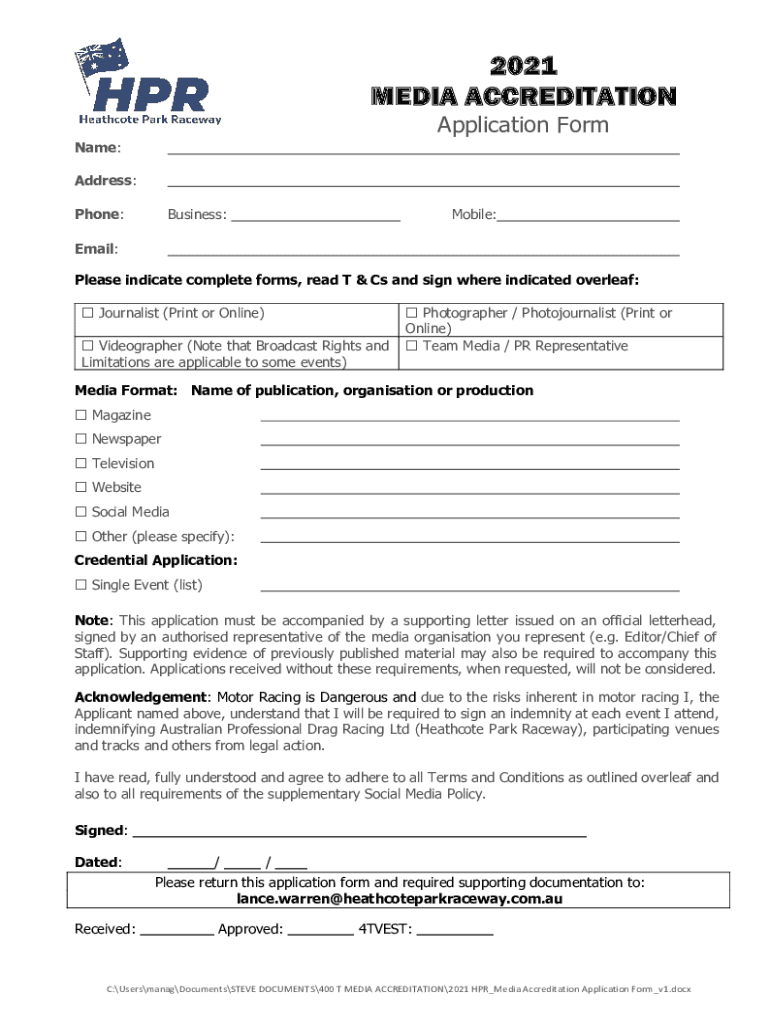
Begin by entering your personal information in the designated fields, including your name, address, phone number, and email. Ensure all details are accurate for effective communication.
Select your media role from the options provided (e.g., Journalist, Videographer). This helps categorize your application appropriately.
Indicate the media format you will be using by checking the relevant boxes. If applicable, specify any other formats not listed.
For credential applications, indicate if this is for a single event and provide a supporting letter on official letterhead as required.
Read through the Terms and Conditions carefully. You must sign and date where indicated to confirm your understanding and agreement.
Once completed, save your form and return it along with any required documentation to the specified email address.
Start filling out your Dstv Registration Form today using our platform for free!
Fill out Dstv Registration Form - Fill Out and Sign Printable PDF online It's free
See more Dstv Registration Form - Fill Out and Sign Printable PDF versions
We've got more versions of the Dstv Registration Form - Fill Out and Sign Printable PDF form. Select the right Dstv Registration Form - Fill Out and Sign Printable PDF version from the list and start editing it straight away!
Dstv registration form fill out and sign printable pdf freeDstv registration form fill out and sign printable pdf downloadDSTV activation numberDStv websiteHow to activate DSTV channelsDStv activation KenyaDStv paymentDStv WhatsApp number
Security and compliance
At DocHub, your data security is our priority. We follow HIPAA, SOC2, GDPR, and other standards, so you can work on your documents with confidence.
Registration (enrollment) is done online and begins each April for the following summer and fall semesters, and each November for the following spring semester.Read more
Cookie consent notice
This site uses cookies to enhance site navigation and personalize your experience.
By using this site you agree to our use of cookies as described in our Privacy Notice.
You can modify your selections by visiting our Cookie and Advertising Notice.