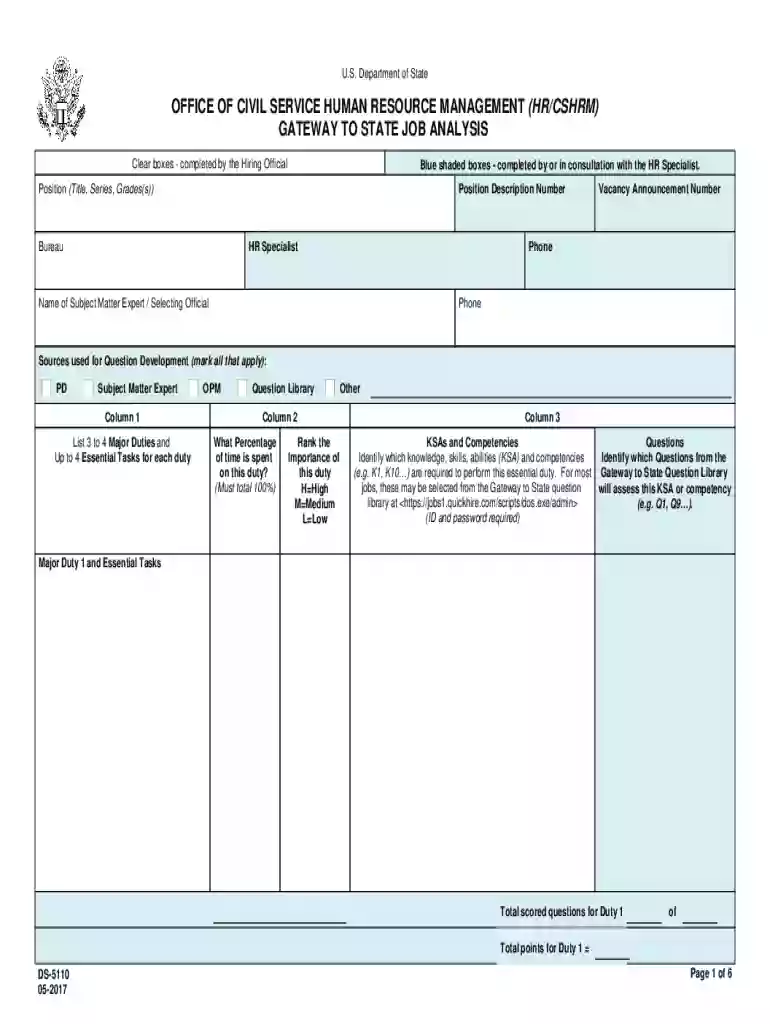
Eforms state Formsds5110OFFICE OF CIVIL SERVICE HUMAN RESOURCE MANAGEMENT (HR CSHRM 2026

Get Form
eforms state Formsds5110OFFICE OF CIVIL SERVICE HUMAN RESOURCE MANAGEMENT (HR CSHRM Preview on Page 1

Here's how it works

01. Edit your form online
Type text, add images, blackout confidential details, add comments, highlights and more.

02. Sign it in a few clicks
Draw your signature, type it, upload its image, or use your mobile device as a signature pad.

03. Share your form with others
Send it via email, link, or fax. You can also download it, export it or print it out.

How to use or fill out eforms state Formsds5110 OFFICE OF CIVIL SERVICE HUMAN RESOURCE MANAGEMENT (HR CSHRM)

Form edit decoration
9.5
Ease of Setup
DocHub User Ratings on G2
9.0
Ease of Use
DocHub User Ratings on G2
  1. Click ‘Get Form’ to open it in the editor.
  2. Begin by filling in the clear boxes, which are designated for completion by the Hiring Official. This includes entering the Position Title, Series, Grade(s), and other relevant details.
  3. Next, consult with the HR Specialist to complete the blue shaded boxes. This section requires input on the Vacancy Announcement Number and contact information for both the HR Specialist and Subject Matter Expert.
  4. In Column 1, list 3 to 4 Major Duties along with up to 4 Essential Tasks for each duty. Ensure that you provide a comprehensive overview of responsibilities.
  5. For each Major Duty, indicate the percentage of time spent on that duty in Column 2. Remember that these percentages must total 100% across all duties.
  6. In Column 3, identify which Knowledge, Skills, Abilities (KSA) and competencies are required for each duty. Reference questions from the Gateway to State Question Library as needed.
  7. Finally, review all entries for accuracy before saving your completed form. Utilize our platform’s features to ensure everything is correctly filled out.

Start using our platform today to streamline your form completion process for free!

See more eforms state Formsds5110OFFICE OF CIVIL SERVICE HUMAN RESOURCE MANAGEMENT (HR CSHRM versions

We've got more versions of the eforms state Formsds5110OFFICE OF CIVIL SERVICE HUMAN RESOURCE MANAGEMENT (HR CSHRM form. Select the right eforms state Formsds5110OFFICE OF CIVIL SERVICE HUMAN RESOURCE MANAGEMENT (HR CSHRM version from the list and start editing it straight away!
Versions Form popularity Fillable & printable
2017 4.8 Satisfied (158 Votes)
be ready to get more

Complete this form in 5 minutes or less

Get form

Got questions?

We have answers to the most popular questions from our customers. If you can't find an answer to your question, please contact us.
Contact us
What is an HR portal? An HR portal, short for a human resources portal, is an internal gateway designed to help your employees find critical organisational information. It can house a wide variety of data and resources, from documentation and employee data to absences, headcount and even birthdays across your company.
When you are invited to sign in to MyHR, you will be emailed a link that is valid for 10 days. This link works once, and from clicking on it you will be able to set up your password and successfully log in.
Employee portals allow you to store most of your employees personal and payment information in one place. This streamlines human resources and payroll employees basic tasks and gives them more time to focus on big-picture items.
The California Department of Human Resources (CalHR) is the California government agency responsible for human resource management of state employees, including issues related to salaries and benefits, job classifications, training and recruitment. It is part of the Government Operations Agency.
An HR portal, short for a human resources portal, is an internal gateway designed to help your employees find critical organisational information. It can house a wide variety of data and resources, from documentation and employee data to absences, headcount and even birthdays across your company.

Security and compliance

At DocHub, your data security is our priority. We follow HIPAA, SOC2, GDPR, and other standards, so you can work on your documents with confidence.

Learn more
ccpa2
pci-dss
gdpr-compliance
hipaa
soc-compliance
be ready to get more

Complete this form in 5 minutes or less

Get form