United States Department of State - Where to Apply for a 2026

Get Form
United States Department of State - Where to Apply for a Preview on Page 1

Here's how it works

01. Edit your form online
Type text, add images, blackout confidential details, add comments, highlights and more.

02. Sign it in a few clicks
Draw your signature, type it, upload its image, or use your mobile device as a signature pad.

03. Share your form with others
Send it via email, link, or fax. You can also download it, export it or print it out.

How to use or fill out United States Department of State - Where to Apply for a with our platform

Form edit decoration
9.5
Ease of Setup
DocHub User Ratings on G2
9.0
Ease of Use
DocHub User Ratings on G2
  1. Click ‘Get Form’ to open it in the editor.
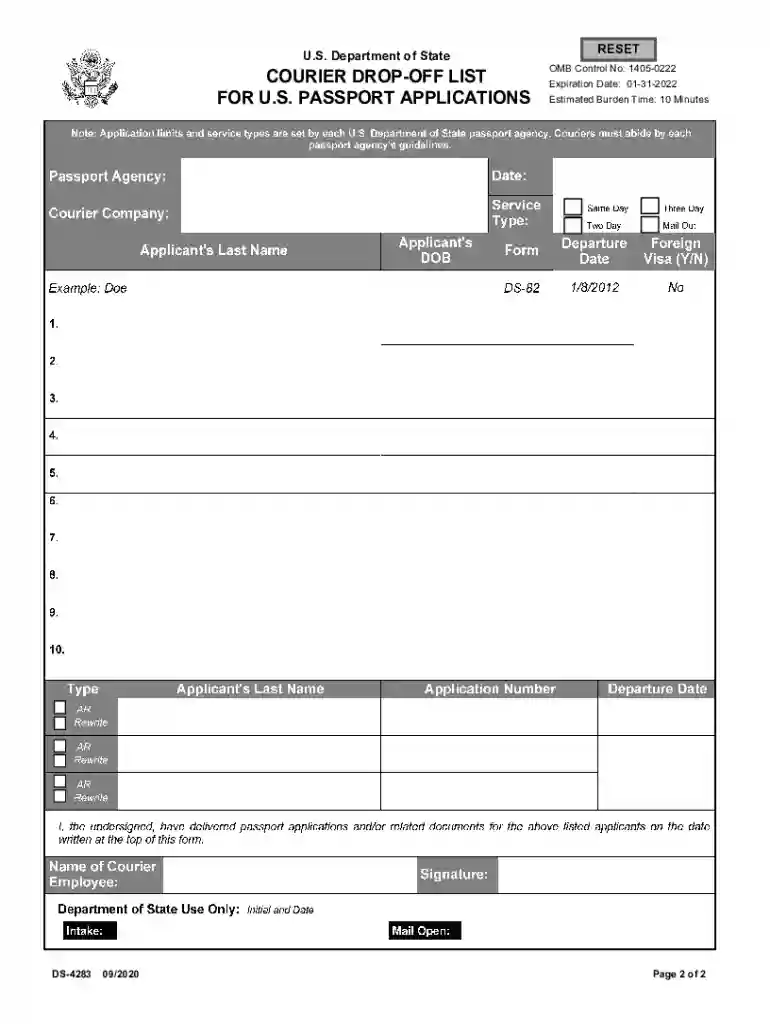
  2. Begin by filling in the 'Passport Agency' and 'Date' fields at the top of the form. Ensure that you enter accurate information as this will be crucial for tracking your application.
  3. Next, input your 'Courier Company' name and select the appropriate 'Service Type' from the options provided, such as Same Day, Two Day, or Three Day Mail Out.
  4. For each applicant, fill in their 'Last Name', 'DOB', and any relevant details like 'Application Number' and 'Departure Date'. If applicable, indicate whether a Foreign Visa is required.
  5. If you are submitting an applicant response or correction, check the corresponding box under the AR/Rewrite section for each applicant.
  6. Finally, have the courier employee sign and date the form at the bottom to confirm delivery of applications. Make sure to attach this completed form to each sealed group of applications before submission.

Start using our platform today for free to streamline your document editing and submission process!

See more United States Department of State - Where to Apply for a versions

We've got more versions of the United States Department of State - Where to Apply for a form. Select the right United States Department of State - Where to Apply for a version from the list and start editing it straight away!
Versions Form popularity Fillable & printable
2020 4.9 Satisfied (52 Votes)
be ready to get more

Complete this form in 5 minutes or less

Get form

Got questions?

We have answers to the most popular questions from our customers. If you can't find an answer to your question, please contact us.
Contact us

You need to use only reliable software solutions with strong data protection compliance to sign your paperwork electronically. DocHub is just the type of software you need! It stores data on Amazon Web Servers and complies with all essential security criteria and eSignature regulations, so it’s a trusted way to eSign your United States Department of State - Where to Apply for a or other documents using this tool.

As a comprehensive document modifying service, DocHub is available on mobile phones. Open DocHub in your choice of mobile browser and employ our intelligent mobile-friendly toolset to fill out your United States Department of State - Where to Apply for a.

Enclose expedited service fee(s) in the form of a personal check or money order. MAKE CHECKS PAYABLE TO U.S. DEPARTMENT OF STATE. The full name and date of birth of the applicant must be typed or printed on the front of the check. For information on fees, please visit travel.state.gov/passportfees.
NVC processing typically takes three to eight months, but timelines vary based on your visa type, country of application, and document accuracy. Your case will not begin processing at the NVC until USCIS approves your petition and transfers it to the NVC.
Adult (16 or Older): Renewal Eligible DocumentSubmit your FormPassport Application Fee Passport Book By Mail or Online $130 Passport Card By Mail or Online $30 Passport Book Card By Mail or Online $160