




Here's how it works

01. Edit your form online
Type text, add images, blackout confidential details, add comments, highlights and more.

02. Sign it in a few clicks
Draw your signature, type it, upload its image, or use your mobile device as a signature pad.

03. Share your form with others
Send it via email, link, or fax. You can also download it, export it or print it out.
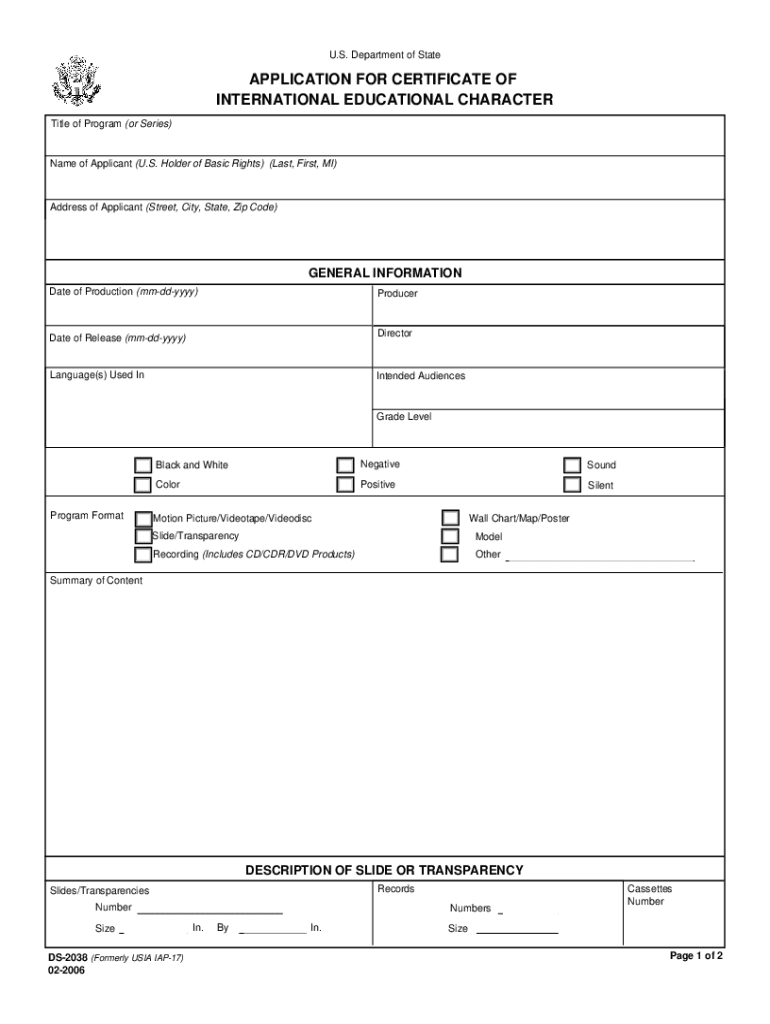
How to use or fill out the U.S. Department of Education Application for Certificate of International Educational Character

- Click ‘Get Form’ to open it in the editor.
- Begin by entering the Title of Program or Series at the top of the form. This identifies your submission.
- Fill in the Name of Applicant, including Last, First, and Middle Initial. Ensure accuracy as this represents the U.S. Holder of Basic Rights.
- Provide the Address of Applicant, including Street, City, State, and Zip Code for correspondence.
- In the GENERAL INFORMATION section, input the Date of Production and Date of Release in mm-dd-yyyy format.
- Complete details about Producer and Director to give context to your application.
- Specify Language(s) Used In and Intended Audiences to clarify your target demographic.
- Select Program Format options such as Black and White or Color based on your material's characteristics.
- For each description section (Slides/Transparencies, Motion Picture/Videotape), provide detailed information including dimensions and formats.
- Finally, complete the Statement of Ownership with your signature, date, title, email address, and telephone number before submitting.
Start using our platform today to streamline your document editing process for free!
Fill out ed categorykeywordTitle IU S Department of Education online
It's free
It's free
See more ed categorykeywordTitle IU S Department of Education versions
We've got more versions of the ed categorykeywordTitle IU S Department of Education form. Select the right ed categorykeywordTitle IU S Department of Education version from the list and start editing it straight away!
| Versions | Form popularity | Fillable & printable |
|---|---|---|
| 2006 | 4.8 Satisfied (137 Votes) |
Security and compliance
At DocHub, your data security is our priority. We follow HIPAA, SOC2, GDPR, and other standards, so you can work on your documents with confidence.
Learn more


