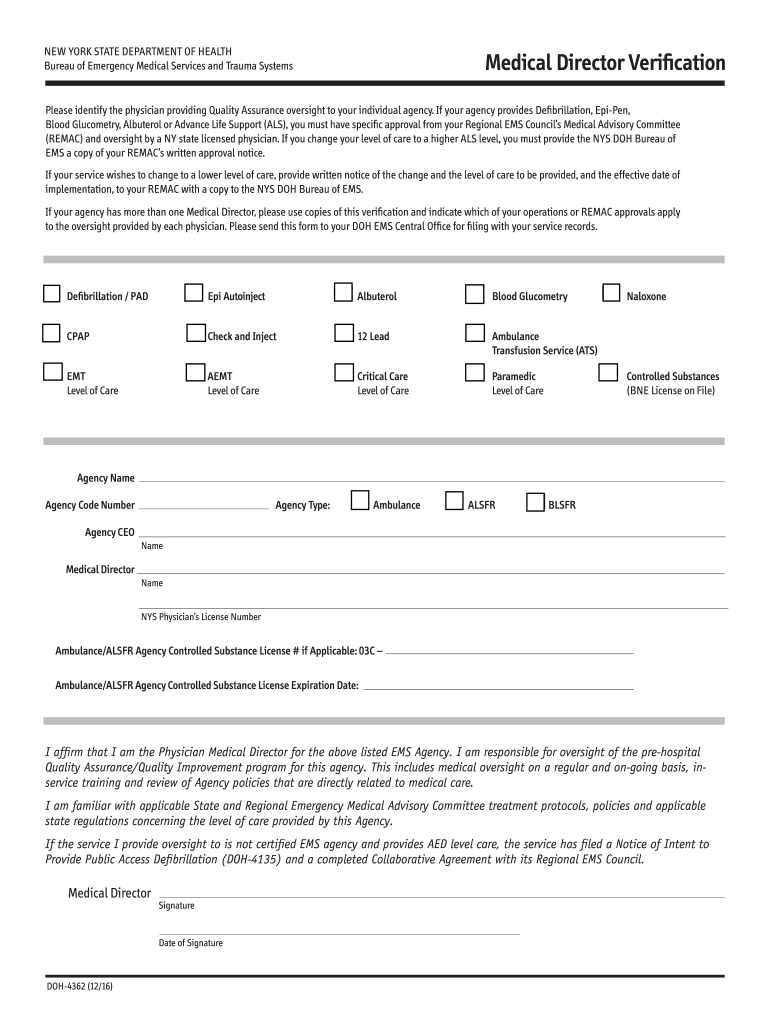
Doh 4362-2026

Get Form
doh 4362 Preview on Page 1

Here's how it works

01. Edit your doh 4362 online
Type text, add images, blackout confidential details, add comments, highlights and more.
02. Sign it in a few clicks
Draw your signature, type it, upload its image, or use your mobile device as a signature pad.
03. Share your form with others
Send director verification via email, link, or fax. You can also download it, export it or print it out.

How to use or fill out doh 4362 with our platform

Form edit decoration
9.5
Ease of Setup
DocHub User Ratings on G2
9.0
Ease of Use
DocHub User Ratings on G2
  1. Click ‘Get Form’ to open the doh 4362 in the editor.
  2. Begin by entering your Agency Name and Agency Code Number in the designated fields. This information is crucial for identifying your EMS agency.
  3. Next, indicate the Medical Director's name and their NYS Physician’s License Number. Ensure accuracy as this verifies the physician's credentials.
  4. In the section regarding services provided, check all applicable boxes such as Defibrillation, Epi-Pen, and others. This indicates the level of care your agency offers.
  5. Complete the signature section by having the Medical Director sign and date the form. This affirms their responsibility for oversight of quality assurance.
  6. Finally, review all entered information for accuracy before submitting it to your DOH EMS Central Office for filing.

Start using our platform today to fill out your doh 4362 form quickly and efficiently!

See more doh 4362 versions

We've got more versions of the doh 4362 form. Select the right doh 4362 version from the list and start editing it straight away!
Versions Form popularity Fillable & printable
2016 4.8 Satisfied (56 Votes)
2014 4.3 Satisfied (42 Votes)
be ready to get more

Complete this form in 5 minutes or less

Get form

Got questions?

We have answers to the most popular questions from our customers. If you can't find an answer to your question, please contact us.
Contact us

Signing documents on a mobile device is quick, straightforward, and doesn’t require software installation if you have an account with DocHub. Log in from any browser, complete your blank fields with your data, and click on Sign → Create your signature. You can draw your eSignature the same way you usually do on paper, add its image to your 4362 form, or type in your name and stylize its look. No matter what option you select, your documentation will be valid.

You may get and edit your doh 4362 online with the help of DocHub. Its straightforward yet feature-rich design allows you to begin productive work immediately after you register your account. Create your profile and add your document, then our user interface will guide you via our stress-free form completion experience.

Certified First Responders (CFRs) and Emergency Medical Technicians (EMTs) must train with an approved course provider. Providers are approved by the New York State Department of Health (NYSDOH). Once training is complete, a certificate is issued.
Their website includes a variety of resources, including information on how to find child care, emergency preparedness, and health insurance. Contact 311 or 212.639. 9675.

Security and compliance

At DocHub, your data security is our priority. We follow HIPAA, SOC2, GDPR, and other standards, so you can work on your documents with confidence.

Learn more
ccpa2
pci-dss
gdpr-compliance
hipaa
soc-compliance