Ga 241 2026

Get Form
cd 241 Preview on Page 1

Here's how it works

01. Edit your cd 241 online
Type text, add images, blackout confidential details, add comments, highlights and more.

02. Sign it in a few clicks
Draw your signature, type it, upload its image, or use your mobile device as a signature pad.

03. Share your form with others
Send georgia foreign llc form via email, link, or fax. You can also download it, export it or print it out.

How to use or fill out ga 241 with our platform

Form edit decoration
9.5
Ease of Setup
DocHub User Ratings on G2
9.0
Ease of Use
DocHub User Ratings on G2
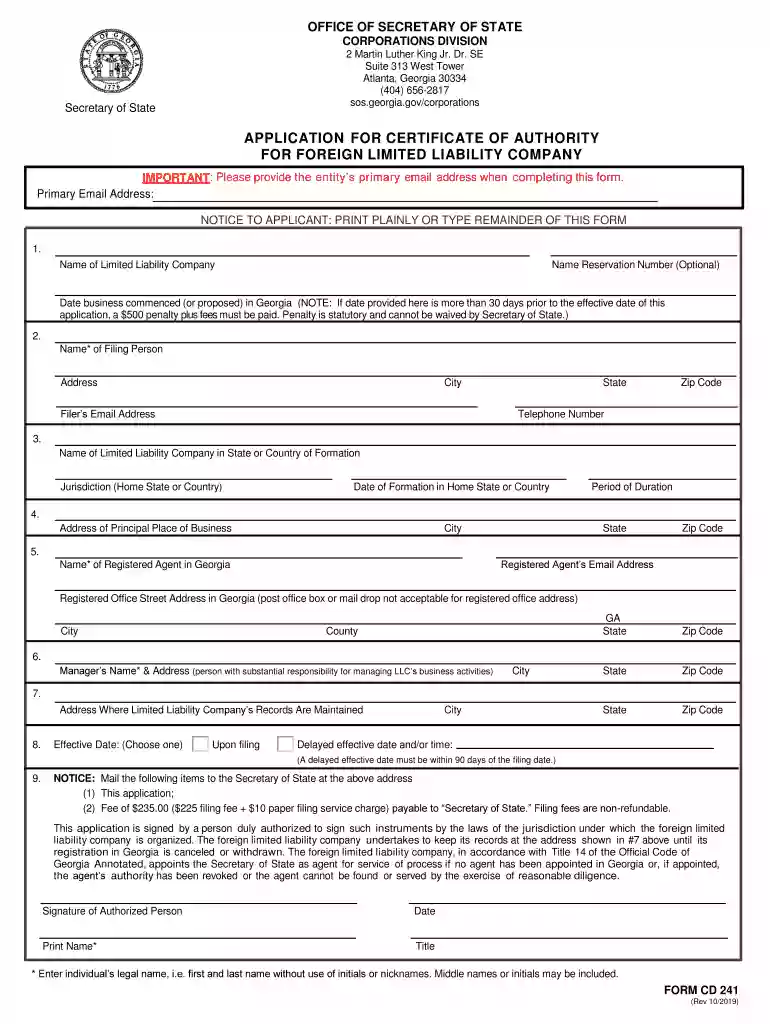
  1. Click ‘Get Form’ to open the ga 241 application in the editor.
  2. Begin by entering the Name of your Limited Liability Company in the designated field. If you have a Name Reservation Number, you can include it as well.
  3. Provide the Date your business commenced or is proposed to commence in Georgia. Be mindful that if this date is more than 30 days prior to your application’s effective date, additional fees will apply.
  4. Fill in the details of the Filing Person, including their Name, Address, Email, State, Zip Code, and Telephone Number.
  5. Next, specify the Name of your Limited Liability Company as it appears in its state or country of formation along with its Jurisdiction and Date of Formation.
  6. Complete the address fields for your Principal Place of Business and Registered Agent's information, ensuring all details are accurate.
  7. Indicate whether you want an effective date upon filing or a delayed effective date within 90 days. Make sure to sign and date the application at the end.

Start filling out your ga 241 form online for free today!

See more ga 241 versions

We've got more versions of the ga 241 form. Select the right ga 241 version from the list and start editing it straight away!
Versions Form popularity Fillable & printable
2019 4.9 Satisfied (47 Votes)
2016 4.4 Satisfied (51 Votes)
be ready to get more

Complete this form in 5 minutes or less

Get form

Got questions?

We have answers to the most popular questions from our customers. If you can't find an answer to your question, please contact us.
Contact us

Managing your documentation with DocHub this way is very simple once you have downloaded its extension for Google Chrome. Navigate to the Chrome Web Store and install DocHub - Sign PDF from Gmail to obtain it. Give our tool access to your Google account, and then open an email containing ga 241 as an attachment and point to the file with your cursor - the DocHub extension button will automatically show up there. Click on it to open your document in our editor. Make any necessary adjustments, fill out the blanks, and click Sign to create your legally-binding electronic signature.

You can find the latest and most relevant version of the ga 241 in our DocHub forms collection. Search it by categories or use the search field to find the exact template that fits your case. You may open this form for editing after you find it.

We dont see the fact that the monitor doesnt have built-in speakers as a disadvantage. Because to be honest, you can hardly use most of the speakers in the monitor anyway. These days, gamers either use real speakers or headsets for a decent sound. Now we come to the conclusion of the Cooler Master GA241 test.
Speakers We dont see the fact that the monitor doesnt have built-in speakers as a disadvantage. Because to be honest, you can hardly use most of the speakers in the monitor anyway.
A: This monitor model does not have speakers or a sound output jack.

Security and compliance

At DocHub, your data security is our priority. We follow HIPAA, SOC2, GDPR, and other standards, so you can work on your documents with confidence.

Learn more
ccpa2
pci-dss
gdpr-compliance
hipaa
soc-compliance
be ready to get more

Complete this form in 5 minutes or less

Get form

People also ask

Technical Specification Panel TypeFlat Series Resolution FHD 1920x1080 Frame Rate 100 Hz Contrast Ratio 4000:1 Viewing Angle (H/V) 178/17819 more rows

Related links