Type text, add images, blackout confidential details, add comments, highlights and more.

02. Sign it in a few clicks
Draw your signature, type it, upload its image, or use your mobile device as a signature pad.

03. Share your form with others
Send it via email, link, or fax. You can also download it, export it or print it out.

How to use or fill out Online Nurse Practitioner Furnishing Number Application ID Form Online Nurse Practitioner Furnishing with DocHub
Ease of Setup
DocHub User Ratings on G2
Ease of Use
DocHub User Ratings on G2
Click ‘Get Form’ to open it in the editor.
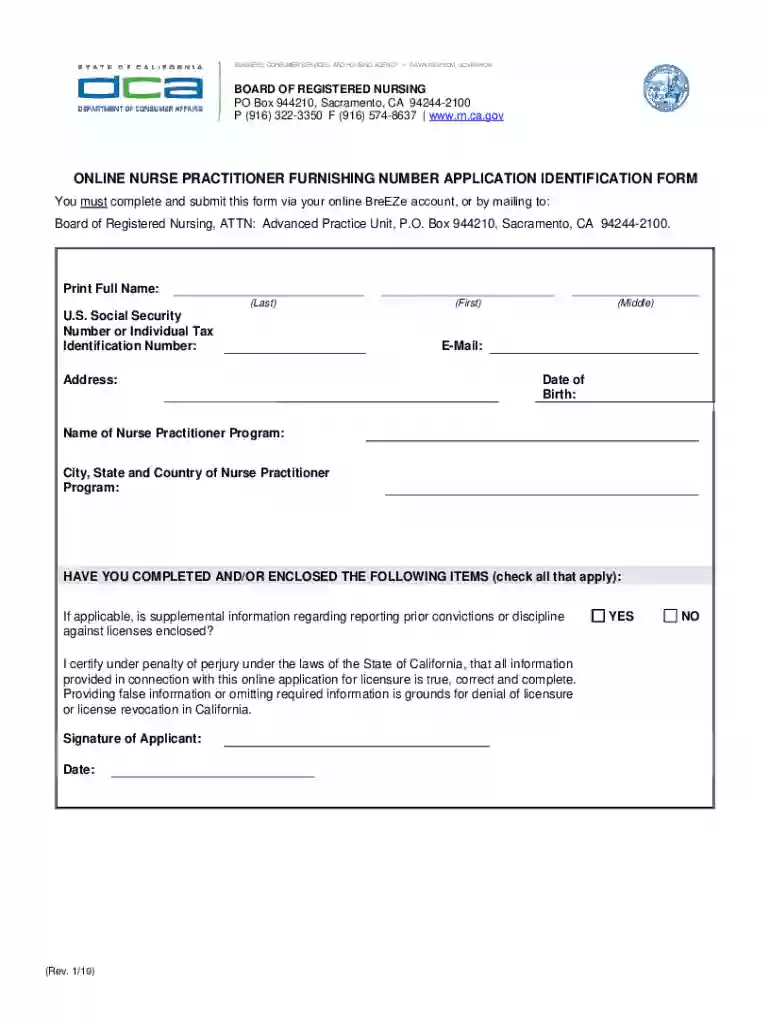
Begin by entering your full name in the designated fields: Last, First, and Middle. Ensure accuracy as this information is crucial for identification.
Input your U.S. Social Security Number or Individual Tax Identification Number in the appropriate section. This is necessary for processing your application.
Fill in your address, including city, state, and country of residence. This helps establish your location for correspondence.
Provide your email address and date of birth. Make sure these details are correct to avoid any delays in communication.
Indicate the name of your Nurse Practitioner Program along with its location. This information validates your educational background.
Check all applicable items regarding supplemental information about prior convictions or discipline against licenses. This ensures compliance with legal requirements.
Finally, certify that all provided information is true by signing and dating the form at the bottom before submission.
Start using our platform today to complete your application effortlessly and for free!
Fill out Online Nurse Practitioner Furnishing Number Application ID Form Online Nurse Practitioner Furnishing online It's free
See more Online Nurse Practitioner Furnishing Number Application ID Form Online Nurse Practitioner Furnishing versions
We've got more versions of the Online Nurse Practitioner Furnishing Number Application ID Form Online Nurse Practitioner Furnishing form. Select the right Online Nurse Practitioner Furnishing Number Application ID Form Online Nurse Practitioner Furnishing version from the list and start editing it straight away!
I am a nurse practitioner (NP): How do I apply for DEA number? Apply online at the U.S. Department of Justice website. Call the DEA Headquarters Registration Unit toll free at 800-882-9539 or call your nearest DEA Registration Field Office to request a physical copy of the order form.
What is an NP furnishing number?
A furnishing number is required for nurse practitioners to prescribe in California. Be aware that the second portion of the Furnishing Number Application must be completed by your NP program, verifying the pharmacology content of your education.
How to apply for an NP license in California?
Requirements include a registered nurse license and a graduate degree in an NP role. National certification and, if applicable, any supplemental examination developed by California state agencies may also be required for NPs in select settings.
How to apply for a California NP license?
You will: Graduate from NP school. Sit for your boards (and get a certification when you pass!) Apply for your state license. Then for your NPI number. And possibly apply for your DEA license.
Related Searches
What is a furnishing number for nurse practitionersNurse practitioner furnishing vs nurse practitionerCalifornia nurse practitioner furnishing license requirementsWhat is a Nurse Practitioner furnishing licenseNurse Practitioner Advanced Pharmacology course Verification formDEA furnishing licenseNurse practitioner furnishing number lookupBRN standardized procedures FOR nurse Practitioners
Security and compliance
At DocHub, your data security is our priority. We follow HIPAA, SOC2, GDPR, and other standards, so you can work on your documents with confidence.
The Child Health and Disability Prevention Department handles all orders for PM 160s and processes PM 160s from. Primary Care Practitioners. Online submission
Cookie consent notice
This site uses cookies to enhance site navigation and personalize your experience.
By using this site you agree to our use of cookies as described in our Privacy Notice.
You can modify your selections by visiting our Cookie and Advertising Notice.