Basketball referee evaluation form 2026

Get Form
basketball referee evaluation form Preview on Page 1

Here's how it works

01. Edit your basketball referee evaluation form online
Type text, add images, blackout confidential details, add comments, highlights and more.
02. Sign it in a few clicks
Draw your signature, type it, upload its image, or use your mobile device as a signature pad.
03. Share your form with others
Send unsatisfactory sportsmanship accuracy via email, link, or fax. You can also download it, export it or print it out.

How to use or fill out basketball referee evaluation form with our platform

Form edit decoration
9.5
Ease of Setup
DocHub User Ratings on G2
9.0
Ease of Use
DocHub User Ratings on G2
  1. Click ‘Get Form’ to open the basketball referee evaluation form in the editor.
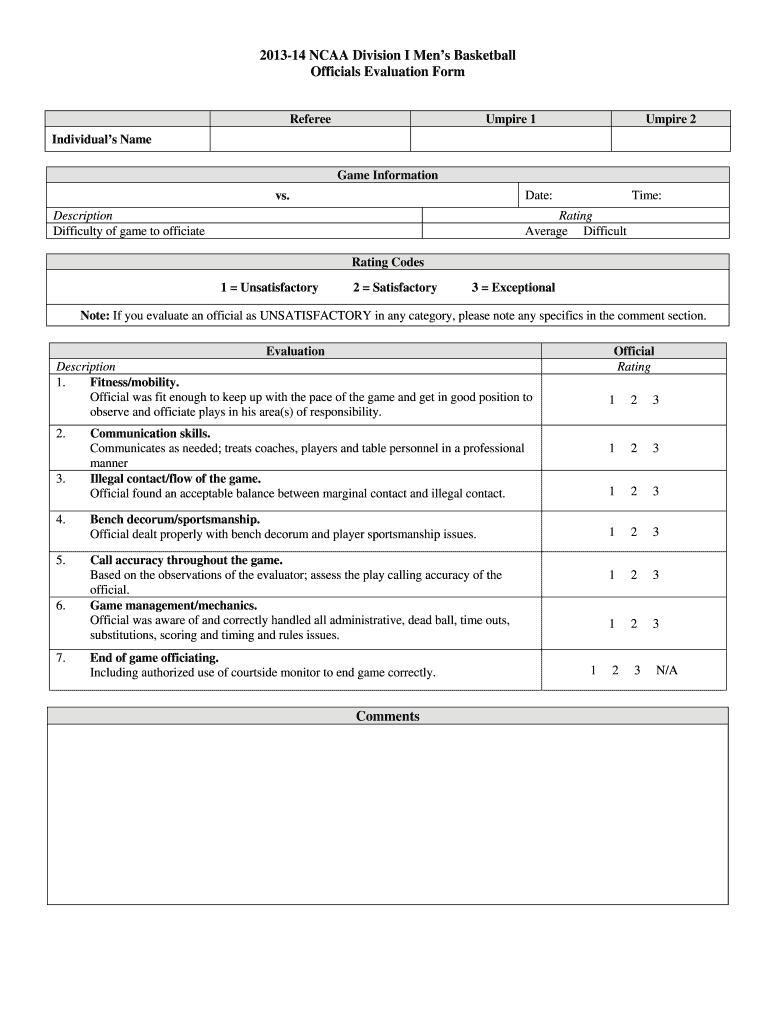
  2. Begin by entering the individual’s name and game information, including the date and teams involved. This sets the context for your evaluation.
  3. Rate each category based on your observations using the provided rating codes (1 = Unsatisfactory, 2 = Satisfactory, 3 = Exceptional). Focus on fitness/mobility, end of game officiating, call accuracy, and more.
  4. For any category rated as Unsatisfactory, provide specific comments in the designated comment section. This feedback is crucial for improvement.
  5. Once all sections are completed, review your evaluations to ensure accuracy before saving or sharing the document.

Start using our platform today to streamline your basketball referee evaluations for free!

See more basketball referee evaluation form versions

We've got more versions of the basketball referee evaluation form form. Select the right basketball referee evaluation form version from the list and start editing it straight away!
Versions Form popularity Fillable & printable
2013 4.9 Satisfied (498 Votes)
be ready to get more

Complete this form in 5 minutes or less

Get form

Got questions?

We have answers to the most popular questions from our customers. If you can't find an answer to your question, please contact us.
Contact us

You need to use only trustworthy software solutions with strong data protection compliance to sign your paperwork electronically. DocHub is just the type of editor you need! It stores data on Amazon Web Servers and complies with all required security criteria and eSignature regulations, so it’s a trustworthy way to eSign your unsatisfactory accuracy decorum or other documents using this tool.

If you edit your 201314 basketball evaluation with DocHub, you merely need a stable internet connection and virtually any browser installed on your device. No need to set up any third-party applications or research guides. Just open a tab with DocHub, drag and drop your file, and modify it immediately.

This is an evaluation performance form for referees. This referee evaluation form is useful for any senior management or coordinator. This referee form template has evaluators name, evaluators email, referee name, date and game time, competition level.
The game officials shall be a Crew Chief, Referee, Umpire and Replay Center They will be assisted by an official scorer, two trained timers, and courtside administrator.
How do you write a performance evaluation? Identify core competencies. Choose a rating scale. Set an evaluation cycle. Prepare a list of questions. Share questions in advance. Have the conversation. Create a goal-setting framework. Be open to feedback.

Security and compliance

At DocHub, your data security is our priority. We follow HIPAA, SOC2, GDPR, and other standards, so you can work on your documents with confidence.

Learn more
ccpa2
pci-dss
gdpr-compliance
hipaa
soc-compliance

People also ask

There are a total of 4,204 basketball referees in the US, and there are currently 655 job openings in this field. The median cost to hire a basketball referee is $1,633. Small businesses spend $1,105 per basketball referee on training each year, while large companies spend $658.

correctly unsatisfactory officiate