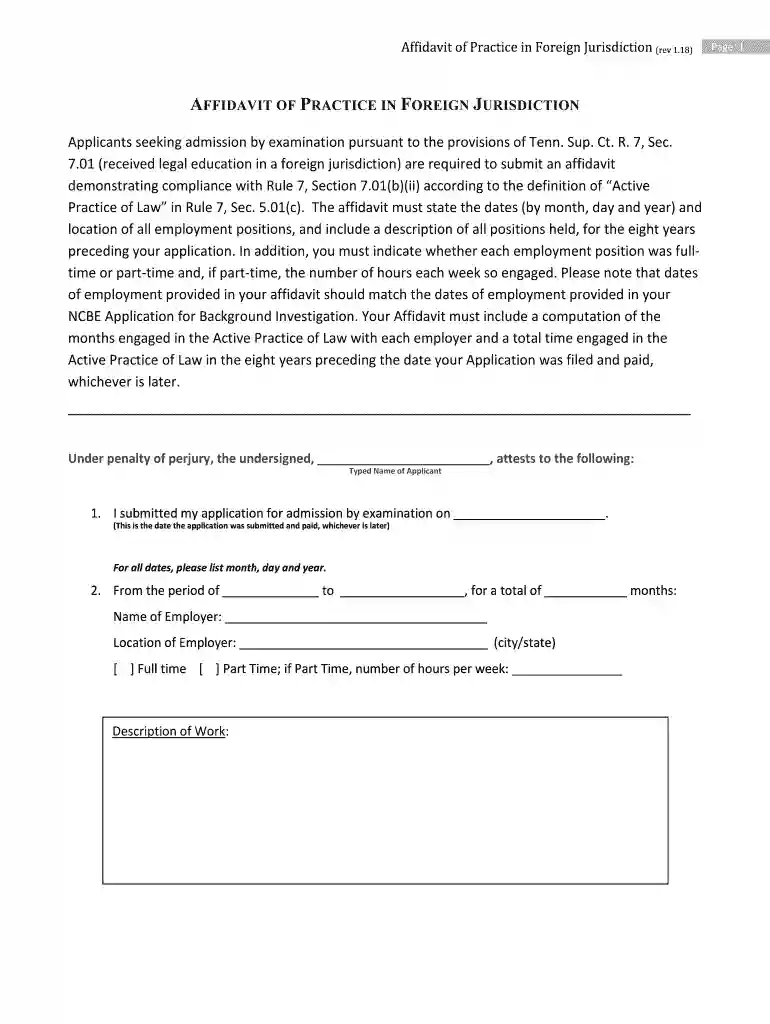
Affidavit of Practice in Foreign Jurisdiction Preview on Page 1

Affidavit of Practice in Foreign Jurisdiction 2026

Here's how it works

  • 01. Edit your form online

    Type text, add images, blackout confidential details, add comments, highlights and more.

  • 02. Sign it in a few clicks

    Draw your signature, type it, upload its image, or use your mobile device as a signature pad.

  • 03. Share your form with others

    Send it via email, link, or fax. You can also download it, export it or print it out.

How to use or fill out Affidavit of Practice in Foreign Jurisdiction with DocHub

Form edit decoration
9.5
Ease of Setup
DocHub User Ratings on G2
9.0
Ease of Use
DocHub User Ratings on G2
  1. Click ‘Get Form’ to open the Affidavit of Practice in Foreign Jurisdiction in our editor.
  2. Begin by entering your typed name as the applicant at the top of the form. This personalizes your affidavit.
  3. Fill in the date you submitted your application for admission by examination, ensuring it matches your NCBE Application.
  4. For each employment position, provide the period of employment, total months worked, employer's name and location. Indicate if it was full-time or part-time, and specify weekly hours if part-time.
  5. Describe your work responsibilities for each position clearly. If you have more than three positions, continue on an attached page as needed.
  6. If applicable, list any non-law-related work and periods of unemployment during the eight years preceding your application.
  7. Finally, calculate and enter the total months engaged in Active Practice of Law before signing the affidavit in front of a Notary.

Start using our platform today to easily complete your Affidavit of Practice in Foreign Jurisdiction for free!

See more Affidavit of Practice in Foreign Jurisdiction versions

We've got more versions of the Affidavit of Practice in Foreign Jurisdiction form. Select the right Affidavit of Practice in Foreign Jurisdiction version from the list and start editing it straight away!

VersionsForm popularityFillable & printable
20184.8 Satisfied (212 Votes)

be ready to get more

Complete this form in 5 minutes or less

Security and compliance

At DocHub, your data security is our priority. We follow HIPAA, SOC2, GDPR, and other standards, so you can work on your documents with confidence.

Related links

Proving Foreign Documents in New York

by WJ Butler 1949 Cited by 7 It will probably be quickest and cheapest in the long run to engage a correspondent attorney in the foreign jurisdiction and give him, or have him make, a copyRead more

Learn more
If you believe that this page should be taken down, please follow our DMCA take down process here