California form bar petition 2026

Get Form
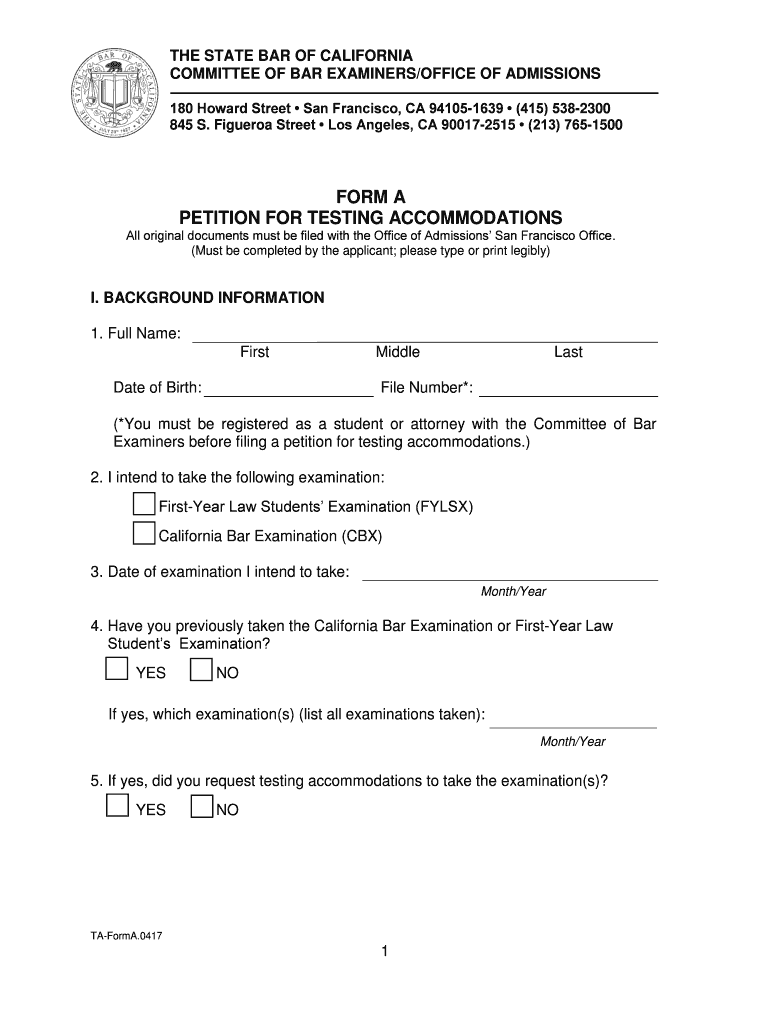
form a petition testing accommodations online Preview on Page 1

Here's how it works

01. Edit your form a petition testing accommodations online online
Type text, add images, blackout confidential details, add comments, highlights and more.
02. Sign it in a few clicks
Draw your signature, type it, upload its image, or use your mobile device as a signature pad.
03. Share your form with others
Send california petition testing via email, link, or fax. You can also download it, export it or print it out.

How to use or fill out California Form Bar Petition with DocHub

Form edit decoration
9.5
Ease of Setup
DocHub User Ratings on G2
9.0
Ease of Use
DocHub User Ratings on G2
  1. Click ‘Get Form’ to open the California Form Bar Petition in our editor.
  2. Begin by filling out the Background Information section. Enter your full name, date of birth, and file number if applicable. Indicate which examination you intend to take and the date.
  3. In the Disability Status section, check all relevant disabilities and provide a narrative description detailing how they affect your daily life. Be sure to include information about your diagnosis and treatment.
  4. Complete the Past Accommodations section by indicating any previous accommodations received in school or during examinations. Attach any necessary documentation.
  5. In the Accommodations Requested section, specify what accommodations you are requesting for the California Bar Examination or First-Year Law Students’ Examination. Provide detailed rationales for each request.
  6. Finally, review the Certification and Authorization section carefully before signing and dating your petition to ensure all information is accurate.

Start using our platform today to fill out your California Form Bar Petition easily and for free!

See more california form bar petition versions

We've got more versions of the california form bar petition form. Select the right california form bar petition version from the list and start editing it straight away!
Versions Form popularity Fillable & printable
2017 4.8 Satisfied (113 Votes)
be ready to get more

Complete this form in 5 minutes or less

Get form

Got questions?

We have answers to the most popular questions from our customers. If you can't find an answer to your question, please contact us.
Contact us
Rule 9.20 (a) prescribes tight deadlines for compliance. Clients, opposing counsel, and courts must be notified within 30 days of the date of the order. The compliance declaration must be filed within 40 days of the effective date of the order in court.
The most common disciplinary complaints filed against lawyers are for: Neglect. Lack of communication. Misrepresentation/Dishonesty. Scope of representation. Fee disputes/Excessive fees.
Inadequate knowledge of the law or legal proceedings, resulting in a trial loss or terrible terms in a contract you signed. Overbilling. Failing to file a lawsuit within the statute of limitations. Unacceptable communication with a client, including not returning phone calls, or failing to keep clients informed.
Clearly State Your Complaint As mentioned earlier, its important to be clear and specific about the issues youre experiencing. State the problem in a clear and concise manner, providing specific dates and details whenever possible. Avoid making emotional accusations or attacks. Stick to the facts.
Filing an attorney complaint You may also call the State Bars multilingual Contact Center at 800-843-9053 (in California) or 213-765-1200 (outside California) to request a complaint form or discuss the complaint-filing process. There is no fee for filing a complaint, and you do not have to be a U.S. citizen.

Security and compliance

At DocHub, your data security is our priority. We follow HIPAA, SOC2, GDPR, and other standards, so you can work on your documents with confidence.

Learn more
ccpa2
pci-dss
gdpr-compliance
hipaa
soc-compliance
be ready to get more

Complete this form in 5 minutes or less

Get form