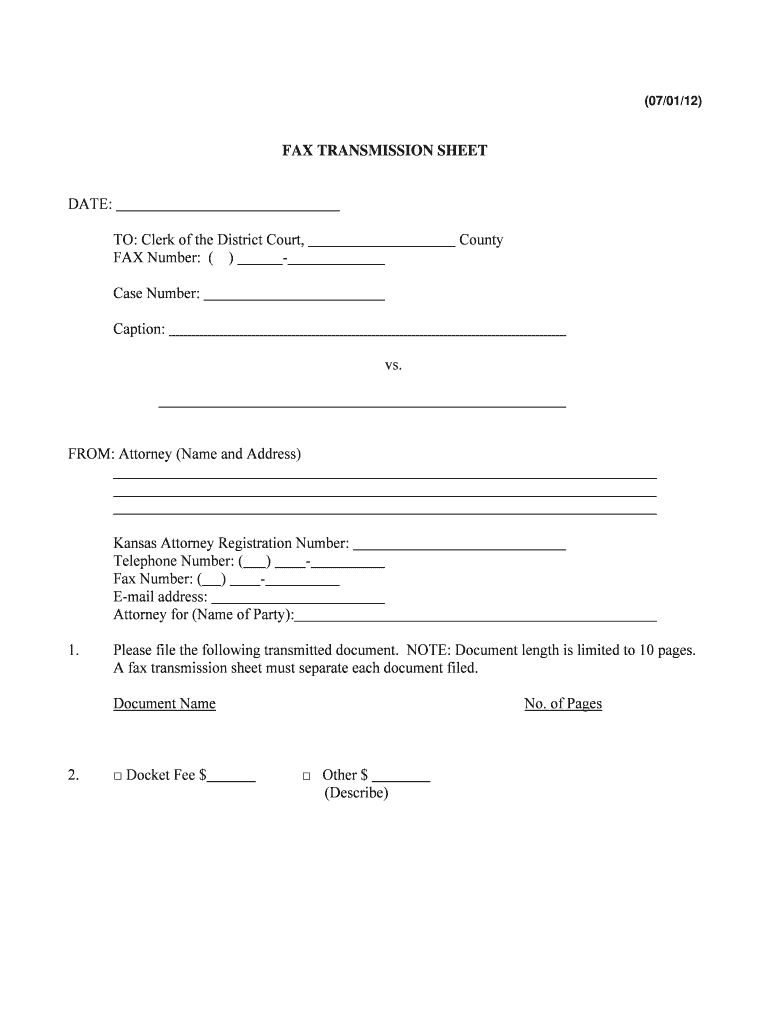
Kansas fax transmission sheet 2026

Get Form
kansas fax transmission sheet Preview on Page 1

Here's how it works

01. Edit your kansas fax transmission sheet online
Type text, add images, blackout confidential details, add comments, highlights and more.
02. Sign it in a few clicks
Draw your signature, type it, upload its image, or use your mobile device as a signature pad.
03. Share your form with others
Send it via email, link, or fax. You can also download it, export it or print it out.

How to use or fill out kansas fax transmission sheet with our platform

Form edit decoration
9.5
Ease of Setup
DocHub User Ratings on G2
9.0
Ease of Use
DocHub User Ratings on G2
  1. Click ‘Get Form’ to open the Kansas fax transmission sheet in the editor.
  2. Begin by entering the date at the top of the form. This is essential for record-keeping.
  3. Fill in the 'TO' section with the Clerk of the District Court's name and fax number. Ensure accuracy to avoid miscommunication.
  4. In the 'FROM' section, provide your name, address, Kansas Attorney Registration Number, telephone number, and fax number. This identifies you as the sender.
  5. Indicate your email address and specify who you are representing in the 'Attorney for' field.
  6. List each document you are transmitting under 'Please file the following transmitted document.' Remember that a separate fax transmission sheet is required for each document.
  7. If applicable, check off any fees associated with filing and indicate the number of pages being sent.
  8. If submitting payment information, complete the second page carefully, ensuring confidentiality by not retaining this page in case files.

Start using our platform today to fill out your Kansas fax transmission sheet easily and for free!

See more kansas fax transmission sheet versions

We've got more versions of the kansas fax transmission sheet form. Select the right kansas fax transmission sheet version from the list and start editing it straight away!
Versions Form popularity Fillable & printable
2012 4.8 Satisfied (176 Votes)
be ready to get more

Complete this form in 5 minutes or less

Get form

Got questions?

We have answers to the most popular questions from our customers. If you can't find an answer to your question, please contact us.
Contact us
This section describes what goes on a cover page. They include: Senders and receivers contact info name, company, email address, phone number, and location. The number of pages to help the recipient know how many fax pages you are sending.
Create a Fax Cover Sheet for Confidential Documents in 7 Steps Add a Header With a Clear Subject and Mark it as Confidential. Add the Intended Recipients Information to Ensure it Reaches the Right Person. Include the Date and Time of the Fax Transmission. Include a Brief Message with the Highlights of the Message.
A fax confirmation page, also known as a fax transmission report or fax receipt, is a one-page document verifying that a fax message was successfully delivered from the sender to the receiver. Its a fax confirmation receipt that contains information about the transmission.
But, per the HIPAA Privacy Rule, the sender must take precautions to ensure the security of the data faxed by verifying the number, using a cover sheet, and keeping the fax machine in a physically secure location.
Steps to safer faxing: Always use a cover letter. To prevent numbers from being mis-dialed, use saved speed-dial numbers for recipients you fax frequently. For any new recipient, verify the number with a test email before sending PHI. Have policies in place for what to do if a fax is sent to the wrong number.

Security and compliance

At DocHub, your data security is our priority. We follow HIPAA, SOC2, GDPR, and other standards, so you can work on your documents with confidence.

Learn more
ccpa2
pci-dss
gdpr-compliance
hipaa
soc-compliance

People also ask

The fax machine should only be accessible to authorized persons. Always double-check that you have entered the right fax number into the machine. Its a good idea to include a fax cover sheet to ensure that the document remains secure.
About confidential communication This ensures fax communications are sent with enhanced security. The destination fax needs to have the F-code function. When sending a confidential fax, you need to check the recipients Confidential User Box number and the password for confidential fax reception.

Related links