




Here's how it works



How to use or fill out kansas request review 400 with our platform

- Click ‘Get Form’ to open the kansas request review 400 in the editor.
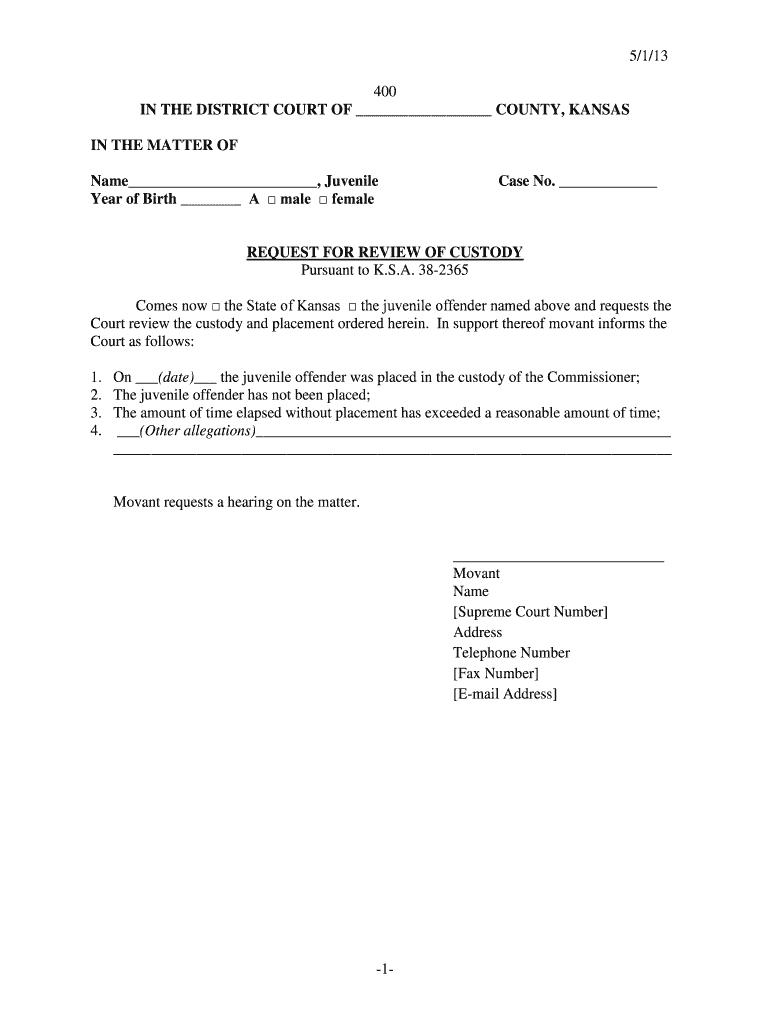
- Begin by filling in the juvenile's name and year of birth in the designated fields. Select the gender by checking either 'male' or 'female'.
- Enter the case number in the appropriate section to ensure proper identification of the case.
- In the body of the form, indicate whether it is the State of Kansas or the juvenile offender making the request by checking the corresponding box.
- Provide details regarding the custody situation, including dates and any other relevant allegations that support your request for a review.
- Complete your contact information at the bottom, including your name, address, telephone number, fax number, and email address.
- Review all entered information for accuracy before submitting your request for a hearing on this matter.
Start using our platform today to fill out your kansas request review 400 easily and for free!
It's free
See more kansas request review 400 versions
| Versions | Form popularity | Fillable & printable |
|---|---|---|
| 2013 | 4.8 Satisfied (225 Votes) |
Got questions?
How can I sign my kansas request custody 400 without printing?
Electronic signatures are an excellent replacement for traditional signing, as they save time, effort, and costs people spend on printing, scanning, and paper delivery. You can eSign your kansas request custody 400 using a reliable and powerful online document management tool like DocHub. It complies with primary eSignature regulations (ESIGN and UETA), so all documents approved there are legally binding and have the same validity as manually signed ones.
How do you fill out kansas request review 400 on Android?
It is a no-brainer on a computer or via a mobile device to fill out a kansas request review 400 with DocHub. All you need to do is open any installed browser on your smartphone and go to the DocHub website. Once authenticated, add your file and open it in editing mode. Use our toolbar to make your edits and save modifications. Optionally, keep your document in your files or send it to a recipient on the spot.
Security and compliance
At DocHub, your data security is our priority. We follow HIPAA, SOC2, GDPR, and other standards, so you can work on your documents with confidence.
Learn more




