Alaska tr 210 2026

Get Form
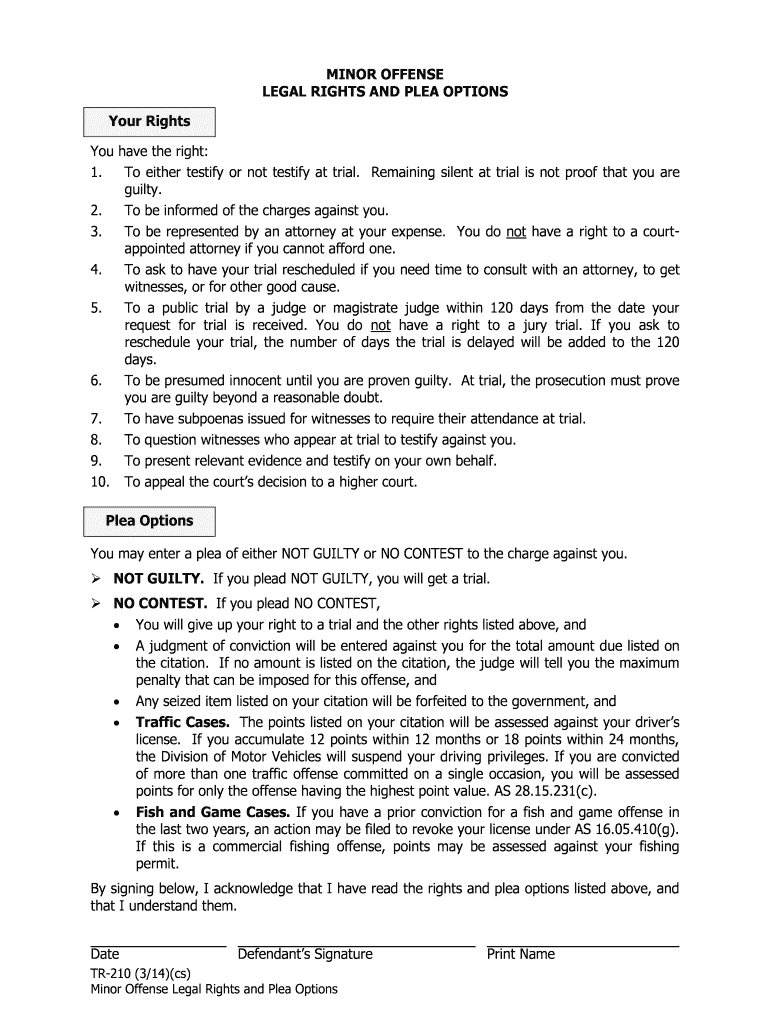
alaska tr 210 Preview on Page 1

Here's how it works

01. Edit your alaska tr 210 online
Type text, add images, blackout confidential details, add comments, highlights and more.
02. Sign it in a few clicks
Draw your signature, type it, upload its image, or use your mobile device as a signature pad.
03. Share your form with others
Send it via email, link, or fax. You can also download it, export it or print it out.

How to use or fill out alaska tr 210 with our platform

Form edit decoration
9.5
Ease of Setup
DocHub User Ratings on G2
9.0
Ease of Use
DocHub User Ratings on G2
  1. Click ‘Get Form’ to open the alaska tr 210 in the editor.
  2. Begin by entering your name in the designated field. This is crucial for identifying yourself on the form.
  3. Next, review your legal rights listed on the form. Ensure you understand each right before proceeding.
  4. In the plea options section, select either 'NOT GUILTY' or 'NO CONTEST' based on your decision. Make sure to read the implications of each choice carefully.
  5. Sign and date the form at the bottom to acknowledge that you have read and understood your rights and plea options.
  6. Once completed, save your changes and export the document directly from our platform for easy submission.

Start using our platform today to fill out your alaska tr 210 quickly and efficiently!

See more alaska tr 210 versions

We've got more versions of the alaska tr 210 form. Select the right alaska tr 210 version from the list and start editing it straight away!
Versions Form popularity Fillable & printable
2014 4.8 Satisfied (82 Votes)
be ready to get more

Complete this form in 5 minutes or less

Get form

Got questions?

We have answers to the most popular questions from our customers. If you can't find an answer to your question, please contact us.
Contact us

With DocHub, it’s pretty simple. The service offers users an add-on called DocHub for Gmail, which you can find in the Google Workspace Marketplace free of charge. Install it and give it access to your Google account. Open your email with your alaska tr 210 attached and click on the add-on button in the right-side panel. Sign in to your DocHub account, and import the form to our editor, where you can fill it out and sign.

You may complete and sign your alaska tr 210 on the internet, even on a tight deadline. All you need to access top-notch editing tools on any device is a DocHub account, that you can register in just a few moments. Once you register, upload your document or find what you are looking for in our catalog, complete it using the editing tools you want, and put your electronic signature on it at the end.

Most court files are available for public inspection. Files in some proceedings, such as juvenile matters, are confidential and only parties to the case are allowed access to the file.
Petit jurors are summoned for a 4-week on-call period. This does not mean that they are in court for 4 weeks, but may be called in for service at some point during their term. If selected they are expected to remain for the duration of the trial. Grand jurors serve for an 12-month period.
You are not required to have an attorney to file papers in your case or to participate in court hearings or a trial. Some people represent themselves because they cannot afford to hire an attorney.

Security and compliance

At DocHub, your data security is our priority. We follow HIPAA, SOC2, GDPR, and other standards, so you can work on your documents with confidence.

Learn more
ccpa2
pci-dss
gdpr-compliance
hipaa
soc-compliance