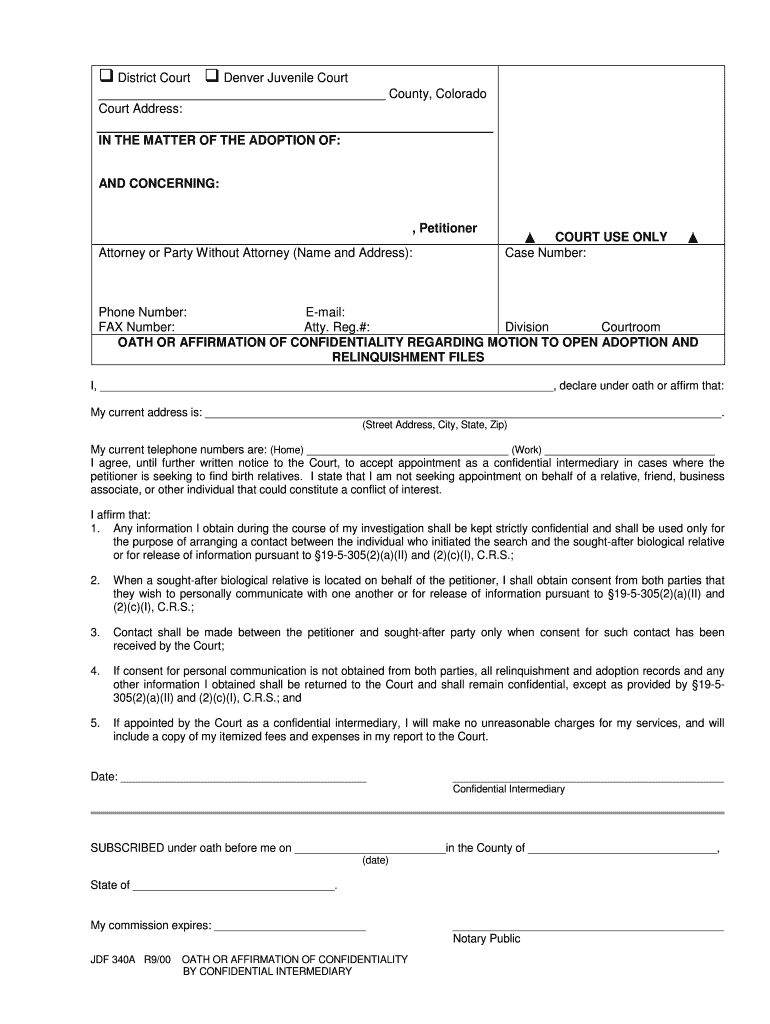
2000 CO JDF 340A-2026

Get Form
2000 CO JDF 340A Preview on Page 1

Here's how it works

01. Edit your form online
Type text, add images, blackout confidential details, add comments, highlights and more.
02. Sign it in a few clicks
Draw your signature, type it, upload its image, or use your mobile device as a signature pad.
03. Share your form with others
Send it via email, link, or fax. You can also download it, export it or print it out.

How to use or fill out 2000 CO JDF 340A with our platform

Form edit decoration
9.5
Ease of Setup
DocHub User Ratings on G2
9.0
Ease of Use
DocHub User Ratings on G2
  1. Click ‘Get Form’ to open the 2000 CO JDF 340A in the editor.
  2. Begin by entering the petitioner’s name and address in the designated fields at the top of the form. Ensure all information is accurate for proper identification.
  3. Fill in your contact details, including phone number, email, and fax number. This information is crucial for communication regarding your case.
  4. In the 'Oath or Affirmation' section, provide your current address and telephone numbers as required. This establishes your identity as a confidential intermediary.
  5. Review and check each affirmation statement carefully. Confirm that you understand and agree to maintain confidentiality as outlined in the document.
  6. Finally, sign and date the form where indicated. If necessary, have a notary public witness your signature to validate the document.

Start using our platform today to complete your forms online for free!

See more 2000 CO JDF 340A versions

We've got more versions of the 2000 CO JDF 340A form. Select the right 2000 CO JDF 340A version from the list and start editing it straight away!
Versions Form popularity Fillable & printable
2000 4.8 Satisfied (212 Votes)
be ready to get more

Complete this form in 5 minutes or less

Get form

Got questions?

We have answers to the most popular questions from our customers. If you can't find an answer to your question, please contact us.
Contact us
If a motion is filed 42 days or less before the trial date, the responding party shall have 14 days after the filing of the motion or such lesser or greater time as the court may allow in which to file a responsive brief.
Find Out How Long You Have to File a Response to a Motion How long do you have to file a response to a motion in California? That can depend upon the kind of motion. However, in many cases, individuals have 15 days to file a response.
A 35(b) motion asks the judge to impose a lesser or different sentence from what was imposed at the original sentencing hearing. It is due 126 days after sentencing or after the appeal is over. If you win a 35(b) motion, the trial judge may impose a shorter sentence or probation if you are eligible.
Rule 16.2 requires compliance with the mandatory disclosures, and completion of the sworn financial statement form and supplemental schedule (if applicable) submitted with this Rule to achieve the disclosure intended by the Rule.
A judge shall be disqualified in an action in which he is interested or prejudiced, or has been of counsel for any party, or is or has been a material witness, or is so related or connected with any party or his attorney as to render it improper for him to sit on the trial, appeal, or other proceeding therein.

Security and compliance

At DocHub, your data security is our priority. We follow HIPAA, SOC2, GDPR, and other standards, so you can work on your documents with confidence.

Learn more
ccpa2
pci-dss
gdpr-compliance
hipaa
soc-compliance
be ready to get more

Complete this form in 5 minutes or less

Get form