





P-forms-initial-referral-for-family-based-services 2026

Get Form
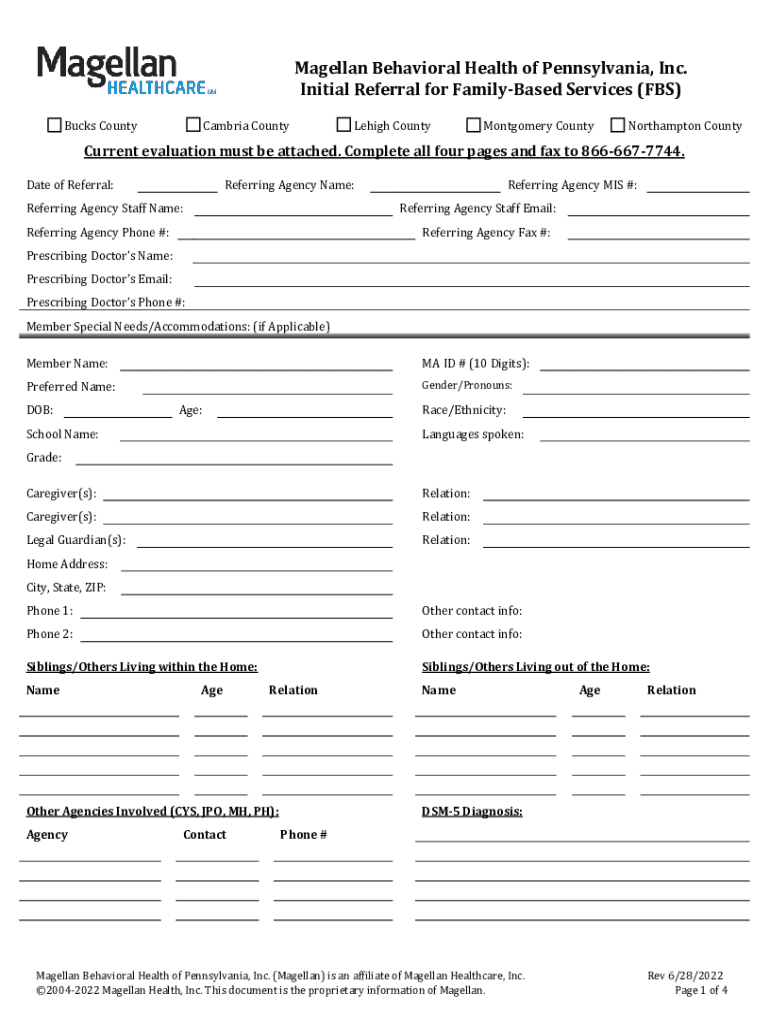
p-forms-initial-referral-for-family-based-services Preview on Page 1

Here's how it works

01. Edit your form online
Type text, add images, blackout confidential details, add comments, highlights and more.
02. Sign it in a few clicks
Draw your signature, type it, upload its image, or use your mobile device as a signature pad.
03. Share your form with others
Send it via email, link, or fax. You can also download it, export it or print it out.

How to use or fill out p-forms-initial-referral-for-family-based-services

Form edit decoration
9.5
Ease of Setup
DocHub User Ratings on G2
9.0
Ease of Use
DocHub User Ratings on G2
  1. Click ‘Get Form’ to open it in the editor.
  2. Begin by entering the 'Date of Referral' and details about the 'Referring Agency', including name, staff contact, phone number, and email. This information is crucial for establishing communication.
  3. Fill in the member's personal details such as 'Name', 'DOB', 'MA ID #', and 'Gender/Pronouns'. Ensure accuracy as this data is essential for identification.
  4. In the section for 'Reason for Referral', provide a detailed explanation of the precipitating factors and severity of symptoms. This helps in understanding the urgency of the referral.
  5. Complete sections regarding family dynamics, including caregiver information and any other agencies involved. This context is vital for effective treatment planning.
  6. Review all entries for completeness before submitting. Attach any required evaluations as specified in the instructions.

Start using our platform today to streamline your document editing and form completion process!

See more p-forms-initial-referral-for-family-based-services versions

We've got more versions of the p-forms-initial-referral-for-family-based-services form. Select the right p-forms-initial-referral-for-family-based-services version from the list and start editing it straight away!
Versions Form popularity Fillable & printable
2022 4.3 Satisfied (48 Votes)
2018 4.4 Satisfied (38 Votes)
2014 5 Satisfied (46 Votes)
be ready to get more

Complete this form in 5 minutes or less

Get form

Got questions?

We have answers to the most popular questions from our customers. If you can't find an answer to your question, please contact us.
Contact us

Yes, you’ll find numerous apps for this on the web. Nonetheless, if you need to eSign your p-forms-initial-referral-for-family-based-services without installing additional software, DocHub is the best choice you can make. This robust editor works on mobile devices just as on desktops. Open our editor in any internet browser, register or log in to your account, and start processing your paperwork.

You need only a web connection and a browser to fill out your p-forms-initial-referral-for-family-based-services on an iOS phone. Open the DocHub website and authenticate. Then, add your file or select it from the list in your dashboard. Then use our editing instruments to fill out your form and preserve all your adjustments. You can also send it to a specified recipient straight away.

Template 10: Hi, [Name]. Ready to join the [your business name] family? Your friend, [current customer name], recently purchased with us. Be sure to include a phone number on your referral forms, so you can send texts like these to potential customers when their contact info is submitted.
Leave a signature. Include both addresses. At the top of the letter of referral, include your address, contact information, the date and address of the recipient. Write a brief introduction. Give an overview of the applicants strengths. Share a story of the applicant. Add a closing statement. Leave a signature.
When crafting a letter of recommendation for a family member, objectivity can be maintained by focusing on facts, appreciable achievements, and specific examples that highlight their skills and attributes. Its wise to minimize overemphasizing emotional ties, as being impartial adds more weight to the recommendation.

Security and compliance

At DocHub, your data security is our priority. We follow HIPAA, SOC2, GDPR, and other standards, so you can work on your documents with confidence.

Learn more
ccpa2
pci-dss
gdpr-compliance
hipaa
soc-compliance
be ready to get more

Complete this form in 5 minutes or less

Get form

People also ask

Family-Based Mental Health Services (FBS) integrate mental health treatment, family support, and casework so that families may continue to care for their children whose emotional and/or behavioral challenges place them at docHub risk of out-of-home placement. FBS are provided 24/7 for up to 32 weeks 2.
How to write a character reference letter Open your letter. Begin your letter with a proper header including your contact information and the date. Explain your relationship to the candidate. Highlight attributes with specific examples. Finish with a statement of recommendation. Close with your name and contact information.

Related links

