Ca fallo incumplimiento form edit 2026

Get Form
deferred entry of judgment california Preview on Page 1

Here's how it works

01. Edit your deferred entry of judgment california online
Type text, add images, blackout confidential details, add comments, highlights and more.

02. Sign it in a few clicks
Draw your signature, type it, upload its image, or use your mobile device as a signature pad.

03. Share your form with others
Send california 615s publicacion diferida incumplimiento via email, link, or fax. You can also download it, export it or print it out.

How to use or fill out ca fallo incumplimiento form edit with our platform

Form edit decoration
9.5
Ease of Setup
DocHub User Ratings on G2
9.0
Ease of Use
DocHub User Ratings on G2
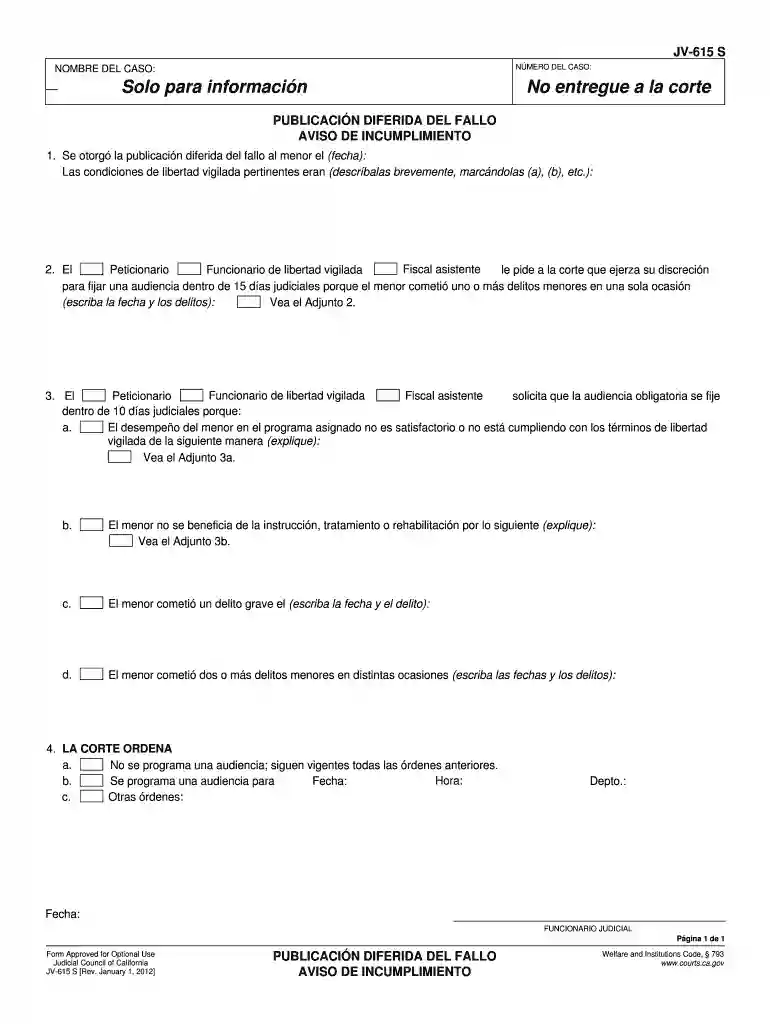
  1. Click ‘Get Form’ to open the ca fallo incumplimiento form in the editor.
  2. Begin by entering the case number and case name at the top of the form. These fields are essential for identifying your document.
  3. In section 1, specify the date when deferred publication was granted and briefly describe the relevant conditions of supervised release, marking them as (a), (b), etc.
  4. For section 2, indicate any minor offenses committed by the minor, including dates and descriptions. This information is crucial for court review.
  5. In section 3, provide details on why a mandatory hearing is requested within 10 judicial days. Use subsections (a) through (d) to explain performance issues or offenses clearly.
  6. Finally, in section 4, follow instructions to indicate whether a hearing is scheduled or if previous orders remain in effect. Fill in all necessary dates and details accurately.

Start editing your ca fallo incumplimiento form online for free today!

See more ca fallo incumplimiento form edit versions

We've got more versions of the ca fallo incumplimiento form edit form. Select the right ca fallo incumplimiento form edit version from the list and start editing it straight away!
Versions Form popularity Fillable & printable
2012 4.8 Satisfied (80 Votes)
be ready to get more

Complete this form in 5 minutes or less

Get form

Got questions?

We have answers to the most popular questions from our customers. If you can't find an answer to your question, please contact us.
Contact us
Notice of Errata Select Bankruptcy menu. Select Other. Enter the case number using correct format and ensure case name and number match the document you are filing. Select Document event: Errata. Select the party filer. Browse, verify and attach the document (PDF file).
Adult name change File a petition with the court. First, you fill out and file court papers and pay a fee. Publish your request in a newspaper. Next, you must publish a notice in a newspaper saying that you are asking the court to legally change your name. Go to a hearing (if required) Get your decree.
Do this: Fill out a Request to Correct or Cancel Judgment and Answer (SC-108) . Indicate that you are asking for an order to correct (NOT vacate) the judgment. File the Request (and any attachments) with the clerk within 30 days after the clerk mails the Notice of Entry of Judgment.
The document is a notice of errata that informs the court and counsel of record about a missing item related to a previously filed legal document. It highlights that an oversight led to the omission of a crucial page or exhibit which is now attached as evidence.
Understanding a Notice of Errata in Legal Documents A notice of errata is a formal correction to a previously filed legal document, addressing minor errors like typos or factual mistakes. It clarifies inaccuracies without altering substantive content.

Security and compliance

At DocHub, your data security is our priority. We follow HIPAA, SOC2, GDPR, and other standards, so you can work on your documents with confidence.

Learn more
ccpa2
pci-dss
gdpr-compliance
hipaa
soc-compliance
be ready to get more

Complete this form in 5 minutes or less

Get form