Form transmission 2026

Get Form
communication recording Preview on Page 1

Here's how it works

01. Edit your communication recording online
Type text, add images, blackout confidential details, add comments, highlights and more.

02. Sign it in a few clicks
Draw your signature, type it, upload its image, or use your mobile device as a signature pad.

03. Share your form with others
Send communication address via email, link, or fax. You can also download it, export it or print it out.

How to Use or Fill Out Form Transmission

Form edit decoration
9.5
Ease of Setup
DocHub User Ratings on G2
9.0
Ease of Use
DocHub User Ratings on G2
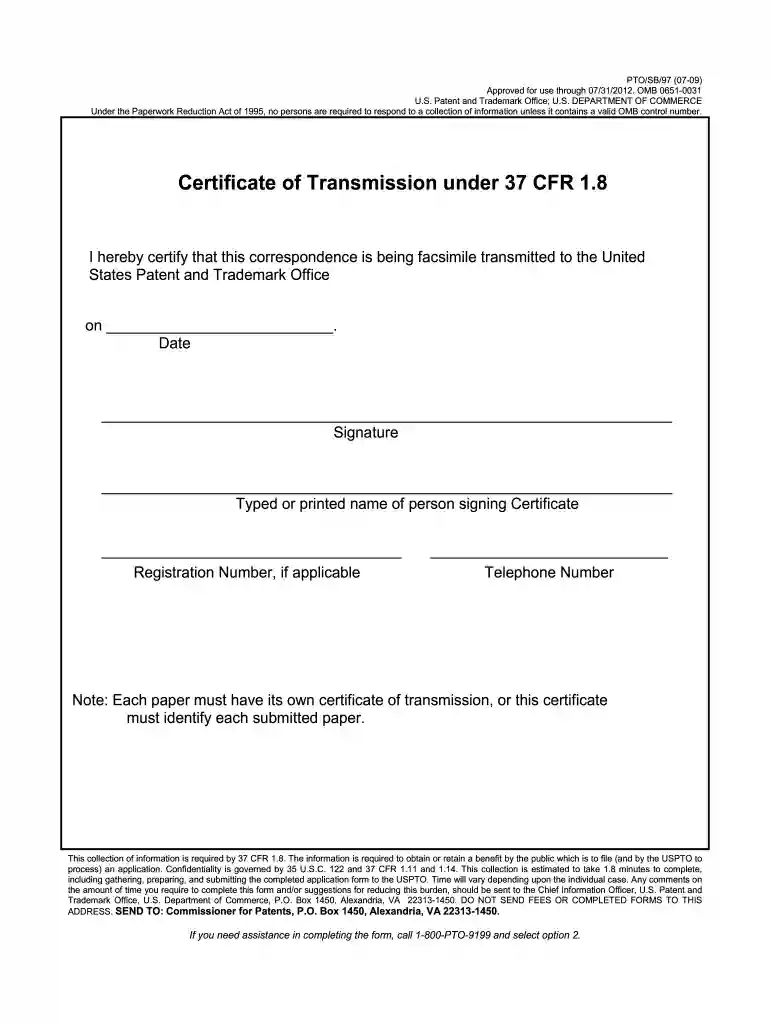
  1. Click 'Get Form' to open the Certificate of Transmission in our editor.
  2. In the designated field, enter the date of transmission. This is crucial for tracking your submission.
  3. Provide your signature in the specified area. Ensure it matches your official documents for authenticity.
  4. Type or print your name clearly in the next field. This identifies you as the signer of the certificate.
  5. If applicable, include your registration number to link this transmission to your patent application.
  6. Lastly, fill in your telephone number for any follow-up communication regarding this submission.

Start using our platform today to streamline your document submissions effortlessly!

See more form transmission versions

We've got more versions of the form transmission form. Select the right form transmission version from the list and start editing it straight away!
Versions Form popularity Fillable & printable
2009 4.9 Satisfied (470 Votes)
2004 4 Satisfied (53 Votes)
be ready to get more

Complete this form in 5 minutes or less

Get form

Got questions?

We have answers to the most popular questions from our customers. If you can't find an answer to your question, please contact us.
Contact us

Electronic signatures are a great alternative to traditional signing, as they save time, effort, and money people spend on printing, scanning, and paper delivery. You can eSign your form electronic using a reliable and powerful online document management tool like DocHub. It complies with primary eSignature regulations (ESIGN and UETA), so all forms approved there are legally binding and have the same validity as manually signed ones.

As a comprehensive document modifying platform, DocHub is accessible on mobile devices. Open DocHub in your choice of mobile browser and use our intelligent mobile-friendly toolset to fill out your form transmission.

The Form 30 is required while buying a car because it helps to transfer all the legal obligations associated with the vehicle. It also indicates that the buyer has received all the vehicle certificates, such as the Registration Certificate and the insurance policy paper, which can come in really handy.
They would need to submit the probate of will, the original share certificate, a certified copy of the death certificate, and their specimen signature to the companys registrar or the bank managing the shares. This ensures that the shares are legally transferred to the spouse without any disputes.
Transmission Request Form (Form T3) for Transmission of Units to the claimant. Death Certificate of the deceased unitholder(s) in original OR photocopy of the death certificate self-attested and attested by a notary public/gazette officer in original copy of Birth Certificate in case the claimant is a minor.

Security and compliance

At DocHub, your data security is our priority. We follow HIPAA, SOC2, GDPR, and other standards, so you can work on your documents with confidence.

Learn more
ccpa2
pci-dss
gdpr-compliance
hipaa
soc-compliance
be ready to get more

Complete this form in 5 minutes or less

Get form

People also ask

How to complete a Stock Transfer Form (J30) Money consideration. Full name of undertaking. Full description of security. Number or amount of shares. Name(s) and address of registered holder(s) Signature(s) of transferor(s) Name(s) and address of transferee(s) Stamp/Name/Address of person lodging the stock transfer form.
To properly fill out the Vehicle Release Form, start by entering the details of your vehicle, including the year, make, and model. Next, provide the VIN number and the name of the authorized agent. Finally, ensure the form is signed by a notary for validation.
(1) I/We, the undersigned, being the. (2) I/We give hereunder the details of my/our account with a Participant to which the security balances are. requested to be transmitted: (3) List of Documents enclosed (for Individual accounts) (tick as applicable): Name. Client ID. DP ID.
Typically, you open the fill plug . once the fill plug is open, you release the drain plug and drain the fluid. Once drained, you reinstall the drain plug (tightening to spec) then fill through the fill plug until the fluid starts dripping out. the fill plug and tighten to spec and you are done.
Document Transmittal vs Submittal Package A transmittal sheet is a PDF file (in most cases) that contains information about the files being transmitted, such as the senders name, the recipients name, and a list of the documents that are being sent with important details about each.

Related links